

Inchworm Reader
Lyle Andrews · Productivity
Independent analytics for this App Store listing. AppTracker is not affiliated with Lyle Andrews.
Chart standing · US
Screenshots



Keywords this app targets
Search terms AppTracker associates with this app — estimates, not search volume. ❝ = in the app's title; a highlighted number is its current position for that term.
Similar apps
Competitors and close alternatives, as estimated by AppTracker.
 Voice Dream - Natural Reader
Voice Dream LLC
2 shared topics · 1 shared title word
Voice Dream - Natural Reader
Voice Dream LLC
2 shared topics · 1 shared title word
 Speechify – Text to Speech PDF
Speechify Inc.
3 shared topics
Speechify – Text to Speech PDF
Speechify Inc.
3 shared topics
 Voice Reader + Text to Speech
MONOPOLEAPPS K.K.
2 shared topics · 1 shared title word
Voice Reader + Text to Speech
MONOPOLEAPPS K.K.
2 shared topics · 1 shared title word
 Peech: Text to Speech Reader
Dopefin Limited
2 shared topics · 1 shared title word
Peech: Text to Speech Reader
Dopefin Limited
2 shared topics · 1 shared title word
 Island Reader: AI Read Aloud
ZHENGZHOU CREATION INFORMATION TECHNOLOGY CO., LTD.
1 shared topic · 1 shared title word
Island Reader: AI Read Aloud
ZHENGZHOU CREATION INFORMATION TECHNOLOGY CO., LTD.
1 shared topic · 1 shared title word
 Speed Reader!
Arthur de Rijke
1 shared topic · 1 shared title word
Speed Reader!
Arthur de Rijke
1 shared topic · 1 shared title word
 KO Reader
James Carrell II
1 shared topic · 1 shared title word
KO Reader
James Carrell II
1 shared topic · 1 shared title word
 ElevenReader: Read Books Aloud
ElevenLabs, Inc.
2 shared topics
ElevenReader: Read Books Aloud
ElevenLabs, Inc.
2 shared topics
About
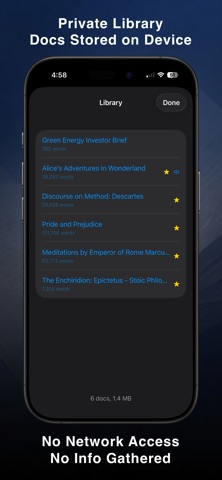
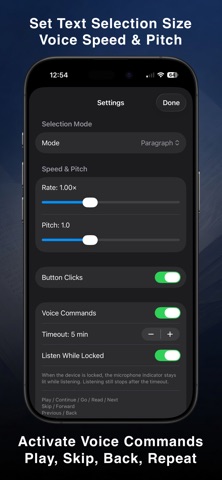
I wrote Inchworm Reader because I was looking for a text-to-speech app that would read a section of text at a time and then stop and let me tell it when to continue with a voice command, a button press or a tap on my Apple Watch. This is handy if you want to think about what you've just heard or are doing some other activity at the same time. While taking walks, when I stop and talk to someone, Inchworm Reader will finish speaking the current selection, letting me chat without distraction. When I continue on I say, "Go" to start it speaking the next section and continue my walk. I couldn't find an app like that so, being a developer, I wrote one. Hearing a section at a time and being able to say "Repeat" or "Skip" or "Back" to move the text selection around easily makes Inchworm Reader good for listening to educational, study, and briefing materials. When listening to an audiobook, sometimes my mind starts to wander and I have to go back and find where I left off. Problem solved. With Inchworm Reader I only advance when I'm ready. Features: READING MODES • A sentence at a time • A paragraph at a time • N paragraphs - you set how many • Continuous reading HANDS-FREE VOICE COMMANDS Turn on voice commands and Inchworm listens for commands after reading aloud. Say: • "Play," "Go," "Read," "Continue," or "Next" to hear the next text selection • "Skip" or "Forward" to move the selection ahead • "Back" or "Previous" to move the selection back • "Repeat" to hear the last selection again • "Stop" to end listening for voice commands APPLE WATCH + COMPLICATION Control phone playback from your wrist. Add the included Complication to a watch face to access Inchworm watch controls with a tap. IMPORT TEXT • Paste text from the clipboard with one tap • Use the Share Extension to send text from Safari, Mail, Notes, and more • Import from the File Browser (PDF, RTF, Markdown, plain text) • Edit text within the app PRIVATE BY DESIGN Your documents stay on your device. No metrics are gathered. Inchworm Reader has no iOS network entitlement; it cannot reach the internet, and it doesn't try to. Inchworm Reader includes a few classic public domain texts to get you started. I'll frequently have an AI survey a topic or generate a report or a brief and hit Copy, then Paste it into Inchworm Reader, and listen to it a section at a time, with more control than the speech feature in AI apps, repeating sections as needed to really absorb it. It's a great way to help move away from low quality Internet distractions and feed your mind high quality information. Inch your way through key texts with Inchworm!
Details