

Flow2: Short Video Creator
Flowboard LLC · Photo & Video
Independent analytics for this App Store listing. AppTracker is not affiliated with Flowboard LLC.
Chart standing · US
What changed · US
Listing changes AppTracker has observed for this app in this storefront — new versions, price moves, rating shifts, and store copy.
Record first. Post when you want. • Video flows keep your phone's videos on the phone. Nothing uploads unless you say so, and the posted flow shows a still in its place • The recorder films your latest edits, posted or not, and tells you when a flow isn't backed up yet • Move the picture-in-picture any time, even mid-take, and it stays where you put it • Title cards are added to the video at export, so the footage films clean. Adjust or hide each one on the Trim screen • Drag captions anywhere on the Trim screen • Flow2 is now in the share sheet: turn any video or photo in your library into a flow • Rearranging or deleting screens keeps your Flowboard and script in sync • Share links always point to flow2.co • A video background is never replaced by the automatic image pass • Fixes and polish throughout
Ratings breakdown · US
The star breakdown behind this app's rating in this storefront.
Screenshots




About
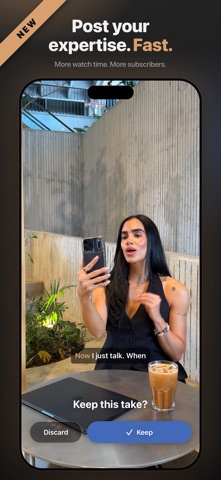
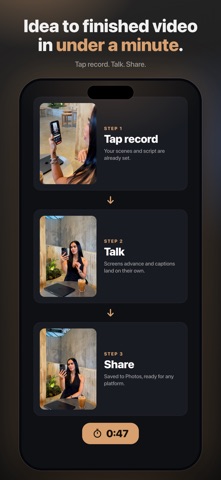
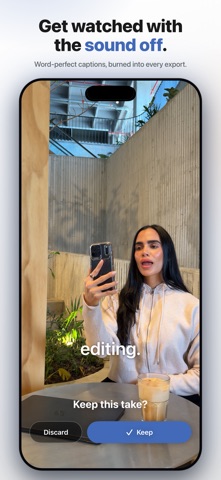
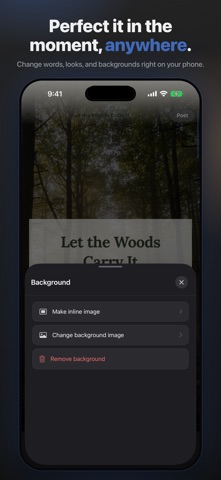
New. The fastest way to publish your expertise. AI helps you prepare. You perform. Instead of starting with a blank screen, Flow2 uses AI to build a Flowboard. Your Flowboard organizes your ideas, becomes your teleprompter, and transforms into the visuals behind you while you record. Flow2 helps coaches, creators, founders, educators, consultants, and professionals create polished vertical videos with less editing and more impact. Practice your delivery. Record with confidence. Publish faster. Publish faster Traditional video creation is slow. Write a script. Set up a teleprompter. Record. Edit. Add captions. Add graphics. Export. Flow2 brings those steps together into one creative workflow so you can spend more time creating and less time editing. Plan with AI Turn an idea into a complete Flowboard in seconds. • Generate AI-powered Flowboards • Create organized video scripts • Break complex topics into clear scenes • Edit and refine every scene and script before recording Practice naturally Your Flowboard becomes an adjustable teleprompter that helps you deliver naturally while staying on message. • Built-in teleprompter • Practice before recording • Adjust scrolling speed • Improve pacing and confidence • Refine your delivery before you hit Record Record once Everything comes together in one recording experience. Your teleprompter, visuals, camera, and presentation stay synchronized while you perform. • Record 9:16 vertical videos • Built-in green screen recording • Camera preview while presenting • Record directly over your Flowboard • Designed for little to no editing afterward Your Flowboard becomes your video Unlike traditional video editors, your storyboard isn’t something you build after recording. Your Flowboard becomes the production behind your performance. Images, video clips, backgrounds, and AI-generated visuals are woven together while you speak, creating engaging videos without spending hours on a timeline editor. • Transform your Flowboard into dynamic visual scenes • Combine images, videos, Live Photos, AI backgrounds • Built-in green screen compositing • Visuals automatically stay synchronized with your presentation • Record your finished video as you perform Create videos people keep watching Great videos keep moving. Flow2 combines your performance with motion, scene changes, captions, and visual storytelling to help keep viewers engaged. Instead of talking to a static camera, your videos evolve as your story unfolds. • Dynamic scene transitions • Motion backgrounds • Animated picture-in-picture layouts • Camera movement and framing • 5 built-in caption styles, with more added regularly • Animated call-to-action overlays • New presentation effects added regularly Spend less time editing while creating videos designed to support stronger viewer engagement. Perfect for • Coaches • Creators • Educators • Founders • Course creators • Marketing professionals • Small business owners • Public speakers Create videos for: • YouTube Shorts • Instagram Reels • TikTok • Online courses • Product demos • Business updates • Training • Thought leadership Why Flow2? Most video apps begin after you press Record. Flow2 begins with your ideas. Build a Flowboard. Practice with a synchronized teleprompter. Record with visuals already behind you. Publish polished vertical videos with little to no editing. Plan. Practice. Perform. Publish. Flow2 Pro is available as an auto-renewable subscription with a free trial for new subscribers. Payment will be charged to your Apple ID account at confirmation of purchase, or at the end of the free trial if one is offered. Subscriptions automatically renew unless canceled at least 24 hours before the end of the current period. You can manage or cancel your subscription anytime in your App Store account settings. Terms of Use (EULA): https://www.apple.com/legal/internet-services/itunes/dev/stdeula/ flow2.co/terms
What's new · 1.1.2
Record first. Post when you want. • Video flows keep your phone's videos on the phone. Nothing uploads unless you say so, and the posted flow shows a still in its place • The recorder films your latest edits, posted or not, and tells you when a flow isn't backed up yet • Move the picture-in-picture any time, even mid-take, and it stays where you put it • Title cards are added to the video at export, so the footage films clean. Adjust or hide each one on the Trim screen • Drag captions anywhere on the Trim screen • Flow2 is now in the share sheet: turn any video or photo in your library into a flow • Rearranging or deleting screens keeps your Flowboard and script in sync • Share links always point to flow2.co • A video background is never replaced by the automatic image pass • Fixes and polish throughout
Details