

PDF Split & Extract
MASATO MIYAZAWA · Productivity
Independent analytics for this App Store listing. AppTracker is not affiliated with MASATO MIYAZAWA.
Chart standing · US
What changed · US
Listing changes AppTracker has observed for this app in this storefront — new versions, price moves, rating shifts, and store copy.
Now available in Korean, Traditional Chinese, German, and French.
In-app purchases · US
What this app sells inside itself, grouped by kind and priced for this storefront.
Screenshots

About
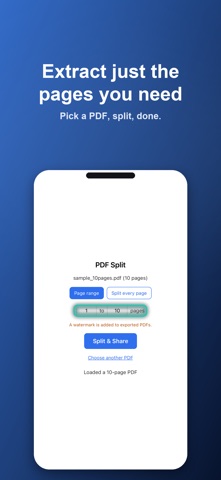
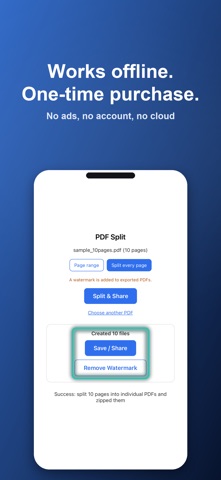
Extract just the pages you need. PDF Split is a PDF splitter built around one idea: simplicity. When you need to pull specific pages out of a document, it gets it done right there, right now. ■ Pricing (In-App Purchase) - The app is free to download. Splitting, saving, and sharing are all free. - PDFs made with the free version include a logo (watermark). - Removing the logo is a one-time purchase (non-consumable). No feature limits, no usage limits. - This is not a subscription — pay once, with no recurring charges. No ads. ■ Two ways to split - By page range: extract only the pages you want (e.g. 3–5) into a single PDF - Split every page: break every page into its own PDF and export them all as a zip ■ Simple by design Open the app, pick a PDF, split. No manual needed. We stripped away the extras and focused on one thing: splitting PDFs. ■ Private by design - Fully offline: your files never leave your device. Your privacy stays yours - One-time purchase: buy once, use forever. No subscription - No ads, no account required Great for when you want to: - Share only the relevant pages from a contract or invoice - Organize a scanned document one page at a time - Split a large PDF to send it by email Password-protected PDFs are not supported.
What's new · 1.1.6
Now available in Korean, Traditional Chinese, German, and French.
Details