

RouteDrop: EV Trip Planner
BaristaLabs, LLC · Navigation
Independent analytics for this App Store listing. AppTracker is not affiliated with BaristaLabs, LLC.
Chart standing · US
What changed · US
Listing changes AppTracker has observed for this app in this storefront — new versions, price moves, rating shifts, and store copy.
Fixed Tesla key setup getting stuck when a vehicle's pairing status is unknown. You can now open Tesla pairing or check an already-approved key from onboarding, Garage, and the send screens, including after relaunch. Status checks avoid overlapping requests and keep commands unavailable until Tesla's secure connection is verified.
Screenshots



About
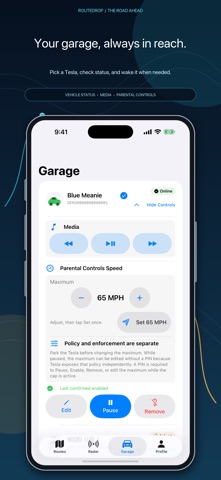
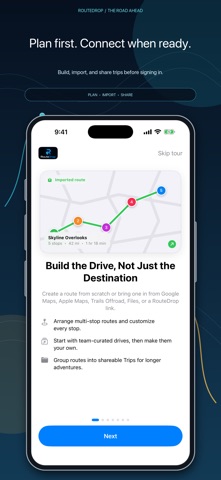
PLAN THE DRIVE. DROP IT IN THE CAR. GO. RouteDrop is the missing planning layer for compatible Tesla navigation. Build multi-stop road trips on a full-screen map — search for places, tap to drop pins, drag stops into the perfect order — then choose the vehicle and send. RouteDrop shows wake, compatibility, and delivery status throughout the process. PLAN AHEAD, DRIVE LATER Routes are saved offline and privately synced through iCloud, ready whenever you are. Plan the weekend wine tour on Tuesday night; send it to the car Saturday morning while your coffee brews. BUILT FOR ROAD TRIPS • Multi-stop routes with drag-to-reorder stops • “I'm Feeling Lucky” surprise routes built from nearby businesses and places to explore • Live distance and drive-time estimates as you plan • Long trips are split into ordered parts; Drive Mode can send later parts as you approach the stops you selected • Send any route in reverse for the drive home • Choose from travel-focused route icons, add a preset or custom color, and use searchable labels to build a library of favorite drives • Customize an individual stop's pin color, or leave it automatic so colors stay distinct as the route is reordered SHARE ROUTES WITH FRIENDS AirDrop a route to a friend and it opens right in their RouteDrop — caravan trips where every Tesla runs the same plan. WAKE, SEND, DONE On compatible vehicles, RouteDrop talks to your car through Tesla's official Fleet API. If the car is asleep and wake access is available, RouteDrop can wake it, wait, and deliver the route. You'll see every step. PRIVATE BY DESIGN Your saved library stays available on this device and privately syncs through your iCloud Drive. Explicit export/import provides a portable backup or person-to-person transfer. Route data reaches RouteDrop's servers only when you choose a server-backed action such as sending or scheduling a route, creating a share link, or sharing a route with a convoy. Tesla sign-in happens on Tesla's own page, and access tokens stay encrypted on our servers. No ads, no cross-app tracking, no data sales. Planning, importing, and file sharing work without signing in. Live vehicle features require a Tesla account and a vehicle supported by Tesla's Fleet API. If Tesla requires signed Vehicle Command Protocol, RouteDrop guides the owner through pairing its virtual key before sending. RouteDrop live vehicle access currently supports North America and Asia-Pacific (excluding China); other regions can still use guest planning and file sharing. RouteDrop is not affiliated with, endorsed by, or sponsored by Tesla, Inc. Terms of Use: https://routedrop.baristalabs.io/terms
What's new · 1.0.2
Fixed Tesla key setup getting stuck when a vehicle's pairing status is unknown. You can now open Tesla pairing or check an already-approved key from onboarding, Garage, and the send screens, including after relaunch. Status checks avoid overlapping requests and keep commands unavailable until Tesla's secure connection is verified.
Details