

Scano3D — AI Model & Scanner
Maddisys Limited · Utilities
Independent analytics for this App Store listing. AppTracker is not affiliated with Maddisys Limited.
Chart standing · US
What changed · US
Listing changes AppTracker has observed for this app in this storefront — new versions, price moves, rating shifts, and store copy.
• Scano3D can now show the occasional in-app tip about new features and ideas to try. • Small improvements and fixes.
In-app purchases · US
What this app sells inside itself, grouped by kind and priced for this storefront.
Screenshots



About
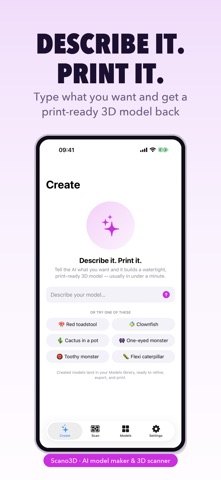
Describe a model and print it. Or scan a real object and make it printable. Scano3D is an AI model maker and 3D scanner for your iPhone. Type what you want and get a watertight, print-ready mesh back — or capture something real with LiDAR and turn it into a model you can slice. CREATE WITH AI • Text to model: "a red toadstool with white spots" becomes a real mesh, not a placeholder • Attach a reference photo and the model is built to match it • Refine by conversation: "make it 80 mm tall", "give it a smiling face" — each turn edits the existing design instead of starting over • The design chat travels with the model, so a refinement weeks later still knows the original brief • Dictate your idea instead of typing it • Generation keeps running while the app is in the background • Typically 20–60 seconds; complex prompts can take up to two minutes SCAN WITH LiDAR • Quick, Detailed and Turntable capture modes • Object isolation: tap an object and the table, floor and background are discarded rather than welded into the model • Crop the capture before it becomes a model • Live mesh overlay so you can see coverage as you go MESH TOOLS • Make Print-Ready in one tap: floaters, holes, welding and simplification, in the right order • Remove floaters — debris is deleted, but large detached parts are snapped back on rather than thrown away • Fill holes, weld vertices, smooth, simplify, clean up • Scale to an exact size in millimetres • Delete individual parts of a multi-body model • Undo and redo survive quitting the app IMPORT & EXPORT • Import STL, 3MF, OBJ, GLB and USDZ • Export STL for printing, 3MF with colour (one object per colour, Bambu-compatible), OBJ, GLB and USDZ • Live readout of triangle count and whether the mesh is watertight AI PROVIDERS • Cloud AI by default — no key, no account, no setup FREE & PRO • Free: 3 exports to start, then 1 more each month, plus 3 Cloud AI actions a month • Scanning, mesh tools, the viewer and import are unrestricted on the free plan • Pro, monthly or yearly with a 7-day free trial: unlimited exports, 40 Cloud AI actions a month, and bring-your-own-key providers • Top-ups: 20 or 50 extra Cloud AI actions as a one-time purchase, never expiring • A failed generation is refunded automatically — you are never charged for a model you didn't receive • Cancel anytime in Settings; you keep Pro until the end of the billing period PRIVACY • Your scans and models stay on the device — nothing is uploaded to be stored • Cloud AI sends your prompt, and your reference image if you attach one, to generate the model. Nothing else leaves the phone • Dictation is transcribed on-device where your locale supports it Scanning needs an iPhone with a LiDAR scanner. Creating with AI, editing, importing and exporting work on any supported iPhone. Terms of Use: https://app.maddisys.co.uk/terms Privacy Policy: https://app.maddisys.co.uk/privacy
What's new · 1.5.2
• Scano3D can now show the occasional in-app tip about new features and ideas to try. • Small improvements and fixes.
Details