

OneScan PDF Scanner
Freedom Dimension (shenzhen) Technology Co., Ltd · Productivity
Independent analytics for this App Store listing. AppTracker is not affiliated with Freedom Dimension (shenzhen) Technology Co., Ltd.
Chart standing · US
What changed · US
Listing changes AppTracker has observed for this app in this storefront — new versions, price moves, rating shifts, and store copy.
• Fresh paper workspace and Paper Owl icon. • Guided front/back capture, with every saved page included in A4 copies. • A private card wallet with reviewed details, folders and tags. • Pro signatures, watermarks, PDF merge, Word text and Excel table exports. • PDF import, free local text search and improved iPhone/iPad layouts. • Clear lifetime purchase and restore controls; basic scanning remains free.
In-app purchases · US
What this app sells inside itself, grouped by kind and priced for this storefront.
Screenshots


About
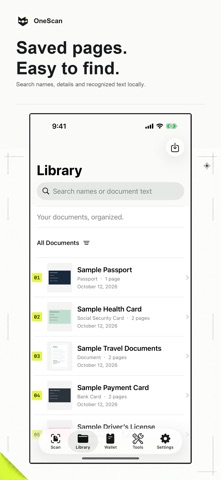
OneScan brings documents and important cards together in one private place on your iPhone and iPad. SCAN AND SAVE Scan multi-page documents with Apple's document camera or import photos. Save IDs, social security cards, bank cards, driver's licenses, passports, household registers, business licenses, student IDs, manuals, receipts, memberships and custom cards. Capture fronts and backs separately, review useful information, folders and tags, and export A4 copies that include every saved side and page. FIND WHAT YOU NEED Automatic on-device text recognition makes your new and existing scans searchable. Search document names, saved information or the words inside. Review labeled OCR suggestions before saving card details. A USEFUL DOCUMENT TOOLKIT Export PDF, JPEG and PNG for free. Pro adds perspective crop and contrast enhancement, page tools, signatures, text or image watermarks, merging, text copying, searchable PDFs, target-size compression, smart names and Face ID lock. Export editable recognized text to Word (DOCX), or review table cells and export CSV or Excel (XLSX). Word and table exports preserve text content rather than original page layout. Imported PDFs and merged exports are scanned copies; original files stay unchanged. PDF import supports up to 40 pages or 80 MB. OneScan is privacy-first: no account, no ads, no third-party tracking, and no document upload. Recent scans stay on this device until you delete them. Limited first-party product analytics is sent only after you choose to share it. It uses a random app-scoped identifier and never includes documents, images, recognized text, or file names. You can turn it off or reset the identifier in Settings. Scanning, automatic text search, card storage, A4 copies and standard exports are free. Pro Lifetime unlocks all Pro tools with a one-time purchase and no renewal. The localized App Store price appears before purchase. Restore previous lifetime purchases from any membership entry. Terms of Use: https://oneapps.studio/terms
What's new · 2.0
• Fresh paper workspace and Paper Owl icon. • Guided front/back capture, with every saved page included in A4 copies. • A private card wallet with reviewed details, folders and tags. • Pro signatures, watermarks, PDF merge, Word text and Excel table exports. • PDF import, free local text search and improved iPhone/iPad layouts. • Clear lifetime purchase and restore controls; basic scanning remains free.
Details