

Imaging Console Lite
栋 张 · Photo & Video
Independent analytics for this App Store listing. AppTracker is not affiliated with 栋 张.
Chart standing · US
What changed · US
Listing changes AppTracker has observed for this app in this storefront — new versions, price moves, rating shifts, and store copy.
- Added more video monitoring sources (iPad only): Supports HDMI capture cards and UVC cameras, with selectable resolution and frame rate, image rotation, horizontal/vertical mirroring, and zoom settings. - Added monitor recording (iPad only): Supports MP4/MOV containers and H.264/H.265 encoding, selectable audio inputs, and saving to the app gallery, Photos, or a folder in Files. - Added synchronized recording: When connected wirelessly to a camera while monitoring via HDMI, recording can start and stop simultaneously in the app and on the camera. When recording ends on the camera, the app automatically finalizes its local recording. - Added synchronized audio recording: Record high-quality audio using your Apple device’s microphone while shooting video. Supports audio/video synchronization adjustments and exporting a video copy with the audio recorded on your Apple device. - Improved audio monitoring: Supports USB audio monitoring, individual channel level meters, and audio input selection when used with synchronized audio recording. - Improved the self-timer experience: Starting the self-timer is now easier. - Improved the monitoring interface: The HDMI recording panel can be dragged and remembers its position. Also improved compact-window layouts and menu stability. - Remembers the monitoring source: Automatically saves and restores your HDMI/JPEG selection (iPad only). - Added support for the fish detection menu on the new Nikon Z5IIC. - Other bug fixes and performance improvements. - Getting the gear ready for a motorcycle trip. Due to iOS limitations, external video monitoring features are currently available only on iPad (iPadOS) and in the Android version.
Screenshots


Keywords this app targets
Search terms AppTracker associates with this app — estimates, not search volume. ❝ = in the app's title; a highlighted number is its current position for that term.
Similar apps
Competitors and close alternatives, as estimated by AppTracker.
 Canon Camera Connect
Canon Inc.
Canon Camera Connect
Canon Inc.
 Smart Photo Sync
笑明 贾
Smart Photo Sync
笑明 贾
 Sony | Imaging Edge Mobile
Sony Corporation
Sony | Imaging Edge Mobile
Sony Corporation
 BMMSC対応カメラリモート
katsunori hirohata
BMMSC対応カメラリモート
katsunori hirohata
 Camera M - Pro Manual Camera
bxb
Camera M - Pro Manual Camera
bxb
 Lens Buddy - Self Timer Camera
Lens Buddy Selfie Timer Photo Video Filter Camera LLC
Lens Buddy - Self Timer Camera
Lens Buddy Selfie Timer Photo Video Filter Camera LLC
 MyPhotoWatch
kim juyoung
MyPhotoWatch
kim juyoung
 PhotoTransfer: SSD & NAS Sync
百明 田
PhotoTransfer: SSD & NAS Sync
百明 田
About
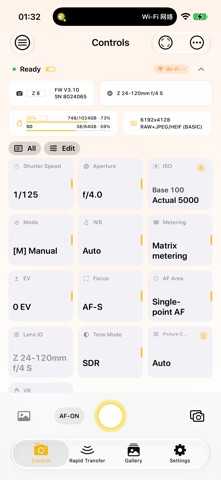
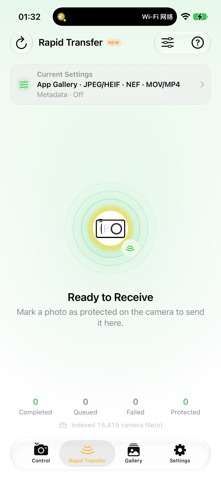
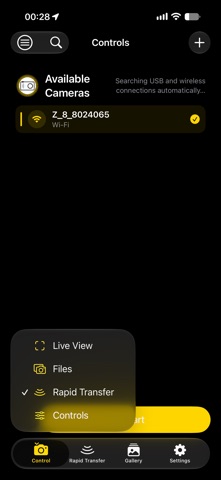
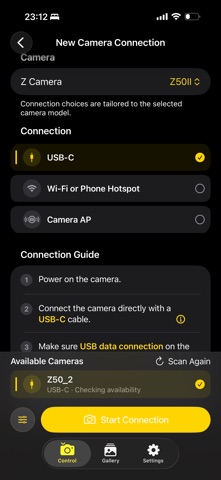
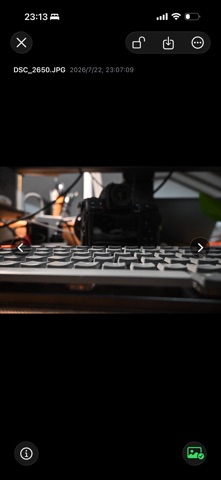
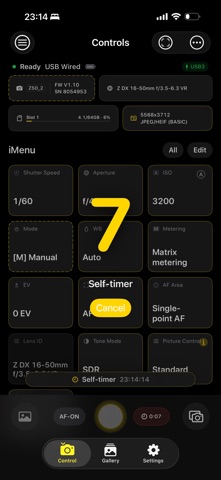
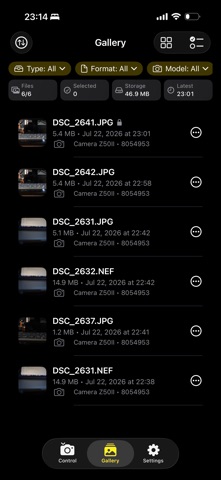
Imaging Console Lite is a third-party camera control, live monitoring, and file transfer app for Nikon Z-series mirrorless and cinema cameras. It focuses on a streamlined single-camera shooting experience and is designed for photography enthusiasts, independent photographers, and visual creators whose primary needs are controlling one camera, monitoring live view, and transferring files from the camera. Without a subscription, you can connect one compatible camera for remote shooting, camera setting adjustments, touch autofocus, in-camera media browsing, and manual downloads. For a more complete single-camera workflow, subscribe to Lite Plus to unlock advanced controls, LiveView, LUT workflows, gallery processing, and export tools. Main Free Features • Connect one compatible camera via USB (MTP/PTP) or wireless PTP/IP • Remotely capture photos and record videos • AF-ON focus control • Adjust shutter speed, aperture, ISO, exposure mode, and exposure compensation • Adjust white balance, metering, focus mode, and AF-area mode • Select Picture Controls and adjust vibration reduction • Use and freely reorder an iMenu containing 12 essential controls • Single-shot self-timer • Quickly review images after capture • Browse photos and videos stored on the camera • Manually download original files and save them to the system photo library Main Lite Plus Features Lite Plus is available as a monthly or annual auto-renewable subscription. Both plans unlock the same features: • Rapid Transfer • Live View monitoring • Touch autofocus • Burst shooting control • Multiple self-timer shots • Change supported settings throughout the complete camera menu • Freely add, remove, and rearrange iMenu items • Automatically display a preview after capture • Custom LUT and Picture Control library • Apply LUTs to Live View monitoring and gallery workflows • Anamorphic de-squeeze monitoring • Red night-vision interface • Gallery filters and LUT image processing • Automatically load original files • System sharing and saving to Files • Quickly create three-second Live Photos Available Only in Imaging Console • Multi-camera cluster control and simultaneous live monitoring • Global synchronized triggering • Automatic downloads, instant transfer, and automatic GPS metadata attachment • Special shooting mode controls • Professional monitoring tools, including focus peaking, framing guides, false color, and timecode • Power zoom and advanced monitoring controls • Live Photos with a custom duration • Custom media import and FHD file workflows • Voice memo management • Live Activities and advanced capture and control options • IPTC and copyright management • GPS in-camera attach Compatibility Expeed 7 models: Z9, Z8, ZR, Z6III, Z5II, Zf, and Z50II. Expeed 6 models: Z5, Z6, Z7, Z6II, Z7II, Z50, Z30, and Zfc. When using the camera’s “Connect to smart device” function, camera control, Live View monitoring, and access to in-camera files are available. When using “Connect to computer,” camera control and Live View monitoring are available. Feature availability may vary depending on the camera model, firmware version, connection method, and shooting mode. Important Notice Imaging Console Lite is an independently developed third-party product and is not affiliated with, associated with, authorized by, endorsed by, or otherwise officially connected with Nikon Corporation, RED Digital Cinema, or any of their affiliated companies. References to Nikon, RED, and related product names are made solely to describe device compatibility. Terms of Use (EULA): https://www.apple.com/legal/internet-services/itunes/dev/stdeula/ Privacy Policy: https://scrawny-honeydew-fc3.notion.site/Imaging-Console-Privacy-Policy-38878bef77b880108900e47dd6ff4441
What's new · 2.7.0
- Added more video monitoring sources (iPad only): Supports HDMI capture cards and UVC cameras, with selectable resolution and frame rate, image rotation, horizontal/vertical mirroring, and zoom settings. - Added monitor recording (iPad only): Supports MP4/MOV containers and H.264/H.265 encoding, selectable audio inputs, and saving to the app gallery, Photos, or a folder in Files. - Added synchronized recording: When connected wirelessly to a camera while monitoring via HDMI, recording can start and stop simultaneously in the app and on the camera. When recording ends on the camera, the app automatically finalizes its local recording. - Added synchronized audio recording: Record high-quality audio using your Apple device’s microphone while shooting video. Supports audio/video synchronization adjustments and exporting a video copy with the audio recorded on your Apple device. - Improved audio monitoring: Supports USB audio monitoring, individual channel level meters, and audio input selection when used with synchronized audio recording. - Improved the self-timer experience: Starting the self-timer is now easier. - Improved the monitoring interface: The HDMI recording panel can be dragged and remembers its position. Also improved compact-window layouts and menu stability. - Remembers the monitoring source: Automatically saves and restores your HDMI/JPEG selection (iPad only). - Added support for the fish detection menu on the new Nikon Z5IIC. - Other bug fixes and performance improvements. - Getting the gear ready for a motorcycle trip. Due to iOS limitations, external video monitoring features are currently available only on iPad (iPadOS) and in the Android version.
Details