

Gramps2: Family Tree Builder
Ni Holding B.V. · Lifestyle
Independent analytics for this App Store listing. AppTracker is not affiliated with Ni Holding B.V.
Chart standing · US
What changed · US
Listing changes AppTracker has observed for this app in this storefront — new versions, price moves, rating shifts, and store copy.
Your family tree, ready for the wall. • Export the tree chart as an image or a PDF. Tap the new share button on the chart and send it anywhere — Messages, Mail, Files, or straight to a printer. • You get the whole chart, not just what fits on screen: every generation you've chosen, profile photos included. • The PDF stays sharp at any size, so it's ready for a poster or the family reunion table. The image is made for the family group chat. • Exports always come out in a light, print-friendly look — even if you use dark mode. Questions or ideas? We'd love to hear from you — leave a review or reach out via Settings.
In-app purchases · US
What this app sells inside itself, grouped by kind and priced for this storefront.
Screenshots



About
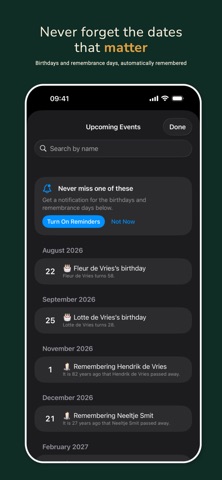
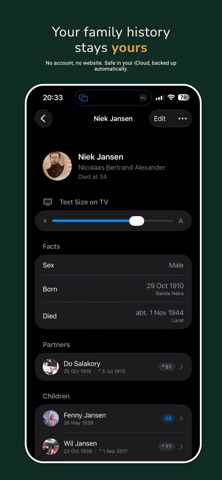
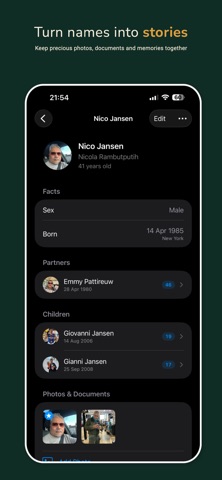
Your family's story, in one living tree. Gramps2 turns names, dates, and old photos into a family tree you can actually explore — and share with the people in it. Build it together with your family over iCloud, and let Gramps2 quietly remind everyone of the birthdays and remembrance days that matter. BUILD YOUR TREE • Add parents, partners, and children in a couple of taps • Real-world genealogy dates: year-only, "about 1902", before/after • Birth and death places, notes, and links for every person • Children automatically ordered by birth date — or drag them into your own order • Blended families welcome: add a child to one parent only, and stepchildren stay clearly distinguished from someone's own children • Keep multiple trees — and search everyone by name SEE THE WHOLE STORY AT A GLANCE • An interactive diagram maps the generations around anyone • Tap a person to travel through your family — pinch to zoom • Profile photos right on the chart SHOW IT ON THE BIG SCREEN • Stream the tree chart to your TV with AirPlay — your iPhone becomes the remote • A TV-sized view built for the big screen, so even the largest tree fits • Perfect for family gatherings: walk everyone through the generations together GROW IT TOGETHER • Share a tree through iCloud and edit it side by side • Changes sync live between family members • Everyone keeps their own reminder preferences NEVER MISS A DATE • Birthday reminders for the whole family • Remembrance days for those who passed, with memorial milestones honored in many traditions: 40 days, 100 days, 6 months, 1 year — or your own • A two-week calendar of upcoming family events • Home Screen and Lock Screen widgets • Apple Watch app and complications with the next event at a glance BRING YOUR RESEARCH WITH YOU • Import GEDCOM files from Ancestry, MyHeritage, desktop Gramps, and other genealogy tools • Export any tree back to GEDCOM anytime — your research is never locked in PHOTOS AND DOCUMENTS • Attach pictures and documents to anyone in your tree • Paste a photo straight from your clipboard onto any person • Pick a profile photo, add captions, and build a family album around each person STAY IN TOUCH • Keep an email, phone number, and address for anyone in your tree • Each detail shows when it was last updated, so an old address reads as old • Import them from Contacts in one tap, or add a person to Contacts with their birthday and photo RESEARCH WITH AI • Copy Summary puts a person's whole record — names, dates, places, parents, partners, children — on your clipboard • Paste it into any AI assistant and ask it to trace the family further PRIVATE BY DESIGN • Your tree lives in your own iCloud — no account to create, no servers of ours • We never see your family's names, dates, or photos • Everything stays yours, and GEDCOM export means it always will be Gramps2 is made by one person — Nico. I built it so my own family's stories wouldn't fade, and I hope it keeps yours alive too. QUESTIONS & ANSWERS Can I import my tree from Ancestry or MyHeritage? Yes — export a GEDCOM file there and open it in Gramps2. Can I print my family tree? Yes — export the chart as a PDF or image, then print or share it. Can my family work on the same tree? Yes — share it through iCloud and everyone can edit. Do I need an account? No — your tree stays in your own iCloud. GRAMPS2 PRO Gramps2 Pro unlocks everything. Current plans and prices are shown in the app before you buy. Subscriptions renew automatically unless cancelled at least 24 hours before the end of the period, and can be managed in your App Store account settings. Privacy policy: https://niapps.com/gramps2/privacy Terms of use: https://niapps.com/gramps2/terms
What's new · 1.19
Your family tree, ready for the wall. • Export the tree chart as an image or a PDF. Tap the new share button on the chart and send it anywhere — Messages, Mail, Files, or straight to a printer. • You get the whole chart, not just what fits on screen: every generation you've chosen, profile photos included. • The PDF stays sharp at any size, so it's ready for a poster or the family reunion table. The image is made for the family group chat. • Exports always come out in a light, print-friendly look — even if you use dark mode. Questions or ideas? We'd love to hear from you — leave a review or reach out via Settings.
Details