

AlwaysOn Desk Clock
Weijin Wang · Utilities
Independent analytics for this App Store listing. AppTracker is not affiliated with Weijin Wang.
Chart standing · US
What changed · US
Listing changes AppTracker has observed for this app in this storefront — new versions, price moves, rating shifts, and store copy.
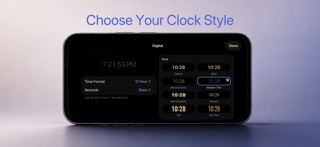
New in 1.15 • Horizon — a cinematic globe rising from the bottom of the screen. A warm glow follows the real sun by day, and the Moon appears at night. • Catnap — a cat asleep in its bed that breathes, flicks its ears, and swishes its tail, with drifting dust and softer light at night. • Digital clock styles — choose from eight looks, including Glow, Elegant, and the big, iPhone-style Tall and Tall Thin. • Any size — the Digital clock now fits any widget size, with an optional date. • Español — the app is now available in Spanish. Also improved: • A new Digital clock settings sheet with a live preview of your widget. • Glow clocks are now part of Digital and keep their look. • A brighter Earth with a soft atmosphere glow, and larger Earth and Moon globes. • Sleeping Pup now sits center stage, like Catnap. • 12-hour AM/PM and seconds now stay right next to the time in every clock. • Dates follow your language's own format. • Better VoiceOver support for the Digital clock. Includes fixes for background transitions, clock sizing, and iPad layouts.
Price & rating history · US
Reconstructed from the listing changes AppTracker has observed in this storefront. A field is charted once it has changed more than once, and each line starts at the value it moved from.
Average rating · ★ 4.82 now · 14 changes on record
Ratings breakdown · US
The star breakdown behind this app's rating in this storefront.
In-app purchases · US
No in-app purchases.
Screenshots





About
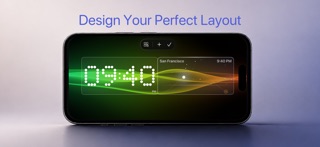
AlwaysOn keeps useful information visible at a glance — time, calendar, weather, upcoming events, and more — with layouts designed for both compact iPhones and larger iPad displays. Arrange widgets your way, choose from a growing collection of clock styles and ambient backgrounds, and let AlwaysOn quietly adapt throughout the day. Features * Customizable widget layouts * Multiple digital and artistic clock styles * Calendar and upcoming events * Local weather and forecast * World Clock and Countdown widgets * Ambient and animated backgrounds * Smart dimming and sleep-friendly display behavior * Floating accessories including battery and alarm * Burn-in protection * Native iPhone and iPad layouts AlwaysOn is designed for devices you leave docked, propped up, or sitting on a desk — turning an unused screen into something calm and useful.
What's new · 1.15
New in 1.15 • Horizon — a cinematic globe rising from the bottom of the screen. A warm glow follows the real sun by day, and the Moon appears at night. • Catnap — a cat asleep in its bed that breathes, flicks its ears, and swishes its tail, with drifting dust and softer light at night. • Digital clock styles — choose from eight looks, including Glow, Elegant, and the big, iPhone-style Tall and Tall Thin. • Any size — the Digital clock now fits any widget size, with an optional date. • Español — the app is now available in Spanish. Also improved: • A new Digital clock settings sheet with a live preview of your widget. • Glow clocks are now part of Digital and keep their look. • A brighter Earth with a soft atmosphere glow, and larger Earth and Moon globes. • Sleeping Pup now sits center stage, like Catnap. • 12-hour AM/PM and seconds now stay right next to the time in every clock. • Dates follow your language's own format. • Better VoiceOver support for the Digital clock. Includes fixes for background transitions, clock sizing, and iPad layouts.
Details