

LoopMemo
Hiroshi Yamazaki · Music
Independent analytics for this App Store listing. AppTracker is not affiliated with Hiroshi Yamazaki.
Chart standing · US
What changed · US
Listing changes AppTracker has observed for this app in this storefront — new versions, price moves, rating shifts, and store copy.
• You can now choose which mic to record with: the phone's built-in mic or your earphone mic. Even with a mic'd headset connected, you can record from the built-in mic (Settings → "Record with built-in mic"). • Minor improvements.
Screenshots




About
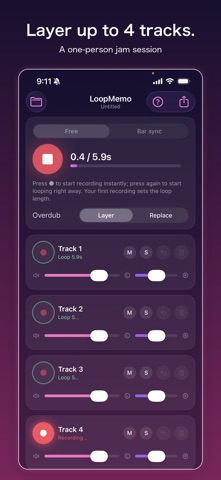
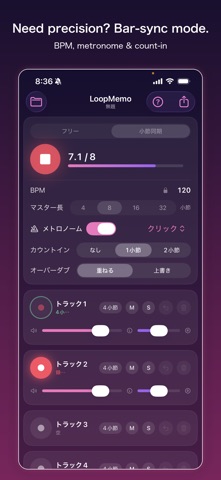
LoopMemo is a loop recorder anyone can pick up and play. Recording starts the moment you press ●, and pressing it again starts looping right away. Your first take sets the loop length — no BPM, no bars, no setup. Just capture the idea while it's fresh and start layering. PERFECT FOR • Jotting down melodies and riffs before you forget them • Practicing beatbox, a cappella, and vocal harmonies • Layering guitar or keyboard phrases in a one-person jam • Sketching rhythm patterns and sound ideas FEATURES • Loop recording with up to 4 tracks • Instant record & instant loop (Free mode) • Overdub with Layer or Replace, plus Undo • Per-track volume, pan, mute, and solo • Per-track timing adjust (10 ms / 50 ms steps, adjustable while playing) • Bar-sync mode for recording exactly on the grid, with metronome (BPM 40–240, master length of 4/8/16/32 bars, count-in, 3 click sounds) • Save and load projects • Export one loop cycle as an audio file and share it • Import your own audio and layer on top of it (Pro) • Stem export for finishing your track in a DAW (Pro) THREE SIMPLE STEPS 1. Press ● and record — voice, instruments, or hand claps 2. Press ● again and the loop starts playing instantly 3. Press ● on another track to layer while you listen FREE & PRO All core features — recording, looping, overdubbing — are free. LoopMemo Pro (one-time purchase) unlocks: • No ads (banner & full-screen) • Unlimited saved projects (free version: up to 3) • WAV (16-bit) export (free version: M4A) • Stem export (one WAV per track) • Importing your own audio files A sample-accurate audio engine keeps loop seams click-free and tracks tightly in sync. Headphones are recommended to keep the loop from bleeding into the microphone. Press ● and make your first loop.
What's new · 1.12
• You can now choose which mic to record with: the phone's built-in mic or your earphone mic. Even with a mic'd headset connected, you can record from the built-in mic (Settings → "Record with built-in mic"). • Minor improvements.
Details