

Timeline: Draw Your Day
nftstory limited · Productivity
Independent analytics for this App Store listing. AppTracker is not affiliated with nftstory limited.
Chart standing · US
In-app purchases · US
No in-app purchases.
Screenshots

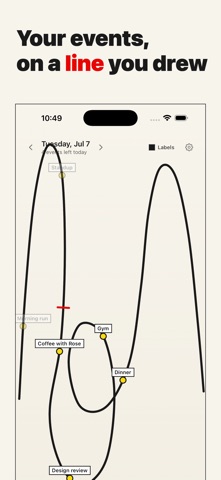


About
Your day is a line. Draw it. Timeline turns your calendar into a picture you drew yourself. Sketch any line with your finger and your events appear along it as colored dots, placed by time. A red tick crosses the line right where you are now, so one glance tells you what is done and what is next. Many people naturally picture time as a shape. A day can feel like a path, an arc, a scribble. It's common for people to imagine time spatially in their minds. Timeline makes that instinct real: instead of a grid of boxes, your day becomes a line shape you can read spatially. Features: - Draw your day as any line you like, then redraw it whenever you want - Events from your calendars appear as dots along the line, with names - A red now marker shows exactly where you are in your day - Home screen widgets in three sizes show your drawing, always with event names - Flip between days, or jump around with the month view - Choose which calendars appear and the hours your line covers - Works with every calendar account on your iPhone, including Google - Everything stays on your device. No accounts, no tracking, no backend Privacy policy: https://nftstory.life/timeline/privacy Terms of use: https://nftstory.life/timeline/terms Support: https://nftstory.life/timeline/support
What's new · 1.1
New in 1.1: • Day, week, month, and year modes with per-mode drawings • Lock Screen widget, plus a mode picker for every widget • Event duration tails and an add-event button • Smoother multi-touch drawing • Week start day setting • Fixes for calendar permissions and header layout
Details