

Visual Closet
Andrew Quinn · Lifestyle
Independent analytics for this App Store listing. AppTracker is not affiliated with Andrew Quinn.
Chart standing · US
What changed · US
Listing changes AppTracker has observed for this app in this storefront — new versions, price moves, rating shifts, and store copy.
Fixes typing and dictation for anyone using SwiftKey, Wispr Flow or another third-party keyboard.
Ratings breakdown · US
The star breakdown behind this app's rating in this storefront.
In-app purchases · US
What this app sells inside itself, grouped by kind and priced for this storefront.
Screenshots




Similar apps
Competitors and close alternatives, as estimated by AppTracker.


About
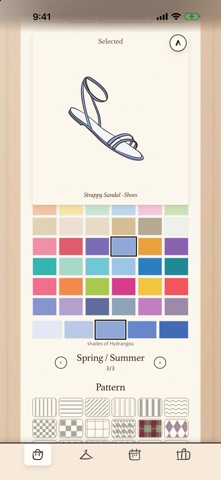
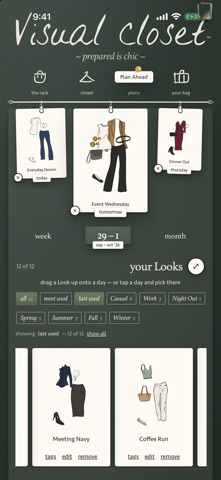
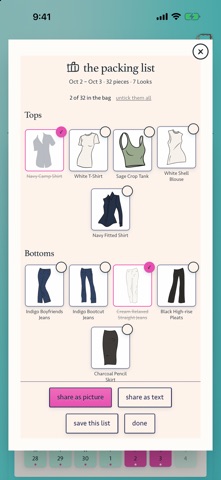
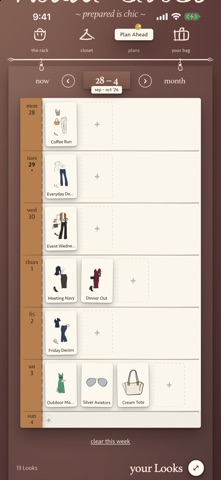
Visual Closet is your wardrobe, illustrated by hand. No photos. No cropping. No cataloging every tag in your closet. Just find the piece that looks like yours, and tap a color or pattern. Lay clothes out the way you actually decide what to wear — tossed on the bed, held up together, layered one over another. Try things. Move them around. Make a Look. Save the good ones. Not sure where to start? Tap the wand and it deals you a first idea. Monday morning, date night, theme park, Hawaii — deal yourself something good and call it handled. THE WHOLE CLOSET, ONE SENTENCE Or skip the shelves and just say it. Type your closet the way you'd tell a friend — "white button shirt, mid wash bootcut jeans, a sun yellow sundress, gold hoops, tan belt" — or paste a list, or use the mic on your keyboard. The pieces appear, drawn and ready. Keep what's right, cross off what isn't. Nothing is saved until you say so. Filling your closet takes a cup of coffee, not a weekend. YOU DON'T HAVE TO STAND AROUND IN YOUR CLOSET The illustrated pieces in Visual Closet are drawn by hand, then made yours. Scroll your closet from the couch, from bed, from the pickup line. Pick your colors. Add a pattern. Pinstripes or hearts, whatever feels right. Tops, bottoms, dresses, outerwear, swim, shoes and accessories are all there to mix, match, layer and rearrange into more combinations than you'll ever get through. Your closet can stay where it is. PLAY YOUR WEEK LIKE A HAND OF CARDS Plan a Look for any day and it becomes a little tailor's ticket of its own. The plans page opens on the next three days, hanging from the rod, with tomorrow front and center. Swipe through a day's options, keep the one you like, and send it to a friend for applause. Planning the week feels less like planning and more like playing dress-up. THE CLOSET YOU WANT Your clothes deserve somewhere good to live. Tap a fabric swatch and the whole app changes rooms. Retreat, all stone and eucalyptus. Champagne, a fitting room warm as its name. Petals, rose plaster and oxblood. And Poolside — pool aqua and hot pink, a little smack to the senses. Then flip the light switch: every room keeps a second self after dark. Moss. Tiramisu. The Atelier. Miami, glowing neon. Pick the one that feels like you, and change it whenever it doesn't. READY WITHOUT THINKING ABOUT IT Make Looks when you feel like playing. Put the good ones on the calendar. Pack them for the trip. Share one when you need a second opinion. You already did the fun part. THE WHOLE APP The app opens furnished: three Looks already in the pile, so there's something to hang on tomorrow before you've drawn a thing. The rack, the closet, today and tomorrow are free: every piece, every pattern, the full color page and three saved Looks of your own. One in-app purchase unlocks the whole app: the day after, the week and the month, the bag, the seasonal color pages and unlimited Looks. No subscription. YOURS, SAFELY Your wardrobe lives on your device. No profile to maintain. Save a copy of your closet whenever you like — it's under the key on the rod. Your clothes are already there. Visual Closet just helps you see what to do with them. Then, when the morning comes, there's nothing left to figure out. Open the app. There you are. Morning made simple.
What's new · 1.3.1
Fixes typing and dictation for anyone using SwiftKey, Wispr Flow or another third-party keyboard.
Details