

Timegrapher — Watch Accuracy
Fotios Avgidis · Utilities
Independent analytics for this App Store listing. AppTracker is not affiliated with Fotios Avgidis.
Chart standing · US
What changed · US
Listing changes AppTracker has observed for this app in this storefront — new versions, price moves, rating shifts, and store copy.
STEADIER, FASTER MEASUREMENTS The measuring engine is new. It finds the watch's beat from its regularity and times each tick against that watch's averaged tick. A weak or noisy signal now gives a steady reading. • The first reading appears within a few seconds. • The trace stays steady while you measure. • Amplitude is read from the averaged tick, where the faint first sound of each tick is visible. If the room is too noisy to measure it, the app shows a dash until it can. • The app listens in the frequency bands where the ticks are clear and leaves out the bands that carry only room noise. • Measurements finish at 30 seconds more often, because the app now hears more of the ticks. For the strongest signal, rest the bottom of the iPhone on the watch glass. RATE OVER A DAY OF WEAR Photograph the dial, wear the watch as usual, and photograph it again the next day. Timegrapher reads the time of each photo from the photo itself. You mark the seconds hand on both. The app then shows how much the watch gained or lost on your wrist during that day. A day between photos gives a reading precise to a fraction of a second. Shorter gaps also work, and each result shows its precision. Your first photo stays saved, so you can close the app and come back later. GERMAN, FRENCH AND JAPANESE The Guide, the health verdicts, the Pro screen, purchase messages and the microphone and camera prompts are now translated. In version 2.4 they were still in English. Numbers now use your region's decimal separator throughout the app. FIXED • On the trend chart, choosing Amplitude could hide the other tabs when a reading had no amplitude. All three tabs now stay visible.
Price & rating history · US
Reconstructed from the listing changes AppTracker has observed in this storefront. A field is charted once it has changed more than once, and each line starts at the value it moved from.
Average rating · ★ 4.88 now · 6 changes on record
In-app purchases · US
What this app sells inside itself, grouped by kind and priced for this storefront.
Screenshots




About
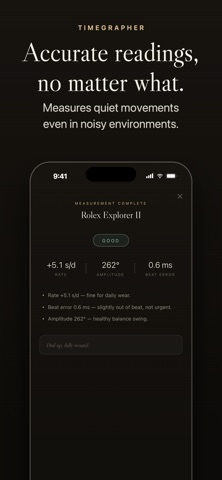
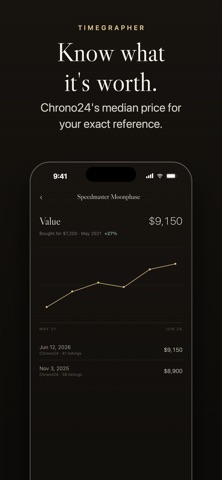
A timegrapher in your pocket: rate, amplitude and beat error from your iPhone's microphone in 30 seconds. Reads through room noise, with amplitude computed from your calibre's own lift angle. First watch free — Pro is one purchase, never a subscription. WHAT IT MEASURES • Rate — seconds gained or lost per day, the number a chronometer certificate is built on • Amplitude — how far the balance swings, the vital sign a watchmaker checks first • Beat error — the tick/tock asymmetry that says the escapement wants adjusting • Beat rate — detected automatically, from vintage 18,000 bph to hi-beat 36,000 bph WHY THE READINGS HOLD STEADY Phone timing apps have a reputation for jumping around, and for amplitude you can't trust. Two things are done differently here. The analyser tracks the room's own noise floor and rejects transients, so a quiet movement stays locked on — it will read a watch through a barking dog. And amplitude is computed from the lift angle you set for that specific calibre, because a wrong lift angle is the single most common reason a phone app reports the wrong swing. Each tick is really three tiny impacts. Timegrapher times every one to a fraction of a millisecond and fits thousands of them against your iPhone's clock — the same principle as a watchmaker's bench machine. YOUR COLLECTION Add every watch with a photo, reference and serial number, year, movement type and lift angle. Every measurement is saved, and charts show the rate drifting across months and years — so a movement slowly going off gets caught early. After each reading you get a plain-language verdict, Excellent through Service needed, with the reasons spelled out. A Guide tab explains every number in plain English. TRACK WHAT IT'S WORTH One tap pulls current Chrono24 asking prices for your exact reference and logs the median — computed on your device, in your own currency. Log what you paid and Timegrapher charts each watch's value over time, its gain since purchase, and your collection's total. PRIVATE BY DESIGN Everything runs on the device. No audio is ever recorded, stored or uploaded. No account, no ads, no tracking. PRICING Your first watch is free, forever. Timegrapher Pro unlocks unlimited watches for a single payment — no subscription. Purchases restore on any device signed into the same App Store account. HONEST LIMITS A quiet room and firm contact between phone and case give the best readings. Results are indicative: a bench machine and a professional's judgement remain the gold standard for service decisions.
What's new · 2.5
STEADIER, FASTER MEASUREMENTS The measuring engine is new. It finds the watch's beat from its regularity and times each tick against that watch's averaged tick. A weak or noisy signal now gives a steady reading. • The first reading appears within a few seconds. • The trace stays steady while you measure. • Amplitude is read from the averaged tick, where the faint first sound of each tick is visible. If the room is too noisy to measure it, the app shows a dash until it can. • The app listens in the frequency bands where the ticks are clear and leaves out the bands that carry only room noise. • Measurements finish at 30 seconds more often, because the app now hears more of the ticks. For the strongest signal, rest the bottom of the iPhone on the watch glass. RATE OVER A DAY OF WEAR Photograph the dial, wear the watch as usual, and photograph it again the next day. Timegrapher reads the time of each photo from the photo itself. You mark the seconds hand on both. The app then shows how much the watch gained or lost on your wrist during that day. A day between photos gives a reading precise to a fraction of a second. Shorter gaps also work, and each result shows its precision. Your first photo stays saved, so you can close the app and come back later. GERMAN, FRENCH AND JAPANESE The Guide, the health verdicts, the Pro screen, purchase messages and the microphone and camera prompts are now translated. In version 2.4 they were still in English. Numbers now use your region's decimal separator throughout the app. FIXED • On the trend chart, choosing Amplitude could hide the other tabs when a reading had no amplitude. All three tabs now stay visible.
Details