

Demote Universal TV Remote
MADE WITH BEST PRACTICE LLC · Utilities
Independent analytics for this App Store listing. AppTracker is not affiliated with MADE WITH BEST PRACTICE LLC.
Chart standing · US
What changed · US
Listing changes AppTracker has observed for this app in this storefront — new versions, price moves, rating shifts, and store copy.
• Gaben 2: a new controller layout after the new Steam Controller, with two sticks over two small trackpads. The original is now Gaben 1. • A tidier controller: Back to TV remote, your layout and Settings sit together at the top, and the shoulder buttons are back in the corners. Where the buttons go (your TV, an emulator or Bluetooth) and Customize now live in the controller's Settings, each explained. • The remote's wheel sits centered under what's playing on every iPhone and iPad, with the trackpad, Settings, keyboard and controller in its corners. • Demote reopens the TV you picked last, every time. Turn off Open last TV on launch in Settings to start on your TV list instead. • Fit-and-finish fixes across Cupertino, Swiper, BIG MODE and the classic layouts.
In-app purchases · US
What this app sells inside itself, grouped by kind and priced for this storefront.
Screenshots


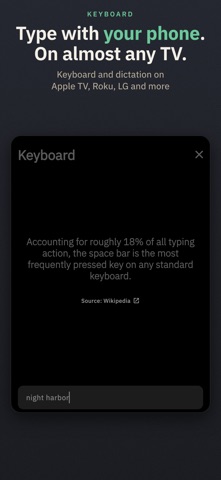


Keywords this app targets
Search terms AppTracker associates with this app — estimates, not search volume. ❝ = in the app's title; a highlighted number is its current position for that term.
Similar apps
Competitors and close alternatives, as estimated by AppTracker.
 Universal TV Remote™ Control
SEAMOBI TECH PTE LTD
Universal TV Remote™ Control
SEAMOBI TECH PTE LTD
 Connect TV Remote
East End Technologies Ltd.
Connect TV Remote
East End Technologies Ltd.
 TV Remote for Roku ·
Netsis Mobile FZCO
TV Remote for Roku ·
Netsis Mobile FZCO
 UniRemote:Universal TV Remote
Kanatom Limited
UniRemote:Universal TV Remote
Kanatom Limited
 Universal Remote — TV Control
Appenvision Ltd
Universal Remote — TV Control
Appenvision Ltd
 TV Remote & Universal Control™
To Ngoc Mai
TV Remote & Universal Control™
To Ngoc Mai
 Universal TV Remote Control*
VISARGERD, S.L.
Universal TV Remote Control*
VISARGERD, S.L.
 Universal Remote TV Control ·
BEGAMOB GLOBAL LIMITED
Universal Remote TV Control ·
BEGAMOB GLOBAL LIMITED
About
The TV remote that never charges for volume. Demote turns your iPhone into a remote for every TV in the house: Roku, Samsung, LG, Apple TV, Google TV, Vizio, Sony and more. Turn it sideways and it's a controller. No ads, no account, no subscription. Open it and it finds the TVs on your Wi-Fi. Pick yours, enter the code if your TV shows one, and the remote is ready. A CONTROLLER FOR TV GAMES AND EMULATORS Turn your iPhone sideways for ten free layouts: • Toaster, Rainbow, Crescent, Twin and Redmond: classic pad shapes with colored face buttons • BIG MODE: big buttons, big text. Power, Home, Back, Play/Pause and volume, nothing to hunt for. • Swiper: your own buttons as a big, labeled deck you swipe through, beside a d-pad. Put your movie-night macro, the porch light and Netflix one tap away. • Cupertino: an Apple TV-style touch surface. Apple TV gets real touch; on other TVs, swipes move the selection. • Gaben 1 and Gaben 2: two trackpads side by side, or two sticks over two small trackpads On a TV it sends the remote's keys, for games and apps that take them. Emulator mode, over Wi-Fi, adds two analog sticks, analog triggers, motion aiming and touch for PC emulators that support DSU, such as Dolphin and Cemu, plus RetroArch hotkeys. Demote remembers your layout for each TV, and one custom button per layout is free. HOME ASSISTANT AND BUTTON PACKS Turn on Home Assistant in Settings › Button Packs for scenes, lights, blinds, fans and speakers, grouped by room, and send a TV's volume to a soundbar. Packs for WLED, Shelly, Kodi, Denon/Marantz, Yamaha MusicCast, Hubitat, IFTTT and more set up right where you turn them on. MACROS THAT DO THE WHOLE JOB One button can wake the TV and wait for it, hold a key, switch the input, dim the lights and open your app. Start from Movie night, Skip intro or Quiet, try it, and tap to stop. THE WHOLE REMOTE IS FREE • D-pad, OK, back, home, playback, volume, mute and power • Your iPhone's volume buttons (turn on in Settings) • Typing, dictation, a trackpad and your apps one tap away • What's playing, with a live timeline, and a TV switcher • Send a photo or video to the TV, or mirror with AirPlay • Widgets, and Lock Screen and Control Center buttons (iOS 18) • A 30-minute sleep timer, and your first custom button • Home Assistant, button packs, and every controller layout and mode Nothing that's free today will ever become paid. WORKS WITH Google TV and Android TV (including SHIELD, TCL and Hisense), Roku TVs and players (including TCL, Hisense and onn.), Apple TV, Samsung from 2016 on (Tizen), LG webOS, Vizio SmartCast, Sony Bravia and most Panasonic Viera TVs. Your iPhone and TV need to share a Wi-Fi network. Power on needs a TV that can wake over the network. Roku players don't take volume or power keys, and app launching isn't available on Sony yet. Apple TV changes the volume only over HDMI-CEC and has no mute. Hisense VIDAA TVs aren't supported. ONE LIFETIME UNLOCK, NEVER A SUBSCRIPTION A one-time Lifetime Unlock adds: • 24 more custom buttons, and more in the controller's gaps • Moving and resizing the controller's buttons • Your photo behind the remote, trackpad, keyboard and controller • More themes, like Peanut: warm graphite, chunky yellow, green and red keys, a cream OK • Button and glow colors, remapping, App-specific remotes, All TVs off, single-button widgets and a sleep timer of any length Preview every theme, color and photo first. Bought it already? Tap Restore purchase in Settings. SIRI, VOICEOVER AND BIG TEXT "Hey Siri, mute the TV with Demote" works; Siri opens Demote to send it. Every key works with VoiceOver, Switch Control and a keyboard, and Dynamic Type is honored. PRIVATE BY DESIGN Demote talks to your TV and Home Assistant directly over your network: no Demote account. Voice searches and photos go straight to your TV.
What's new · 2.1.3
• Gaben 2: a new controller layout after the new Steam Controller, with two sticks over two small trackpads. The original is now Gaben 1. • A tidier controller: Back to TV remote, your layout and Settings sit together at the top, and the shoulder buttons are back in the corners. Where the buttons go (your TV, an emulator or Bluetooth) and Customize now live in the controller's Settings, each explained. • The remote's wheel sits centered under what's playing on every iPhone and iPad, with the trackpad, Settings, keyboard and controller in its corners. • Demote reopens the TV you picked last, every time. Turn off Open last TV on launch in Settings to start on your TV list instead. • Fit-and-finish fixes across Cupertino, Swiper, BIG MODE and the classic layouts.
Details