

Hear from Another Room
Ronald Lumor · Utilities
Independent analytics for this App Store listing. AppTracker is not affiliated with Ronald Lumor.
Chart standing · US
What changed · US
Listing changes AppTracker has observed for this app in this storefront — new versions, price moves, rating shifts, and store copy.
Price & rating history · US
Reconstructed from the listing changes AppTracker has observed in this storefront. A field is charted once it has changed more than once, and each line starts at the value it moved from.
Average rating · ★ 4.87 now · 4 changes on record
Ratings breakdown · US
The star breakdown behind this app's rating in this storefront.
In-app purchases · US
What this app sells inside itself, grouped by kind and priced for this storefront.
Screenshots



About
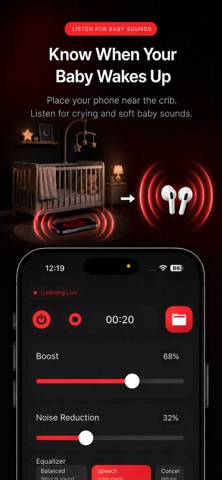
Hear from Another Room is a hearing amplifier that lets you hear sound from another room at home using AirPods, Bluetooth earbuds, or wireless headphones. The Hear from Another Room app turns your iPhone into a remote microphone or audio baby monitor. Place your phone near the sound source, such as in front of a TV or near a baby crib, then listen to the amplified audio through your connected Bluetooth headphones. Use Hear from Another Room when you want to keep listening while you move around the house. You can leave your phone in the living room and continue hearing the audio from another room through your wireless earbuds or headphones. Hear from Another Room is helpful for TV listening and audio baby monitoring at home. Place your phone near the TV to hear dialogue more clearly through your headphones without turning up the volume for everyone else. You can also use Hear from Another Room as a simple audio baby monitor to listen for baby sounds from another room at home. Hear TV From Another Room Hear from Another Room is useful when you are watching TV but need to step away for a short time. Place your iPhone near the TV, connect your AirPods or Bluetooth headphones, and continue listening from another room while you cook, clean, do laundry, use the washroom, or move around the house. Hear from Another Room helps you follow TV dialogue, movies, news, sports, shows, and programs through your headphones while keeping the TV volume comfortable for everyone else nearby. Audio Baby Monitoring at Home Hear from Another Room can also be used as a simple audio baby monitor. Place your iPhone safely near the baby crib area or baby room, then listen for baby sounds through your wireless headphones from another room. Use Hear from Another Room to listen for crying, movement, soft sounds, and other baby sounds while you are in the kitchen, living room, home office, or another part of the house. Live Remote Microphone Hear from Another Room captures sound through your iPhone microphone and streams the live audio directly to your connected headphones. Your iPhone works like a wireless microphone, helping you hear sound from another room in real time. Simply connect your AirPods, Bluetooth earbuds, or wireless headphones, tap Listen, and place your phone near the sound you want to hear. Use Hear from Another Room to: • Hear TV audio from another room • Follow TV dialogue while you move around the house • Listen through AirPods or Bluetooth headphones • Monitor baby sounds from another room at home • Keep TV volume lower for others nearby • Hear important home sounds more clearly Place your phone: • Near a television • Close to a speaker • Near a baby crib area • In the room with the sound source Then listen privately through your AirPods, Bluetooth earbuds, or wireless headphones. Listening Features Hear from Another Room includes helpful audio tools for everyday home listening: • Live audio listening • Audio boost controls • Noise reduction • Equalizer presets • Manual equalizer sliders • Audio recording Free features include live audio listening, audio recording, equalizer presets, 25% Boost, and 30% Noise Reduction. Some advanced features require an upgrade, including full Boost, full Noise Reduction, and Manual Equalizer Sliders for adjusting sound quality. Customize your listening experience with: • Sound Boost — 25% free boost; full Boost requires upgrade • Noise Reduction — 25% free noise reduction included; full Noise Reduction requires upgrade • Equalizer Presets • Manual Equalizer Sliders — requires upgrade • Audio Recording — requires upgrade Optimized for: • AirPods • Bluetooth earbuds • Wireless headphones Hear from Another Room makes home listening simple. Place your iPhone near the sound source, connect your headphones, and hear live audio from another room in real time.
Details