

PearList
Timothy Hudgins · Productivity
Independent analytics for this App Store listing. AppTracker is not affiliated with Timothy Hudgins.
Chart standing · US
What changed · US
Listing changes AppTracker has observed for this app in this storefront — new versions, price moves, rating shifts, and store copy.
## What's Changed New Features - Clear out checked items in one tap. Open a list's menu and choose "Delete checked items" to remove everything that's been ticked off. Checked items still stay on the list until you clear them, so everyone can see what's done. Improvements - Closing sheets is easier. Swipe any pop-up sheet down to close it, or tap the new X in its top corner. Bug Fixes - On newer Android phones, the keyboard no longer covers the box you're typing in. - Fixed a rare problem that could stop the app from working properly after it saved your changes.
Screenshots



About
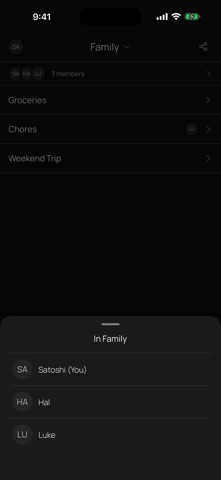
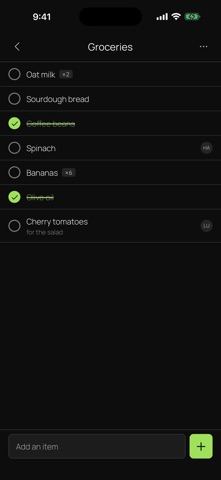
PearList keeps your household's shared lists in sync across everyone's phones, with no account, no server and no company in the middle. Make a grocery list, a to-do list or a chore board. Anyone in your household can add items, check them off, rename them, assign them and delete them, and every change syncs directly between your phones. Assign an item to a person and any list doubles as a shared chore board. There is no sign-up and no login. You join a household by scanning a QR code or tapping an invite link. From then on everyone sees and edits the same lists. Because PearList is peer-to-peer, your lists live only on your devices. They are never uploaded to a server, so no company can read them, sell them or lose them in a breach. Everything syncs encrypted, directly device to device. Features - Multiple shared lists per household: groceries, to-dos, chores - Add, check, rename, assign and delete items, synced to everyone - Assign items to a person to use any list as a chore board - Join by QR code or invite link, no account needed - Works offline, syncs when your devices are online together - Open source and private by design: no account, no ads, no tracking PearList is fully open source: https://github.com/peerloomllc/pearlist
What's new · 1.1.15
## What's Changed New Features - Clear out checked items in one tap. Open a list's menu and choose "Delete checked items" to remove everything that's been ticked off. Checked items still stay on the list until you clear them, so everyone can see what's done. Improvements - Closing sheets is easier. Swipe any pop-up sheet down to close it, or tap the new X in its top corner. Bug Fixes - On newer Android phones, the keyboard no longer covers the box you're typing in. - Fixed a rare problem that could stop the app from working properly after it saved your changes.
Details