
Chart standing · US
What changed · US
Listing changes AppTracker has observed for this app in this storefront — new versions, price moves, rating shifts, and store copy.
Start faster: a sample bookshelf project shows a full cut diagram on first launch. Plan without limits — Pro is now only needed when you export (PDF/CSV).
Screenshots


About
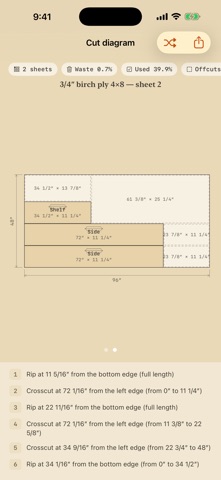
Turn a parts list into an optimized cutting diagram — right at the lumber aisle. Choose a weekly or lifetime Pro option, while keeping project data on your device. Boardcut takes the parts you need and the sheets and boards you have, and lays out where every cut goes — so you buy less material and waste less of what you buy. WHAT YOU CAN DO • Enter parts fast — a fraction keypad built for inches (24 3/8″ takes four taps), plus decimal and mm modes • Add stock from standard presets — 4×8 plywood, dimensional lumber — or enter your own sizes • Get an optimized cut diagram with engineering-style dimensions and grain arrows • Blade kerf is drawn at its real width on every cut — with edge trim and a minimum offcut size you control • Follow a numbered cut list: every rip and crosscut in order, linked to the diagram • See waste, yield, sheet count, cut count, and material cost at a glance • Reshuffle for an alternate layout when you want a second opinion • Lock grain direction on the parts that show • Switch units anytime — inch fractions, decimal inches, or millimeters — never paywalled • Two drawing-table themes: Workshop (birch and pencil) and Blueprint (cyanotype) FREE — THE FULL TOOL, UP TO 10 PIECES Plan a whole small project free: the optimizer, the cut diagram, the ordered cut steps, and sheet-image sharing. No account, no trial clock — nothing held back but project size. PRO — WEEKLY OR LIFETIME. • Unlimited pieces per project • Vector PDF plans — diagrams, cut steps, and a shopping list, sharp in print • Save usable offcuts as stock for your next project • CSV export of parts and placements Choose a $12.99 lifetime unlock or a $1.99/week subscription with a 3-day free trial. The weekly subscription renews automatically unless canceled. PRIVATE BY DESIGN Your projects stay on your device. Boardcut has no account, no ads, and no third-party tracking. It sends limited anonymous product-interaction events for analytics; project names, notes, dimensions, and layouts are not sent. Boardcut is a planning calculator. Always verify every dimension against your actual material before cutting — sheet sizes, blade kerf, and lumber dimensions vary. Boardcut does not provide instruction on tool use or workshop safety; follow your tool manufacturer's instructions and use proper safety equipment. Terms of Use (EULA): https://softgrove.github.io/boardcut-legal/terms.html Privacy Policy: https://softgrove.github.io/boardcut-legal/privacy.html
What's new · 1.4.0
Start faster: a sample bookshelf project shows a full cut diagram on first launch. Plan without limits — Pro is now only needed when you export (PDF/CSV).
Details