

Feed Me RSS
Kendal Slack · News
Independent analytics for this App Store listing. AppTracker is not affiliated with Kendal Slack.
Chart standing · US
What changed · US
Listing changes AppTracker has observed for this app in this storefront — new versions, price moves, rating shifts, and store copy.
It unfolds. Feed Me RSS is built for iPhone Duo. Open it on the inner display and your stories sit beside the article you are reading. Drag the divider wherever you want it, or push it past the edge for a full-width read and pull it back with a tap. The toolbar stands up along the right rail, the Reading Companion comes along with summaries and what to read next, and your place in a story survives every fold. SUMMARIES THAT ARRIVE BEFORE YOU DO Summaries are real background work now. Your unread pile quietly summarises itself while the app is closed, so a morning's backlog is already skimmable when you open it instead of starting from nothing while you wait. Apple Intelligence, on your own device, as always: nothing uploaded, no account, no fee. BACKGROUND REFRESH THAT ACTUALLY REFRESHES New stories, the unread badge and your widgets now update while the app is in your pocket, across every feed you subscribe to. FASTER EVERYWHERE Opening a story and swiping back no longer rebuilds the whole list behind the scenes, so lists, scrolling and the swipe back are quick again, and a refresh no longer brings everything to a halt while it runs. ALSO IN THIS UPDATE • Find in article gained up and down buttons that jump to each result, with a running count • Your reading position is restored properly again when you return to a story • Open in New Window is no longer offered when there is no story open Your feeds, your pace. Go subscribe to something weird.
Ratings breakdown · US
The star breakdown behind this app's rating in this storefront.
Screenshots





About
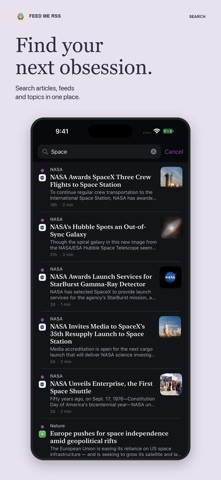
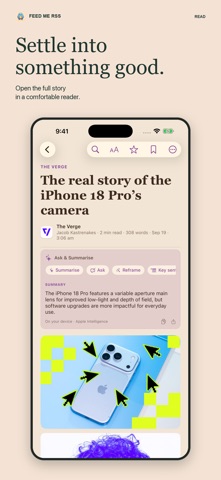
A fast, private, genuinely complete RSS reader for iPhone, iPad and Mac. Completely free — no subscription, no unlock, no ads, no "Pro" tier. Feed Me RSS is built for people who follow a lot of sources and refuse to let an algorithm choose between them. Your feeds, your order, your reading — synced across every device through your own iCloud account. SUMMARIES FOR AN OVERWHELMING INBOX Two hundred unread is not a plan. Switch on AI summaries and your unread pile summarises itself in the background — on your device, most interesting stories first — so a morning's backlog becomes a couple of minutes of skimming and you only open what earns it. Two sentences per story. Powered by Apple Intelligence on your own iPhone, iPad or Mac: nothing uploaded, nothing logged, no account, no server, no monthly fee. It works on a plane. BUILT FOR PEOPLE WHO READ A LOT • Front Page — a newspaper-style view that ranks the day across every feed you follow • The Daily — the biggest story from each source, so nothing quiet gets buried • Same-story grouping — one row per story, with "also covered by" for the other outlets • For You — ranks unread against what you actually read and star • Smart lists, custom filters, folders, keyword alerts and per-feed notifications • Full-text reader that strips ads and clutter, with highlights and reading stats • Offline caching, so what you've synced is readable with no signal POWER USER, PROPERLY • Mac: three-pane window, menu-bar reader, Focus mode, per-window light/dark, open articles in their own window • Custom keyboard shortcuts throughout • Markdown export, share sheets, Quick Look • Widgets and Lock Screen complications in a range of styles • Siri Shortcuts, Spotlight, Handoff • OPML import and export — bring your feeds in, take them out whenever you like • FreshRSS / Google Reader API sync if you already run a server PRIVATE BY DEFAULT No accounts. No tracking. No analytics. No data collected, which is why the App Store privacy label says "Data Not Collected". Reading state syncs through your own iCloud, visible only to you — and the AI never leaves your device. Add a site by name, a subreddit, a Bluesky handle or a YouTube channel, or share any page to the app from Safari. RSS does the thing every algorithm promises and never quite delivers: it shows you exactly what you asked for, in the order it happened, with nobody in between. Thirty years on it is still the best deal in news. Go subscribe to something weird.
What's new · 1.8
It unfolds. Feed Me RSS is built for iPhone Duo. Open it on the inner display and your stories sit beside the article you are reading. Drag the divider wherever you want it, or push it past the edge for a full-width read and pull it back with a tap. The toolbar stands up along the right rail, the Reading Companion comes along with summaries and what to read next, and your place in a story survives every fold. SUMMARIES THAT ARRIVE BEFORE YOU DO Summaries are real background work now. Your unread pile quietly summarises itself while the app is closed, so a morning's backlog is already skimmable when you open it instead of starting from nothing while you wait. Apple Intelligence, on your own device, as always: nothing uploaded, no account, no fee. BACKGROUND REFRESH THAT ACTUALLY REFRESHES New stories, the unread badge and your widgets now update while the app is in your pocket, across every feed you subscribe to. FASTER EVERYWHERE Opening a story and swiping back no longer rebuilds the whole list behind the scenes, so lists, scrolling and the swipe back are quick again, and a refresh no longer brings everything to a halt while it runs. ALSO IN THIS UPDATE • Find in article gained up and down buttons that jump to each result, with a running count • Your reading position is restored properly again when you return to a story • Open in New Window is no longer offered when there is no story open Your feeds, your pace. Go subscribe to something weird.
Details