
Chart standing · US
What changed · US
Listing changes AppTracker has observed for this app in this storefront — new versions, price moves, rating shifts, and store copy.
Import your expenses from a CSV file, right from Settings — including a CSV exported from the Android version of SpendCheck, so switching devices or keeping both in sync doesn't mean starting your history over. Merchant and note fields now have a quick clear button, so starting over doesn't mean holding down backspace. Plus: cleaner merchant names for Apple Pay purchases at chains that include a store number, a fix so a Shortcuts-created entry correctly suggests a category once you fill in its real amount and business name, and other small improvements under the hood.
Ratings breakdown · US
The star breakdown behind this app's rating in this storefront.
Screenshots



About
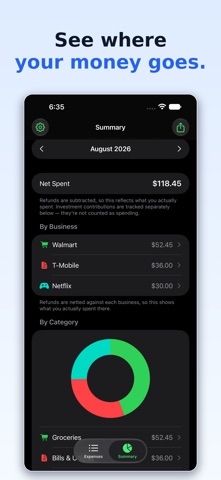
SpendCheck is the expense tracker for people who just want to see where their money goes; all without accounts, ads, subscriptions, or a single byte leaving your phone. Everything you log lives only on your device. There's no sign-up, no cloud, no analytics, and no company (including us) that can see your spending. Open the app and start tracking in seconds. WHY YOU'LL LIKE IT • Fast entry — A bank-app-style keypad lets you punch in an amount and save an expense in a couple of taps. No fiddly decimal typing. • Expenses, refunds, and investments — Track money going out, money coming back, and money you've moved into brokerage or crypto platforms. Investments are kept separate so they never inflate what you "spent." • Receipt photos, made searchable — Snap or attach a photo of a receipt. SpendCheck reads the text on it right on your device, so you can later search for an item printed on the receipt even if you never typed it in. • Smart categories — As you type a business name, SpendCheck pre-fills the category you last used there. Less thinking, faster logging. • Recurring expenses — Mark something as weekly, monthly, or annual and it logs itself automatically; perfect for subscriptions, rent, and yearly renewals. • Clear summaries — See what you spent this week and this month, a breakdown by business and by category, and a simple chart; all for any month you pick. • Export anytime — Send a clean CSV of your full history to Files, Numbers, Excel, or Google Sheets whenever you want a backup. • Make it yours — Pick an accent color to match your style. PRIVATE BY DESIGN SpendCheck stores everything locally using Apple's on-device database. There is no server, no login, and no tracking. Your financial life is nobody's business but yours; the app is built so that even we couldn't see your data if we wanted to. FREE SpendCheck is free to use. No ads, no data selling, no catch. Questions or feedback? We'd love to hear from you — reach us through the contact link on our website.
What's new · 2.3
Import your expenses from a CSV file, right from Settings — including a CSV exported from the Android version of SpendCheck, so switching devices or keeping both in sync doesn't mean starting your history over. Merchant and note fields now have a quick clear button, so starting over doesn't mean holding down backspace. Plus: cleaner merchant names for Apple Pay purchases at chains that include a store number, a fix so a Shortcuts-created entry correctly suggests a category once you fill in its real amount and business name, and other small improvements under the hood.
Details