

LiveMoji: Photo & Video Kit
山杰 韩 · Photo & Video
Independent analytics for this App Store listing. AppTracker is not affiliated with 山杰 韩.
Chart standing · US
What changed · US
Listing changes AppTracker has observed for this app in this storefront — new versions, price moves, rating shifts, and store copy.
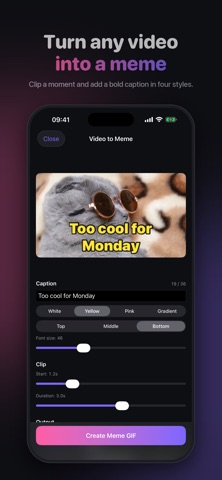
LiveMoji 2.0 is our biggest update yet: a fresh new look, three new tools, and upgrades across the app. NEW LOOK • A dark design throughout that puts your photos and videos first • Tools grouped by what you want to do: Video & GIF, Photos, and Privacy • Each tool keeps its own color from the home screen into its editor NEW TOOLS • Video to Meme: clip a moment from any video and add a caption in four styles, with a live preview • Resize Image: one-tap sizes for social posts, video covers and wallpapers, plus 1-inch and 2-inch ID photos, with a crop preview • Export Video Clip: trim 1–30 seconds and save as MP4, with location data removed SMARTER REDACTION • Auto Mask finds phone numbers, ID and bank card numbers, addresses, license plates, emails, faces and QR codes in one tap • Six mask styles, including pixelate, blur, black out and translucent, plus custom colors • Resize emoji stickers with a slider or a pinch UPGRADES • GIFs play right in the preview, can be kept under 10 MB for chat apps, and save straight to Photos • Still to Live can now export an MP4 video as well as a Live Photo • Metadata cleanup removes more hidden data (EXIF, TIFF, IPTC, XMP and maker notes) and double-checks the result before saving • Share from every tool, not just save FASTER AND MORE RELIABLE • Videos open faster after you pick them, with progress shown for iCloud videos • Quicker GIF creation and lower memory use with large photos • Clear messages when a photo can't be loaded • Main buttons stay in reach on longer editing screens Everything is processed on your device. Your photos and videos are never uploaded.
Screenshots



About
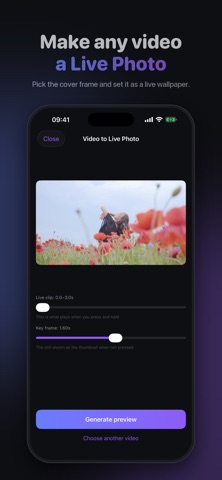
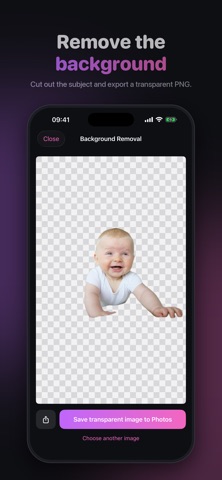
LiveMoji is a lightweight photo and video toolbox that packs the tools you reach for every day into a single app. Like a Swiss Army knife, it's always ready, so you never have to juggle multiple apps again. VIDEO TO LIVE PHOTO Pick any video and turn it into a Live Photo, then save it to your library in one tap. Bring your lock screen and chat avatars to life. VIDEO TO GIF Trim the best moments and export them as high-quality GIFs. Share to any chat or social app, and make reaction clips or quick demos on the fly. PHOTO REDACTION Quickly cover ID numbers, addresses, faces, and other sensitive details with a smear brush or emoji stickers. Choose pixel mosaic or Gaussian blur, then share with confidence. BACKGROUND REMOVAL Cut out people or objects in one tap and export a clean transparent PNG. Perfect for stickers, product shots, and collages. FORMAT CONVERT & COMPRESS Convert HEIC to JPG or PNG, shrink file size with an adjustable quality slider, and cap the max dimension to keep uploads light. METADATA SCRUB Strip GPS location, device model, and capture time from your photos before you share, so your private info stays private. SCREENSHOT STITCH Merge multiple screenshots into one long image, vertically or horizontally, with adjustable spacing. Great for chats, articles, and receipts. STILL TO LIVE PHOTO Add subtle motion to a still photo and turn it into a Live Photo wallpaper. WHY LIVEMOJI - Clean, direct interface. Open it and go - Everything runs on-device. Your photos and videos are never uploaded - English and Chinese, built for edge-to-edge iPhones - More handy tools added over time Download LiveMoji and handle your everyday photo and video tasks in one app. — LiveMoji Pro is an auto-renewable subscription available as weekly / monthly / annual plans. Payment is charged to your App Store account and renews automatically unless canceled at least 24 hours before the end of the current period. Manage or cancel anytime in your App Store account settings. Terms of Use (EULA): https://www.apple.com/legal/internet-services/itunes/dev/stdeula/ Privacy Policy: https://cloudsjhan.github.io/livemoji-privacy-policy/
What's new · 2.0.0
LiveMoji 2.0 is our biggest update yet: a fresh new look, three new tools, and upgrades across the app. NEW LOOK • A dark design throughout that puts your photos and videos first • Tools grouped by what you want to do: Video & GIF, Photos, and Privacy • Each tool keeps its own color from the home screen into its editor NEW TOOLS • Video to Meme: clip a moment from any video and add a caption in four styles, with a live preview • Resize Image: one-tap sizes for social posts, video covers and wallpapers, plus 1-inch and 2-inch ID photos, with a crop preview • Export Video Clip: trim 1–30 seconds and save as MP4, with location data removed SMARTER REDACTION • Auto Mask finds phone numbers, ID and bank card numbers, addresses, license plates, emails, faces and QR codes in one tap • Six mask styles, including pixelate, blur, black out and translucent, plus custom colors • Resize emoji stickers with a slider or a pinch UPGRADES • GIFs play right in the preview, can be kept under 10 MB for chat apps, and save straight to Photos • Still to Live can now export an MP4 video as well as a Live Photo • Metadata cleanup removes more hidden data (EXIF, TIFF, IPTC, XMP and maker notes) and double-checks the result before saving • Share from every tool, not just save FASTER AND MORE RELIABLE • Videos open faster after you pick them, with progress shown for iCloud videos • Quicker GIF creation and lower memory use with large photos • Clear messages when a photo can't be loaded • Main buttons stay in reach on longer editing screens Everything is processed on your device. Your photos and videos are never uploaded.
Details