

D-day Counter - Countdowns
SiU Ahn · Productivity
Independent analytics for this App Store listing. AppTracker is not affiliated with SiU Ahn.
Chart standing · US
What changed · US
Listing changes AppTracker has observed for this app in this storefront — new versions, price moves, rating shifts, and store copy.
• Lock screen widgets: see the days left right on your lock screen (circular, rectangular and inline). • New design: refreshed home, detail, add and welcome screens, with clean icons instead of emoji. • Home screen widgets follow the app's theme, and the medium size also lists your next three D-days.
In-app purchases · US
No in-app purchases.
Screenshots




About
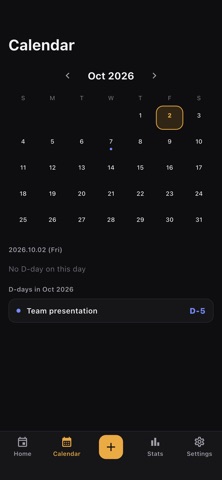
Never miss a day that matters. D-day Counter keeps every countdown in your life — exams, anniversaries, birthdays, deadlines — organized in one clean app. ■ Made for you if… • You're a student counting down to a final exam, certification test, or interview • You want to celebrate your 100th or 1000th day together as a couple • You never want to forget a family member's or friend's birthday — even one kept on the lunar calendar • You're tracking a project deadline, trip departure, or any big day ahead ■ Key features 1. Unlimited D-days Create as many countdowns as you want — no limits. Pick an emoji and add a memo to make each one yours. Count down to upcoming days (D-35) or count up from past events (D+82). 2. Reminders Get notified on the day, or 1, 2, 3, 7 or 30 days before — at the time you choose. 3. Home screen widgets Check your D-days right from your home screen. Pick which D-day each widget shows; with a start date it shows a progress bar too. 4. Yearly repeating events Birthdays and anniversaries roll over automatically every year. Set it once and it always shows the next occurrence. 5. Lunar calendar dates Enter a date on the Korean lunar calendar and it repeats on that lunar date every year, with the solar date worked out for you. Leap months included. 6. Statistics Year progress, what's coming up, your next 100th or 1000th day, goals in progress and a by-month chart — all on one screen. 7. Calendar view See all your D-days laid out on a monthly calendar. Instantly know what's coming up this month. 8. Categories Exam, Anniversary, Birthday, Military and Other — rename them, change their icon and color, or create your own. 9. Progress ring Set a start date and watch the progress ring fill up as you approach your goal. 10. Backup & restore Export your D-days to a file and bring them back on a new phone. ■ Light and private • No sign-up — start using it the moment you install • All data stays on your device (nothing is sent to a server) • Works fully offline • Dark and light themes, English & Korean supported From exam countdowns to couple anniversaries and birthday reminders — start counting the days that matter with D-day Counter.
What's new · 1.2.0
• Lock screen widgets: see the days left right on your lock screen (circular, rectangular and inline). • New design: refreshed home, detail, add and welcome screens, with clean icons instead of emoji. • Home screen widgets follow the app's theme, and the medium size also lists your next three D-days.
Details