

SkyPocket
John Mckay · Navigation
Independent analytics for this App Store listing. AppTracker is not affiliated with John Mckay.
Chart standing · US
What changed · US
Listing changes AppTracker has observed for this app in this storefront — new versions, price moves, rating shifts, and store copy.
5.1.0 puts SkyPocket on your wrist. SkyPocket for Apple Watch records your flight with the Watch's own GPS, alongside your iPhone or on its own. Start on either and the other joins in. After landing the two recordings join into one flight, and if either battery runs low, the other takes over. On the wrist: ground speed, altitude, time left, a moving map with the route to your destination, and which side the sun is on. Hold to end, so a sleeve can't end a flight. Outside a flight, swipe down for live speed and altitude. Tap a reading to change units on either device. A complication on your watch face shows REC and the time while you fly. On iPhone: a WATCH panel for the cockpit and an Apple Watch section in Settings.
Price & rating history · US
Reconstructed from the listing changes AppTracker has observed in this storefront. A field is charted once it has changed more than once, and each line starts at the value it moved from.
Price · 0.99 USD now · 2 changes on record
Average rating · ★ 4.33 now · 3 changes on record
Ratings breakdown · US
The star breakdown behind this app's rating in this storefront.
In-app purchases · US
No in-app purchases.
Screenshots





Keywords this app targets
Search terms AppTracker associates with this app — estimates, not search volume. ❝ = in the app's title; a highlighted number is its current position for that term.
Similar apps
Competitors and close alternatives, as estimated by AppTracker.
 Flyskyhy
Renevision
1 shared topic
Flyskyhy
Renevision
1 shared topic
 Inflight Map
Nikolay Klimchuk
1 shared topic
Inflight Map
Nikolay Klimchuk
1 shared topic
 FlightSky: Live Plane Radar
Ocean Float Mobile
1 shared topic
FlightSky: Live Plane Radar
Ocean Float Mobile
1 shared topic
 Flighty – Live Flight Tracker
Flighty LLC
1 shared topic
Flighty – Live Flight Tracker
Flighty LLC
1 shared topic
 SkyPulse - Flight Tracker
Moamen Basel
SkyPulse - Flight Tracker
Moamen Basel
 Flight Mode Map
SPIDER SERVICE SRL
1 shared topic
Flight Mode Map
SPIDER SERVICE SRL
1 shared topic
 SkyLogger
Hartwig Wiesmann
SkyLogger
Hartwig Wiesmann
 Flight Passport
WEI LIU
1 shared topic
Flight Passport
WEI LIU
1 shared topic
About
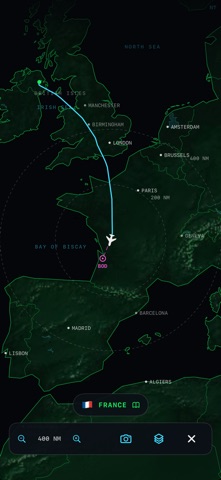
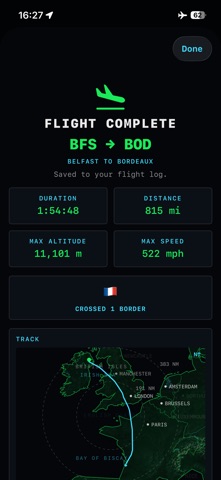
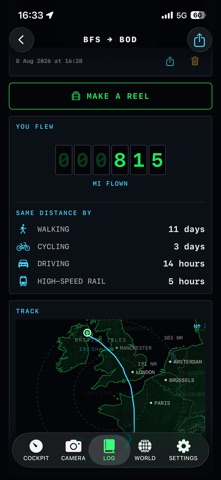
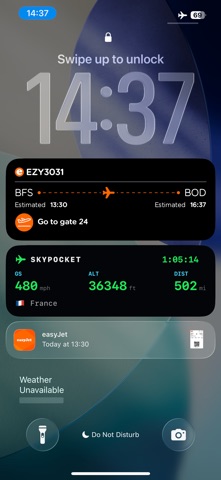
SkyPocket is the flight mode app for anyone who flies: no ads, sign ups, analytics or in-app purchases. Buy it once and it's yours for life. It works on iPhone and Apple Watch, and a window seat helps. The Aviation Nerd: • Live ground speed, altitude, track and vertical speed on cockpit-style tapes • An offline moving map, mid-ocean included, with 41,000 peaks and 3,000 lakes • Cabin altitude, turbulence, g-force and bank from your phone's own sensors • The country below, its local time, and which side the sun is on • Pick a destination for distance to go and a live ETA The Nervous Flyer: • Every phase of the flight explained as it happens, with your aircraft's own numbers • Two dozen cabin sounds decoded, the worrying ones marked NORMAL • 65 aircraft with their numbers, spotting clues and trivia The Storyteller: • Photos and clips stamped with your speed, altitude and position • Notes saved with the moment they happened • Turn the whole flight into a 9:16 reel The Globetrotter: • A logbook of every flight, named from 4,000 airports • A ten-language phrasebook, spoken aloud The Long Haul: • Eight games in the flight deck's style, with your speed and altitude still in view • GPS LOST mode: an honest estimate toward your destination when the fix drops out over a jamming zone On your wrist: • SkyPocket for Apple Watch records with its own GPS, alongside your iPhone or on its own, and the two join into one flight • Speed, altitude, time left and your route on your wrist, plus a complication that shows REC while you fly Record the whole flight: Tap once before takeoff. SkyPocket records with your phone locked, shows live stats on the lock screen and detects the landing itself. If the app closes or the battery dies, your flight is safe and can resume. In 15 languages, including the whole World Factbook for all 238 countries.
What's new · 5.1.0
5.1.0 puts SkyPocket on your wrist. SkyPocket for Apple Watch records your flight with the Watch's own GPS, alongside your iPhone or on its own. Start on either and the other joins in. After landing the two recordings join into one flight, and if either battery runs low, the other takes over. On the wrist: ground speed, altitude, time left, a moving map with the route to your destination, and which side the sun is on. Hold to end, so a sleeve can't end a flight. Outside a flight, swipe down for live speed and altitude. Tap a reading to change units on either device. A complication on your watch face shows REC and the time while you fly. On iPhone: a WATCH panel for the cockpit and an Apple Watch section in Settings.
Details