

ScrivenerBridge
明罡 蒋 · Productivity
Independent analytics for this App Store listing. AppTracker is not affiliated with 明罡 蒋.
Chart standing · US
What changed · US
Listing changes AppTracker has observed for this app in this storefront — new versions, price moves, rating shifts, and store copy.
• Use Ask This Book to explore plots, characters and relationships, get an overview, discuss the story, or ask for writing ideas. • Choose the chapters to include, with batch selection through the chapter hierarchy. Deep Summary processes the selected, readable text in batches. Follow its progress or stop the task. • Choose a local model or configure your own external AI API. Before external requests, confirm the content and review estimated usage. • Check reference chapters and original excerpts against the answer. AI can make mistakes. • Improved text preparation, index reuse, sync progress messages and multilingual display for large projects. • Refined paragraph annotations, the writing toolbar, automatic backups and conflict handling. Local models work offline once the model and manuscript are ready on your device. External APIs require a network connection and may incur provider charges. AI answers are for reference; check the original text.
In-app purchases · US
What this app sells inside itself, grouped by kind and priced for this storefront.
Screenshots




About
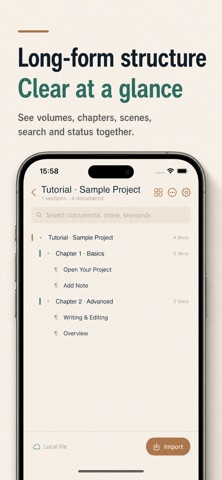
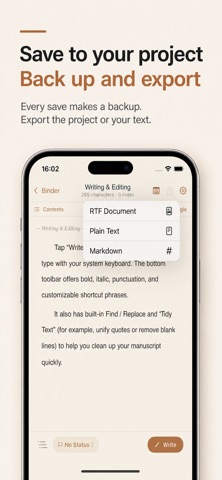
Bring your Scrivener projects to iPhone and iPad and continue reading, organising, and writing wherever you are. ScrivenerBridge opens .scriv projects that you manage and preserves the Binder hierarchy, text, titles, synopses, status, document notes, and project structure. Projects can stay in the Files app or iCloud Drive, and your changes are written back to the original project. AI FOR YOUR MANUSCRIPT • Use Ask This Book to explore plots, characters and relationships, get an overview, discuss the story, or ask for writing ideas. • Choose the chapters to include, with batch selection through the chapter hierarchy. • Deep Summary processes the selected, readable text in batches. Follow its progress or stop the task. • Choose a local model or configure your own external AI API. Before external requests, confirm the content and review estimated usage. • Check reference chapters and original excerpts against the answer. AI can make mistakes. • Each question is handled independently. The question page does not save its conversation and clears it when closed. Local models work offline once the model and manuscript are ready on your device. External APIs require a network connection and may incur provider charges. AI answers are for reference; check the original text. CONTINUE WRITING • Browse volumes, chapters, scenes, and documents through the Binder • Edit text, titles, synopses, document notes, and chapter status • Use rich-text formatting, punctuation, quick phrases, and a customisable keyboard bar • Set word-count targets and follow your progress READ AND ANNOTATE • Read multiple chapters continuously • Select a paragraph to add an annotation • View, edit, delete, locate, and re-anchor existing annotations • Optionally mirror annotations to Scrivener Document Notes HANDLE PROJECTS SAFELY • Create an automatic backup before writing changes • Use coordinated writes for text, project metadata, and checksums • Preserve recovery copies when an iCloud conflict occurs and let you choose the version • Load the current working set of large projects to avoid unnecessary downloads IMPORT AND EXPORT • Open a .scriv folder or .scriv.zip • Import RTF and TXT documents • Export RTF, TXT, Markdown, a complete .scriv project, or a ZIP backup PRIVACY No app account is required. The app has no advertising or analytics SDKs and does not upload your writing to developer-operated servers. With local models, text retrieval and answer generation run on your device. When you choose an external AI API, confirmed questions and manuscript content are sent directly to your selected provider, whose data handling and charges apply. Apple handles iCloud syncing according to your account settings. Pro is a one-time purchase and can be restored with the same Apple Account. Scrivener is a trademark of Literature & Latte Ltd. This independent app is not affiliated with or endorsed by Literature & Latte Ltd.
What's new · 1.0.2
• Use Ask This Book to explore plots, characters and relationships, get an overview, discuss the story, or ask for writing ideas. • Choose the chapters to include, with batch selection through the chapter hierarchy. Deep Summary processes the selected, readable text in batches. Follow its progress or stop the task. • Choose a local model or configure your own external AI API. Before external requests, confirm the content and review estimated usage. • Check reference chapters and original excerpts against the answer. AI can make mistakes. • Improved text preparation, index reuse, sync progress messages and multilingual display for large projects. • Refined paragraph annotations, the writing toolbar, automatic backups and conflict handling. Local models work offline once the model and manuscript are ready on your device. External APIs require a network connection and may incur provider charges. AI answers are for reference; check the original text.
Details