

Offline AI Auto Captions
Manish Kapoor · Photo & Video
Independent analytics for this App Store listing. AppTracker is not affiliated with Manish Kapoor.
Chart standing · US
What changed · US
Listing changes AppTracker has observed for this app in this storefront — new versions, price moves, rating shifts, and store copy.
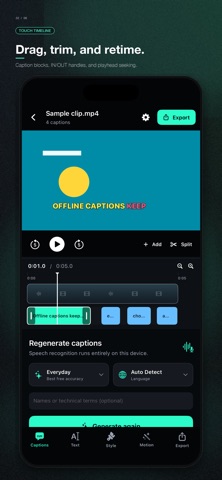
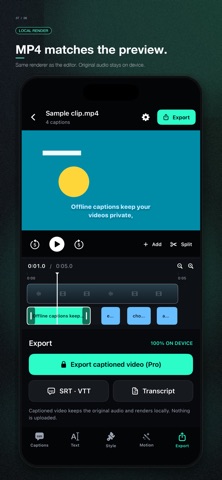
CapCut-style caption editor update. • Touch timeline: drag caption blocks, trim IN/OUT handles, seek by touch • On-preview editing: drag placement, pinch/corner resize • 30 professional caption styles with animated style browser samples • 30+ caption animations: karaoke, word highlight, typewriter, word-by-word, pop, bounce, zoom, shake, glow, tracking • Separate transitions: fade, slide, zoom, bounce, snap • Preview-accurate MP4 export • Stronger multilingual offline models, plus smaller low-RAM options • Stability fixes for tokenizer/extractor crashes • Fully private on-device processing — no cloud tier
Screenshots




About
Offline AI Auto Captions is the ultimate tool for content creators, professionals, and privacy-conscious users who want to generate accurate, stylized subtitles directly on their iPhone or iPad. Powered by advanced on-device AI technology, your video and audio data never leaves your device. There are no cloud uploads, no hidden server processing, and zero privacy risks. Your content remains strictly yours. KEY FEATURES • 100% Offline AI: Generate accurate captions without an internet connection using local on-device models. • Word-Level Animations: Bring your videos to life with dynamic text effects like Karaoke, Highlight Sweep, Pop, and Bounce. • Advanced Style Studio: Customize everything. Change fonts, colors, shadows, outline widths, and background boxes to match your personal brand. • Precision Editor: Easily split, merge, delete, or adjust the exact timing of any caption segment. • Multiple Formats: Export standard SRT, WebVTT, plain-text transcripts, and heavily styled ASS (Advanced SubStation Alpha) files. • Local Video Rendering: Hardcode your captions directly onto your video and export a fresh MP4 file—all rendered locally on your device keeping the original audio quality. • Multi-Language Support: Automatically detect the spoken language, or manually choose from English, Spanish, French, German, Italian, Portuguese, Hindi, Japanese, Korean, Chinese, Arabic, and Russian. 3 FREE PROJECTS EVERY DAY Download and use the core features of the app for free! You get 3 free captioning projects every day using our highly optimized Quick and Balanced speech models. AI AUTO CAPTIONS PRO Upgrade to Pro (available as a Monthly or Yearly subscription) to unlock the ultimate creator toolkit: • Unlimited captioning projects. • Batch process up to 10 videos at the exact same time. • Access to our most advanced models: Accurate, Studio, and Maximum (Great for heavy accents and long-form content). • Unlock styled .ASS subtitle file exports. • Unlock Captioned Video (MP4) rendering. Note on Models: The AI models are downloaded once to your device. The Studio and Maximum Pro models offer incredible accuracy but require devices with ample free storage and memory. Privacy Policy: https://bytesweavers.tech/autocaptionsios/privacy.html Terms of Use: https://www.apple.com/legal/internet-services/itunes/dev/stdeula/
What's new · 1.0.1
CapCut-style caption editor update. • Touch timeline: drag caption blocks, trim IN/OUT handles, seek by touch • On-preview editing: drag placement, pinch/corner resize • 30 professional caption styles with animated style browser samples • 30+ caption animations: karaoke, word highlight, typewriter, word-by-word, pop, bounce, zoom, shake, glow, tracking • Separate transitions: fade, slide, zoom, bounce, snap • Preview-accurate MP4 export • Stronger multilingual offline models, plus smaller low-RAM options • Stability fixes for tokenizer/extractor crashes • Fully private on-device processing — no cloud tier
Details