
Chart standing · US
What changed · US
Listing changes AppTracker has observed for this app in this storefront — new versions, price moves, rating shifts, and store copy.
Screenshots



About
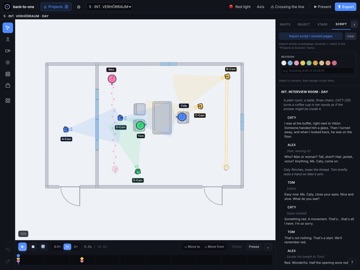
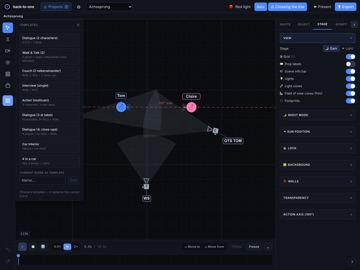
From script to finished blocking. back-to-one is the blocking tool for directors and cinematographers. Import your screenplay as FDX and the app builds the project for you: every scene with its slugline, and every character. Instead of starting from scratch, you start where the work begins. SCRIPT IMPORT - Import FDX, TXT or PDF - FDX creates the project, scenes and characters automatically - Pick scenes individually, OMITTED scenes are excluded - Each scene's text laid out in proper screenplay format CANVAS AND STAGING - Top-down canvas, smooth on iPad and Mac - Place characters, cameras, lights, walls and props - Import a floor plan as a background image - Scene templates, and save your own - Large prop library, import your own PNG props - Background actor groups as a single object CAMERAS - Auto-aim: the camera turns with the character it is linked to - Field of view from focal length and sensor format (S35, FF, S16, MFT, ARRI LF, anamorphic) - Six rig types: tripod, Steadicam, handheld, drone, action cam, crane - Multi-cam setups, grouped by color - 180-degree line with a crossing-the-line warning SHOT LIST - Every camera creates a shot, linked both ways with the canvas - Shot numbers by setup (1A/1B) - A storyboard image per shot - Coverage status: open, shot, cut - Estimated shooting time per shot, with totals - Shoot day per scene, and a shoot-day filter ANIMATION - Timeline with keyframes, play, loop, speed - Characters walk to target points, facing direction per keyframe - Camera moves and orbits on smooth curves - Follow: the camera tracks a character LIGHT AND EXTERIORS - Key, fill, back, practical, HMI, Kino, reflector - Watts, dimmer, gel, diffusion, height, color temperature - Real sun position by location, date and time, with golden hour detection SET DOCUMENTS, READY TO HAND OUT - Scene PDF with plan and shot table - Lighting plot with numbered fixtures and a legend - Project overview as a PDF - Shot list as Excel and CSV - Canvas as an image ON SET - Full-screen presentation mode - Dim, night and red-light modes for a dark set PROJECTS AND COLLABORATION - iCloud sync between iPad and Mac - Share projects through iCloud sharing - Scene-level merge, auto-save, backups YOUR DATA No server of our own, no tracking, no ads. Your content stays on your device and in your iCloud. Available in English and German. For iPad and Mac. SUBSCRIPTION Pro is available as an auto-renewing subscription (monthly or yearly, with a 7-day free trial) or as a one-time Lifetime purchase. Payment is charged to your Apple Account at confirmation. A subscription renews automatically unless it is cancelled at least 24 hours before the end of the current period. You can manage and cancel subscriptions in your Apple Account settings. Terms of Use (EULA): https://www.apple.com/legal/internet-services/itunes/dev/stdeula/ Privacy Policy: https://back-to-one.de/datenschutz.html
Details