

Waffled
Kevin Sites · Lifestyle
Independent analytics for this App Store listing. AppTracker is not affiliated with Kevin Sites.
Chart standing · US
What changed · US
Listing changes AppTracker has observed for this app in this storefront — new versions, price moves, rating shifts, and store copy.
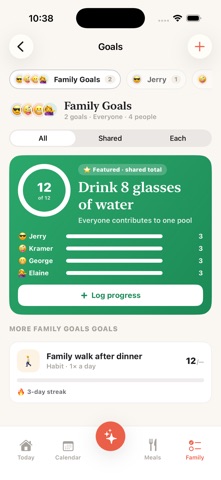
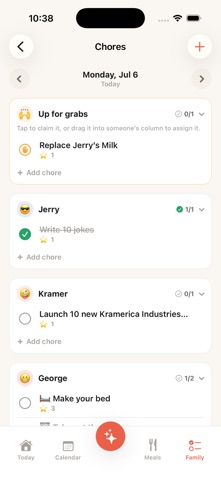
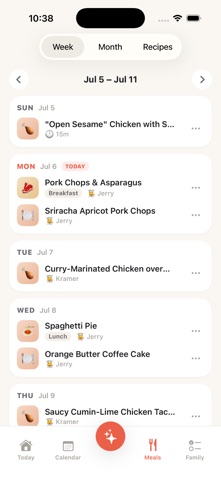
WEEKLY PLANNING IS NOW ON IPHONE AND IPAD (NEW MODULE) Sit down once a week and decide the week ahead together. The whole guided session now runs in the app: loose ends, the calendar, goals, meals, who does what, the month ahead, family night, time together, and a turn for the kids — ending in a recap that reads the week back, so everyone knows what was decided. Nothing is typed twice. An event you add is a real calendar event, a task you hand out lands on the Tasks board, the dinners you pick go on the plan, and handing someone the shopping makes a real chore. Tick tasks and rhythms off as you go, add to the grocery list without leaving the step, build a whole meal in the recipe picker, park a note for a step still ahead (or turn one into a task or an event), and set a goal's target for just this week — "10 hours this week" — which then shows on the goal all week and gets read back next time. Leave part-way and it waits exactly where you left it, on any device. On iPhone it opens from a tile in the Family tab; on the family display, from a Today card or a Planning page you can pin to the rail. Turn it on in Settings → Modules. A NEW IPHONE CALENDAR: MONTH, WEEK AND DAY Month now fills the screen, with week numbers down the side and each day's event titles. Tap a day for a full Day timeline, or switch to Week — a row of day cards that each end with that night's dinner. Switch views from the header's view button or pinch; Agenda and the per-person filter are in that menu too, and planned dinners show in amber. Multi-day events — a trip synced from Google — now appear on every day they cover instead of only the first, and the calendar redraws far less as it syncs, so opening and scrolling it is smoother. EVENTS THAT SAY WHEN THEY END The event editor now has an Ends date, so a trip can span several days, and a timed event has an Ends date and time — including an end on a later day — in place of the duration menu. Moving the start keeps the event's length, and every date and time reads the same way wherever you meet it. YOUR CHORES, TICKED OFF FROM TODAY The iPhone's Today chores card opens on whoever is signed in and lists their chores for today, each with a tick. Tap the card's title to see someone else's list or go back to the family summary. GOALS THAT COUNT THE RIGHT THING A habit now shows this period's count — "2 of 5 this week" — rather than a lifetime total, and the week rolls over on your household's own start-of-week day. Checklists read as steps done, "each" goals measure against everyone's target, milestones count what the goal itself counts, and a habit that's already been logged says so instead of letting a second tap look like it worked. You can add a note to an entry that counted itself, and tell Review events to stop suggesting events like "soccer practice" for a goal. RHYTHMS THAT FIT REAL LIFE A rhythm can ask to be booked in the first days of its period ("date night, in the first week of the month") and nudge you from the start of the cycle, and an event you put on the calendar yourself can settle it — the event editor has a "Keeps a rhythm" picker. "Skip a period" is now "Mark handled". Plus a lot of fixes: redeeming a reward only celebrates when it really went through, and one that needs a parent's OK waits for a parent instead of approving itself. A one-off chore can be moved to another day. The tab bar gets out of the way while you're typing. Today and Family keep what they last knew when the server can't be reached, instead of looking empty, and a change the server refused no longer looks saved. Event chips on purple, blue, green, red and pink are easier to read, goal charts on iPad no longer trap you in Month, and Family Night's weekly event starts at the time you set. Thanks for using Waffled — we'd love your feedback!
In-app purchases · US
No in-app purchases.
Screenshots




Keywords this app targets
Search terms AppTracker associates with this app — estimates, not search volume. ❝ = in the app's title; a highlighted number is its current position for that term.
Similar apps
Competitors and close alternatives, as estimated by AppTracker.


About
Waffled is the calm command-center for family life. One shared home for your calendar, chores, meals, pantry, shopping lists, and goals — so everyone in the house is finally on the same page. Mount an iPad on the wall or counter as a family display, and carry the same plan in your pocket on your phone. Everything stays in sync. • SHARED CALENDAR — Everyone's events in one view, with countdowns to the days that matter ("3 sleeps until the trip!") and birthdays that never sneak up on you. • CHORES & REWARDS — Assign chores, snap photo-proof when they're done, and let kids earn rewards. Set up a rewards jar to save toward a shared goal. • MEALS & SHOPPING — Plan the week's meals and build the grocery list from them. Scan barcodes to add pantry items in a tap. • PANTRY — Track what's in the house and what's about to expire, with allergen warnings for the whole family or per person. • GOALS — Keep the family's intentions front and center, from reading streaks to saving up for something big. • RHYTHMS — The things that should keep happening but aren't chores and aren't goals: trash out weekly, the air filter every three months, a family outing on the third weekend. Waffled counts down to each one and gets out of the way. • WEEKLY PLANNING — Sit down once a week and decide the week ahead together: what's still open, the calendar, goals, meals, who does what, and a turn for the kids. • FAMILY NIGHT — A customizable, auto-rotating agenda for your weekly family time. • A HOME SCREEN THAT'S YOURS — Reorder and hide the cards on your Today view so it shows what your family actually cares about. PRIVATE BY DESIGN Waffled is self-hostable and open source. Run it on your own server and your family's data stays yours — no ads, no tracking, no selling your life to anyone. Get your family on the same page. Get Waffled.
What's new · 0.15.1
WEEKLY PLANNING IS NOW ON IPHONE AND IPAD (NEW MODULE) Sit down once a week and decide the week ahead together. The whole guided session now runs in the app: loose ends, the calendar, goals, meals, who does what, the month ahead, family night, time together, and a turn for the kids — ending in a recap that reads the week back, so everyone knows what was decided. Nothing is typed twice. An event you add is a real calendar event, a task you hand out lands on the Tasks board, the dinners you pick go on the plan, and handing someone the shopping makes a real chore. Tick tasks and rhythms off as you go, add to the grocery list without leaving the step, build a whole meal in the recipe picker, park a note for a step still ahead (or turn one into a task or an event), and set a goal's target for just this week — "10 hours this week" — which then shows on the goal all week and gets read back next time. Leave part-way and it waits exactly where you left it, on any device. On iPhone it opens from a tile in the Family tab; on the family display, from a Today card or a Planning page you can pin to the rail. Turn it on in Settings → Modules. A NEW IPHONE CALENDAR: MONTH, WEEK AND DAY Month now fills the screen, with week numbers down the side and each day's event titles. Tap a day for a full Day timeline, or switch to Week — a row of day cards that each end with that night's dinner. Switch views from the header's view button or pinch; Agenda and the per-person filter are in that menu too, and planned dinners show in amber. Multi-day events — a trip synced from Google — now appear on every day they cover instead of only the first, and the calendar redraws far less as it syncs, so opening and scrolling it is smoother. EVENTS THAT SAY WHEN THEY END The event editor now has an Ends date, so a trip can span several days, and a timed event has an Ends date and time — including an end on a later day — in place of the duration menu. Moving the start keeps the event's length, and every date and time reads the same way wherever you meet it. YOUR CHORES, TICKED OFF FROM TODAY The iPhone's Today chores card opens on whoever is signed in and lists their chores for today, each with a tick. Tap the card's title to see someone else's list or go back to the family summary. GOALS THAT COUNT THE RIGHT THING A habit now shows this period's count — "2 of 5 this week" — rather than a lifetime total, and the week rolls over on your household's own start-of-week day. Checklists read as steps done, "each" goals measure against everyone's target, milestones count what the goal itself counts, and a habit that's already been logged says so instead of letting a second tap look like it worked. You can add a note to an entry that counted itself, and tell Review events to stop suggesting events like "soccer practice" for a goal. RHYTHMS THAT FIT REAL LIFE A rhythm can ask to be booked in the first days of its period ("date night, in the first week of the month") and nudge you from the start of the cycle, and an event you put on the calendar yourself can settle it — the event editor has a "Keeps a rhythm" picker. "Skip a period" is now "Mark handled". Plus a lot of fixes: redeeming a reward only celebrates when it really went through, and one that needs a parent's OK waits for a parent instead of approving itself. A one-off chore can be moved to another day. The tab bar gets out of the way while you're typing. Today and Family keep what they last knew when the server can't be reached, instead of looking empty, and a change the server refused no longer looks saved. Event chips on purple, blue, green, red and pink are easier to read, goal charts on iPad no longer trap you in Month, and Family Night's weekly event starts at the time you set. Thanks for using Waffled — we'd love your feedback!
Details