

Sermon Sidekick
Christopher Judge · Reference
Independent analytics for this App Store listing. AppTracker is not affiliated with Christopher Judge.
Chart standing · US
What changed · US
Listing changes AppTracker has observed for this app in this storefront — new versions, price moves, rating shifts, and store copy.
Sermon Sidekick 2.1 brings a new home for reading, study and writing: • Refreshed Now, Bible, Sermons, Journal and Me navigation. Open Study from Now or Me. • Clearer passage study, reading continuation and tools for exploring Scripture, people, places and words. • Silas's reading companion and consent-based online passage questions for eligible Plus accounts. • Updated Ask the Passage disclosure naming OpenAI, with passage context and follow-up questions. • A dedicated Journal tab, richer entry editing and restored recording controls for spoken notes and device-local kept audio. • Multi-verse actions, seven highlight colors, reading text up to 300% and spacing controls. • Scripture attachment/removal, device-local photos, autosave and 30-day Recently deleted in Journal. • Improved voice controls and clearer free/Plus study access. Bible reading and saved writing stay free. Genesis, Mark and Psalms have complete free studies. Online AI requires consent, a connection and the displayed access and usage limits.
Ratings breakdown · US
The star breakdown behind this app's rating in this storefront.
Screenshots

About
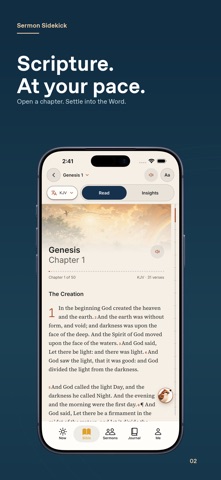
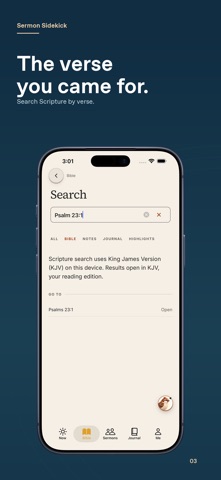
Carry Scripture into the moments between Sundays. Sermon Sidekick brings Bible reading, guided study, sermon notes and your personal Journal together around the passage. A VERSE FOR THIS MOMENT Open Now to a Scripture clock and a verse to explore. Open the chapter for context, save the verse or return to your reading. The main tabs are Now, Bible, Sermons, Journal and Me; open Study from Now or Me. READ WITH ROOM TO THINK Find a passage by reference, continue from a saved place and adjust the text for comfortable reading. Select multiple verses, choose from seven highlight colors, save, copy or share a passage and write notes beside Scripture. Reading controls offer text sizes from 85% to 300% and spacing adjustments. Read Aloud uses your device's voices for BSB and KJV chapter reading, including listening with the screen locked. Licensed online editions need a connection and do not use that Read Aloud feature. GO DEEPER INTO THE PASSAGE Explore guided study through Read, Understand, Explore and Practice. Follow reading plans and look into the Bible's people, places, events and words. Silas helps you open passages and use reading tools. Genesis, Mark and Psalms include complete free book studies; other books include sample lessons. KEEP YOUR WORDS CLOSE Gather reflections, prayers and sermon notes in Journal. Attach or remove Scripture, add a device-local photo, search saved writing and edit entries with the keyboard toolbar. Autosave keeps your work, and Recently deleted offers a 30-day recovery window. Voice controls can turn speech into note text and keep an audio recording when you choose. Kept audio stays on its recording device; written work can sync with an account. Speech recognition may use Apple or Google's online service and requires microphone and speech-recognition permission. Optional AI summaries of selected notes require sign-in and consent and have a separate displayed allowance; they are not Plus-exclusive. TAKE SUNDAY INTO YOUR WEEK Enter a participating church's code to read its published messages and keep service notes together. You can also take sermon notes without a church code. Available messages depend on your church. OPTIONAL SIDEKICK PLUS Plus opens complete studies beyond the free samples in the other 63 books and adds five themes. Ask the Passage and online questions with Silas require Plus, a connection and consent before sending permitted passage context and your question to an AI service. Updated versions name OpenAI in their disclosure. Availability and usage limits are shown in the app. AI answers can be wrong; check them against Scripture and your pastor. Silas's reading tools and your saved writing remain available without Plus. Sidekick Plus is a monthly or yearly auto-renewing subscription. Prices and renewal terms are shown before purchase. Payment is charged to your Apple Account at confirmation. It renews automatically unless cancelled at least 24 hours before the period ends. Manage or cancel it in your App Store account settings. Deleting the app or your Sidekick account does not cancel a store subscription. Support: https://sermon-sidekick.web.app/support.html Privacy: https://sermon-sidekick.web.app/privacy.html Terms of Use: https://sermon-sidekick.web.app/terms.html
What's new · 2.1.0
Sermon Sidekick 2.1 brings a new home for reading, study and writing: • Refreshed Now, Bible, Sermons, Journal and Me navigation. Open Study from Now or Me. • Clearer passage study, reading continuation and tools for exploring Scripture, people, places and words. • Silas's reading companion and consent-based online passage questions for eligible Plus accounts. • Updated Ask the Passage disclosure naming OpenAI, with passage context and follow-up questions. • A dedicated Journal tab, richer entry editing and restored recording controls for spoken notes and device-local kept audio. • Multi-verse actions, seven highlight colors, reading text up to 300% and spacing controls. • Scripture attachment/removal, device-local photos, autosave and 30-day Recently deleted in Journal. • Improved voice controls and clearer free/Plus study access. Bible reading and saved writing stay free. Genesis, Mark and Psalms have complete free studies. Online AI requires consent, a connection and the displayed access and usage limits.
Details