

How to TV
Daniel Hinkson · Entertainment
Independent analytics for this App Store listing. AppTracker is not affiliated with Daniel Hinkson.
Chart standing · US
What changed · US
Listing changes AppTracker has observed for this app in this storefront — new versions, price moves, rating shifts, and store copy.
Your Up Next widget now always tells you where you stand with a show. It says how many episodes you're behind, even on a show you're seasons behind on, "All caught up" when you've seen everything that's aired, and "Not started" for a show still waiting on your watchlist. In Your Year in Shows, tap the poster wall, any month's bar, or any genre to see the shows behind it.
In-app purchases · US
No in-app purchases.
Screenshots



About
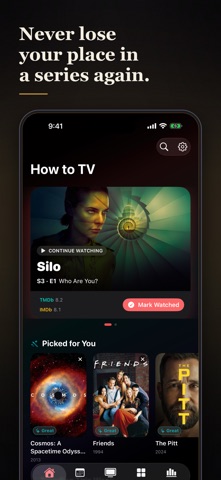
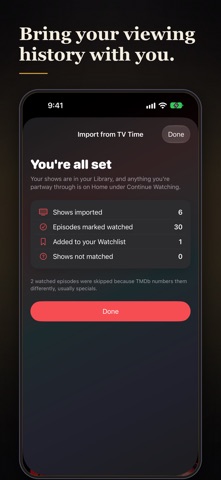
Never lose your place in a series again. How to TV tracks every show you are watching, remembers the exact episode you are up to, and tells you the moment the next one drops. What to watch next comes from your actual taste, not a generic top-10 list. Coming from TV Time? Import your saved TV Time data export and pick up exactly where you left off: your shows, every episode you've watched and when you watched it. Rate fast, remember everything One tap captures how a show landed (Ugh, Good, Great, or Mind Blown) and your ratings power everything else in the app. Never miss an episode See what airs next across your whole watchlist, with reminders for new episodes and for series coming back from hiatus. The Up Next widget puts your next episode on the Home Screen. Know where to stream it Streaming, rent, and buy options for every show, in your region. Show pages that connect everything Watch trailers, tap a creator to explore their other work, and jump straight to similar shows or to more from the same genre or network. Your library, organized Watchlist, In Progress, Finished, and Rated, filterable by genre and network. Browse every genre as a rail of posters, your best genres first, with your own ratings layered on top. Your taste, explained Insights that measure every number against something, trends by month, and a Profile that tells you what you are leaning into lately and what to watch next. Your year in shows See your year at a glance: the hours you watched, month by month, the shows you gave the most time to, your top genres and your biggest binge day. Look back at earlier years and share any of them as a card. Top People shows who you spent the most time with, on screen and behind it. Backed up and in sync. Your ratings and progress sync privately over iCloud across your devices. No ads, no analytics SDKs, no tracking. Sign in with a free TMDb account, add the shows you love, and start rating. Free to use. From the makers of How to Movie. How to TV uses the TMDb API but is not endorsed or certified by TMDb.
What's new · 1.8
Your Up Next widget now always tells you where you stand with a show. It says how many episodes you're behind, even on a show you're seasons behind on, "All caught up" when you've seen everything that's aired, and "Not started" for a show still waiting on your watchlist. In Your Year in Shows, tap the poster wall, any month's bar, or any genre to see the shows behind it.
Details