

Flaccy
Midgar Oy · Music
Independent analytics for this App Store listing. AppTracker is not affiliated with Midgar Oy.
Chart standing · US
What changed · US
Listing changes AppTracker has observed for this app in this storefront — new versions, price moves, rating shifts, and store copy.
The equalizer is here. • Drag the curve and hear it change. Switch to Advanced for up to ten bands with bells, shelves, filters and adjustable Q • 16 presets, your own saved profiles, and import of Equalizer APO and AutoEq text • A separate setting for every output, so AirPods, a wired DAC and the speaker each sound right • Automatic headroom, a level-matched Hold to compare, and a live spectrum • Gapless playback stays intact, and when the equalizer is off nothing touches your audio Open it from Now Playing or Settings. Importing your Last.fm history is faster and no longer freezes the app. New: the Midgar universe. Open the card at the top of Settings and drift through every app we make. Tap one to see what it does and get it without leaving this app. Apps you already have show a tick, and one tap opens them.
In-app purchases · US
What this app sells inside itself, grouped by kind and priced for this storefront.
Screenshots




About
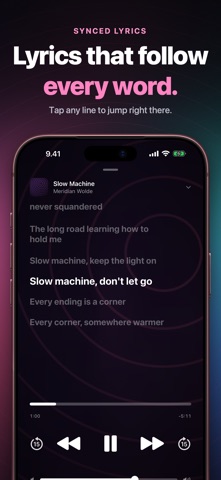
Flaccy plays the music you own at full quality: FLAC, ALAC, WAV, AIFF, MP3 and AAC. A real equalizer, gapless playback, synced lyrics, Last.fm scrobbling and a standalone Apple Watch app. No account, no ads, and your files never leave your device. SEE EXACTLY WHAT YOU'RE HEARING • Codec, bit depth and sample rate on every track, from CD quality to Hi-Res • Gapless playback that honors your albums (exact for lossless files), with a queue that survives relaunches • A built-in Listening Guide that explains what Bluetooth, AirPods and wired DACs really deliver. No snake oil A REAL EQUALIZER • Drag the curve and hear it change, or switch to Advanced for up to ten bands with bells, shelves, filters and adjustable Q • 16 presets and your own. Import Equalizer APO and AutoEq profiles to tune for your headphones • A separate setting for every output: AirPods, a wired DAC, the speaker. Flaccy switches when you do • Automatic headroom keeps boosts from clipping, and Hold to compare is level-matched, so louder never sounds better • Works with every format and keeps playback gapless. Off or flat, the signal passes through untouched YOUR LIBRARY, ORGANIZED • Bring music in from the Files app, USB, a NAS or any folder; Flaccy keeps your folder structure • Messy filenames and scene releases are identified and cleaned up automatically (AI cleanup is included in the trial and in Lifetime) • Albums, artists, songs and playlists with fast search, flexible sorting and large artwork you can replace with your own • Duplicate songs are listed once, and Flaccy builds smart playlists from your own listening MADE FOR LISTENING • Synced lyrics with tap-to-seek • Full controls on the Lock Screen and in the Dynamic Island, AirPlay and a sleep timer • Light and dark appearance, and a Now Playing screen worth looking at SCROBBLE EVERYTHING • Sign in with Last.fm and every play is scrobbled, even offline, with automatic retry • Listening charts, artist bios and a wantlist for the records you're hunting • Year in Music: shareable story cards and a poster of your listening year APPLE WATCH, NO PHONE NEEDED • Sync tracks to your watch and play them offline • A true standalone player with gapless playback, shuffle, repeat and AirPods controls • Storage-smart sync that knows what fits TRY IT FREE Flaccy is free for 7 days from the first time you play your own music. After that, keep everything with a one-time Lifetime purchase, or choose the yearly plan. The yearly plan renews automatically unless canceled at least 24 hours before the end of the period; manage or cancel it in your Apple Account settings. Flaccy plays FLAC, ALAC, AAC, M4A, MP3, WAV, AIFF and CAF. Terms of Use: https://mako.midgarcorp.cc/terms/flaccy Privacy Policy: https://mako.midgarcorp.cc/privacy/flaccy
What's new · 1.8.0
The equalizer is here. • Drag the curve and hear it change. Switch to Advanced for up to ten bands with bells, shelves, filters and adjustable Q • 16 presets, your own saved profiles, and import of Equalizer APO and AutoEq text • A separate setting for every output, so AirPods, a wired DAC and the speaker each sound right • Automatic headroom, a level-matched Hold to compare, and a live spectrum • Gapless playback stays intact, and when the equalizer is off nothing touches your audio Open it from Now Playing or Settings. Importing your Last.fm history is faster and no longer freezes the app. New: the Midgar universe. Open the card at the top of Settings and drift through every app we make. Tap one to see what it does and get it without leaving this app. Apps you already have show a tick, and one tap opens them.
Details