

Dashboard for your home
Jan Sindelar · Entertainment
Independent analytics for this App Store listing. AppTracker is not affiliated with Jan Sindelar.
Chart standing · US
What changed · US
Listing changes AppTracker has observed for this app in this storefront — new versions, price moves, rating shifts, and store copy.
Scenes that put the panel to sleep, thermostat modes and a long list of fixes. • Sleep and wake on scene: on iPad, the panel goes to sleep when a chosen scene runs (say, when everyone leaves), and another scene wakes it up. • Thermostats and air conditioners: tap the top of the tile to pick a mode the device supports — Off, Heat, Cool or Automatic. • Dragging a tile to the top or bottom edge scrolls the layout on its own. • On iPad, the doorbell camera shows a countdown until it closes, and a camera you open yourself closes after 10 minutes without a touch. • Outlets and lights behind bridges that don’t report changes now show changes made elsewhere. • Locks, garage doors and blinds check their state again when you return to the app; the weather catches up as soon as the panel wakes. • Plus many more fixes.
Price & rating history · US
Reconstructed from the listing changes AppTracker has observed in this storefront. A field is charted once it has changed more than once, and each line starts at the value it moved from.
Average rating · ★ 4.73 now · 5 changes on record
Ratings breakdown · US
The star breakdown behind this app's rating in this storefront.
In-app purchases · US
What this app sells inside itself, grouped by kind and priced for this storefront.
Screenshots




About
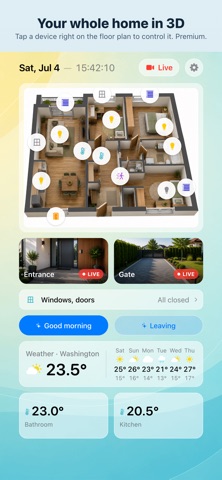
Turn a wall-mounted iPad into a control panel for Apple Home. Cameras, heating, lights, blinds, locks, solar power and the calendar on one screen — arranged the way you want. CUSTOM LAYOUT (PREMIUM) • Press and drag any tile anywhere, every device on its own; resize it with the corner handle and give it a color tint. • iPad in landscape has pages; otherwise the screen scrolls, on its own as you drag a tile to the edge. CAMERAS • RTSP cameras outside HomeKit: enter the stream address or let the app find it (ONVIF); the tile shows live video, with G.711 or AAC audio. H.264 and H.265: Hikvision, Dahua, Reolink, UniFi, Axis, Tapo, VIGI, Synology. • HomeKit cameras: refreshing snapshots, one Live button for all, listen and talk back in detail. • Doorbell like on Apple TV: a ring wakes the panel and opens the doorbell camera full screen beside your locks and gates. • RTSP time-lapse up to 12 hours, saved to Photos (Premium). • Two cameras free, HomeKit and RTSP together. YOUR HOME • Thermostats and air conditioners: target temperature in 0.5° steps and the mode the device offers — Off, Heat, Cool, Automatic. Thermometers in °C or °F (2 each free). • Lights, switches and outlets, Home app groups too (4 free): a brightness slider on the tile, color and white temperature in a panel (Premium). State is rechecked behind bridges that don't report changes. • Blinds and shades: position and slat tilt, Matter bridges too — KNX/1Home (4 free). • Locks, gates and garage doors: lock/unlock, open/close; Nuki and tedee can open the door on a long press (4 free). • Security: windows and doors as one Open / All closed item (4 free); alarm Home / Away / Night / Off, no limit. • Sensors: humidity, water leak, smoke, CO, light level, motion, air quality with CO₂ and dust (4 free). • Device batteries as tiles, turning red when low (4 free). • Robot vacuums a bridge exposes as a fan: start, stop, suction and battery (2 free). • One-tap scenes, the active one highlighted (2 free). • Solar: an inverter that a bridge exposes as a light sensor shows power in W, kW or % — production, consumption, grid draw, feed-in, battery. • Weather for 6 days; with Premium, today hour by hour. 3D FLOOR PLAN (PREMIUM) Upload a render of your home, place devices on it and tap the plan to control them. Each floor gets its own tile; the plan can go frameless. MUSIC (PREMIUM) Apple Music player with playlists, output via AirPlay. Needs an Apple Music subscription. CALENDAR A weekly view of a shared calendar (three days on iPhone) with countdowns; a clock with the date as a tile. DISPLAY AND LOOKS On iPad the screen dims when idle and wakes on touch, the front camera or a motion sensor. A scene can put it to sleep and wake it too, say when everyone leaves. With Premium a screen saver takes over: clock, weather, calendar and a camera, arranged your way, even over your photos. Six backgrounds, three of them dark and seasonal, or your own color or photo. BACKUP Configuration goes to iCloud and loads on another device with the same account; with Premium as a file. PREMIUM (SUBSCRIPTION OR ONE-TIME) Unlocks custom layouts, separate for iPad and iPhone, the 3D floor plan, music, light colors, hourly weather, time-lapse, Shortcuts, the screen saver and file backup, and removes count limits. The free version stays free for good, only with limits. Try Premium free for a week; a yearly subscription then starts and renews automatically and can be canceled any time in Apple Account settings. Or buy it once and keep it forever. PRIVACY No data collected, no accounts, no sign-up. Everything stays on your device; camera video stays on your network. Only the weather is fetched, anonymously, plus a daily check for a new version. In 16 languages. Requires iOS 17 or later. Controlling devices needs an Apple Home; RTSP cameras work without one. Support and privacy policy: https://jansindelar.com/ Terms of use (EULA): https://www.apple.com/legal/internet-services/itunes/dev/stdeula/
What's new · 3.4
Scenes that put the panel to sleep, thermostat modes and a long list of fixes. • Sleep and wake on scene: on iPad, the panel goes to sleep when a chosen scene runs (say, when everyone leaves), and another scene wakes it up. • Thermostats and air conditioners: tap the top of the tile to pick a mode the device supports — Off, Heat, Cool or Automatic. • Dragging a tile to the top or bottom edge scrolls the layout on its own. • On iPad, the doorbell camera shows a countdown until it closes, and a camera you open yourself closes after 10 minutes without a touch. • Outlets and lights behind bridges that don’t report changes now show changes made elsewhere. • Locks, garage doors and blinds check their state again when you return to the app; the weather catches up as soon as the panel wakes. • Plus many more fixes.
Details