

Bills: Organizer & Calendar
斯臻 林 · Finance
Independent analytics for this App Store listing. AppTracker is not affiliated with 斯臻 林.
Chart standing · US
What changed · US
Listing changes AppTracker has observed for this app in this storefront — new versions, price moves, rating shifts, and store copy.
See exactly what needs paying before your next payday. Tap the Before payday card to open a dated list of scheduled payments. Repeating bills now include every occurrence before payday, and recorded payments are left out. Tap a row to update the existing bill. Missing amounts are clearly flagged, so an incomplete total is never mistaken for the full amount due. You can still change your pay schedule from the plan. Same 20-bill free limit and optional one-time Unlimited purchase. No bank connection or account required.
Ratings breakdown · US
The star breakdown behind this app's rating in this storefront.
In-app purchases · US
What this app sells inside itself, grouped by kind and priced for this storefront.
Screenshots




About
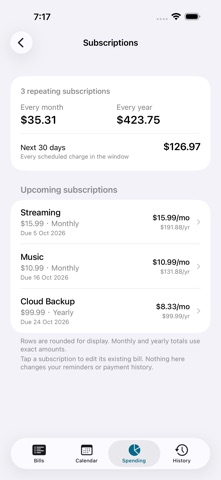
Keep track of bills, due dates and what needs paying before your next paycheck. Enter a bill once, choose how it repeats, and see its dates on your calendar. When you pay it, swipe to record the payment and move to the next due date. PLAN BEFORE PAYDAY Set your pay schedule, then tap Before payday for a dated list of scheduled payments. Weekly and other repeating bills appear each time they fall due in the period. Overdue payments stay visible; recorded payments are left out. If an amount is missing, the plan tells you the total is incomplete. Tap a row to update the bill. SEE FIXED COSTS The Spending tab adds up repeating bills by category and shows their monthly and yearly cost. Tap Subscription for the subscription count, costs and charges scheduled in the next 30 days. These views use the same bills you already entered. KEEP THE DATES STRAIGHT Choose weekly, every two weeks, monthly, quarterly, twice a month, yearly or one-time schedules. Month-end dates stay anchored: a bill due on the 31st falls on the last day of a shorter month and returns to the 31st when possible. REMEMBER AND RECORD Local reminders notify you before a bill is due. Mark it paid to stop that occurrence's reminders and keep a payment record. Look back through History, group bills by the account that pays them, and keep notes alongside each bill. BRING YOUR OWN LIST Import bills from a CSV file and export your list whenever you need it. No bank connection or account is required. Your bill data stays on your device. PRICING Track up to 20 bills free. Bills Unlimited is an optional one-time purchase that removes the bill limit. There is no subscription. Existing bills remain accessible, and the limit does not lock editing, payment history, reminders or CSV export. The payday plan covers scheduled bills you enter. It is not a bank balance or a daily spending budget.
What's new · 1.6
See exactly what needs paying before your next payday. Tap the Before payday card to open a dated list of scheduled payments. Repeating bills now include every occurrence before payday, and recorded payments are left out. Tap a row to update the existing bill. Missing amounts are clearly flagged, so an incomplete total is never mistaken for the full amount due. You can still change your pay schedule from the plan. Same 20-bill free limit and optional one-time Unlimited purchase. No bank connection or account required.
Details