

Blue-AC180
Marco Frigerio · Utilities
Independent analytics for this App Store listing. AppTracker is not affiliated with Marco Frigerio.
Chart standing · US
What changed · US
Listing changes AppTracker has observed for this app in this storefront — new versions, price moves, rating shifts, and store copy.
Version 1.5 is a major update: - Renamed to Blue-AC Console - Redesigned CarPlay menu with large, easy-to-tap rows for Overview, Power and Battery - New: Lock Screen and Dynamic Island Live Activity, plus CarPlay Widgets page support - New: Apple Watch app and complication - New: Home Screen widget - New: Demo Mode to explore the app with simulated data, no power station required - New: spoken CarPlay voice readouts - Live Bluetooth signal strength (RSSI) shown next to the connection status - Fixed: "Grid connected" now also reflects measured AC input power, not just the raw status flag - Fixed: connection no longer gets stuck on "Connecting..." if the initial handshake stalls - Improved AC70 runtime accuracy - General reliability and bug fixes
Screenshots


About
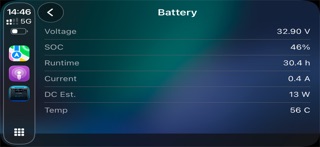
Blue-AC Console gives you a fast, focused way to monitor your Bluetti AC180 or AC70 portable power station — on iPhone, in CarPlay, on your Lock Screen and Dynamic Island, and on Apple Watch. Connect over Bluetooth LE and see battery level, runtime, AC and DC input/output power, charging source and internal temperature update live. No cloud account, no data collection — everything is read and decoded locally on your iPhone. FEATURES - Clean iPhone dashboard with state of charge, runtime, live power flow and connection signal strength - Separate detection of AC (grid) and DC (solar or car) charging, so you always know what's powering your unit - CarPlay menu built for driving, with large list rows for Overview, Power and Battery, plus spoken voice readouts - Lock Screen and Dynamic Island Live Activity, also available on CarPlay's Widgets page - Apple Watch app and complication showing your power station's status on your wrist - Home Screen widget with your latest reading at a glance - Demo Mode: see the full app in action with simulated data, no power station required - Automatic reconnection handling and a live Bluetooth signal indicator SUPPORTED DEVICES - Bluetti AC180 - Bluetti AC70 Blue-AC Console is an independent app and is not affiliated with, endorsed by, or sponsored by Bluetti. Blue-AC Console is free to try: one free CarPlay session, one free Live Activity session, one free voice readout and one free Apple Watch session are included. Blue-AC Console Pro unlocks unlimited use of all four.
What's new · 1.5
Version 1.5 is a major update: - Renamed to Blue-AC Console - Redesigned CarPlay menu with large, easy-to-tap rows for Overview, Power and Battery - New: Lock Screen and Dynamic Island Live Activity, plus CarPlay Widgets page support - New: Apple Watch app and complication - New: Home Screen widget - New: Demo Mode to explore the app with simulated data, no power station required - New: spoken CarPlay voice readouts - Live Bluetooth signal strength (RSSI) shown next to the connection status - Fixed: "Grid connected" now also reflects measured AC input power, not just the raw status flag - Fixed: connection no longer gets stuck on "Connecting..." if the initial handshake stalls - Improved AC70 runtime accuracy - General reliability and bug fixes
Details