

Miter & Cut Calc: 1:1 PDF
QAEE CONPUUTENG, INC. · Utilities
Independent analytics for this App Store listing. AppTracker is not affiliated with QAEE CONPUUTENG, INC.
Chart standing · US
What changed · US
Listing changes AppTracker has observed for this app in this storefront — new versions, price moves, rating shifts, and store copy.
• Ellipse frames are now calculated exactly. On long, narrow ellipses the frame area (and so the paint estimate) came out about 10% low; inner and outer perimeters now use the exact formula too. • The ellipse perimeter uses a more accurate formula (an 800 x 200 mm ellipse was 0.18 mm short). • Fixed the shape icons on the home screen being invisible in dark appearance. Choose the appearance: System, Natural, Light or Dark. • While typing numbers, a button above the keyboard closes it. Scrolling or tapping outside the field also closes it. • Fixed: at the largest text size, the button on the first screen can now be reached (the screen scrolls only when it doesn't fit). • At the largest text size, plan prices no longer run off the screen. Restore Purchases now always shows a result, even when the app is already unlocked. • Fixed: results, paint estimate and the shape preview were hard to read in dark appearance; screens that broke at the largest text size (shape names, calculator, results, presets, save field) now fit.
In-app purchases · US
What this app sells inside itself, grouped by kind and priced for this storefront.
Screenshots


About
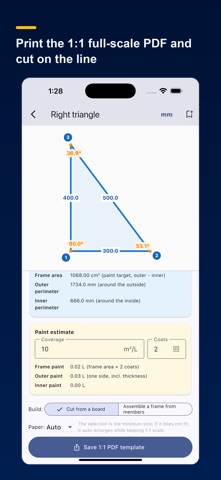
Miter & Cut Calc turns shape numbers into a template you can cut right away. Pick a template, type the dimensions or angles you know, and the rest is filled in automatically (AUTO): every edge length, miter and saw angles, areas, a paint estimate, and a 1:1 full-scale PDF. AUTO CALCULATION (from any known values) Enter a few known values and the rest is solved. Triangles accept angles, not just sides. - Right triangle: any 2 of base / height / hypotenuse / acute angle - Isosceles: base + (height / equal side / apex / base angle) - Any triangle: any mix of 3 sides and angles (at least one side) - Quadrilateral: fixed by a diagonal that splits it into two triangles Filled fields lock automatically to prevent conflicting input. BUILT FOR MATERIAL WITH THICKNESS Real parts have width. Each edge is computed as Center, Inner and Outer length, synced to your material thickness, so a mitered frame or box actually closes. Switch units between mm and inch. WHAT IT COMPUTES - Center / Inner / Outer length of every edge - Miter angle (theta/2), table-saw setting (90-theta/2) - Interior angle (sin / cos / tan), diagonal - Three areas (outer / inner opening / frame) plus inner and outer perimeter - Paint estimate (coverage m2/L x coats gives liters) TWO WAYS TO BUILD - Cut from a board: cut the outer and inner outline from one sheet - Assemble from members: cut one part per edge and miter-join them The PDF adapts to the chosen mode. FULL-SCALE PDF (1:1) Paper size is chosen automatically (A4 to A1) to keep 1:1, or set it yourself. Print at 100%, verify with the 100 mm ruler box, then cut along the line on the material. Includes an assembled drawing (thickness, vertex numbers, interior angles, edge lengths), a cut template per member, and a full table of every value. Save or share the PDF. SHAPES Right triangle, isosceles, any triangle, rectangle and square, trapezoid, parallelogram, any quadrilateral (4 sides + diagonal), regular polygon / segment ring, circle, ellipse. SAVE AND PRESETS Name and save a calculation, then reopen it anytime. Store your common material widths (2x4 = 89 mm, pipe 48.6 mm, aluminum 30 mm, or any value). The last width is remembered. FOR Carpentry and joinery, welding and metalwork, pipe fitting, aluminum framing, signage and framing, DIY. Roof pitch, hip rafters, stair stringers, trusses, picture / window / door frames. WORKS OFFLINE No account, no connection. Everything runs on device. SUBSCRIPTION Every feature is free for 30 days after you install the app. After that, all calculations stay free; the 1:1 PDF template needs an auto-renewing monthly or yearly subscription. Price: US$14.99 per month or US$149.99 per year (shown in your local currency in the app before you buy). Payment is charged to your Apple Account at confirmation of purchase. The subscription renews automatically unless it is canceled at least 24 hours before the end of the current period; the renewal is charged within 24 hours before the period ends. You can manage or cancel your subscription in your Apple Account settings. Terms of Use: https://www.apple.com/legal/internet-services/itunes/dev/stdeula/ Privacy Policy: https://qconp.com/privacy
What's new · 1.0.2
• Ellipse frames are now calculated exactly. On long, narrow ellipses the frame area (and so the paint estimate) came out about 10% low; inner and outer perimeters now use the exact formula too. • The ellipse perimeter uses a more accurate formula (an 800 x 200 mm ellipse was 0.18 mm short). • Fixed the shape icons on the home screen being invisible in dark appearance. Choose the appearance: System, Natural, Light or Dark. • While typing numbers, a button above the keyboard closes it. Scrolling or tapping outside the field also closes it. • Fixed: at the largest text size, the button on the first screen can now be reached (the screen scrolls only when it doesn't fit). • At the largest text size, plan prices no longer run off the screen. Restore Purchases now always shows a result, even when the app is already unlocked. • Fixed: results, paint estimate and the shape preview were hard to read in dark appearance; screens that broke at the largest text size (shape names, calculator, results, presets, save field) now fit.
Details