

Tablo: Wedding Seating
ALEXANDRE JOSEPH PIERRE PAUL · Lifestyle
Independent analytics for this App Store listing. AppTracker is not affiliated with ALEXANDRE JOSEPH PIERRE PAUL.
Chart standing · US
What changed · US
Listing changes AppTracker has observed for this app in this storefront — new versions, price moves, rating shifts, and store copy.
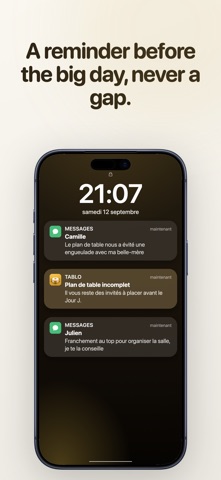
Paste your whole guest list right from setup: guests beyond the free version are kept on hold and added automatically with Premium, no retyping. Also in this version: a simpler calendar to pick the date, the option to fill in names later, and reminders before the big day you can turn on in one tap from the seating chart.
In-app purchases · US
What this app sells inside itself, grouped by kind and priced for this storefront.
Screenshots




About
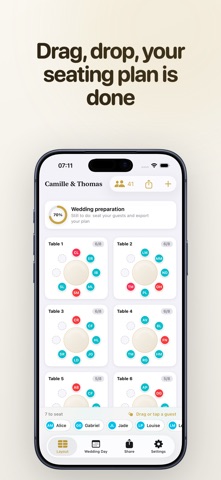
The seating chart is the puzzle every couple dreads. Aunt Jane who absolutely cannot sit next to her ex-brother-in-law, the kids together or apart, the colleagues who know nobody. You drag labels around a spreadsheet, you print, you cross things out, and the night before the wedding nothing is settled. Tablo changes that moment. Drop your tables, drag your guests, and instantly see who is seated and who still needs a spot. Then build the hour-by-hour timeline of your day and share it in a single tap. THE SEATING CHART, FINALLY VISUAL Add your round or rectangular tables on a real canvas. Drag each guest to their seat with your fingertip. Every table's counter updates live, and unseated guests stay visible until everyone has found a chair. No more spreadsheet, no more sticky notes on the living-room table. THE WEDDING-DAY TIMELINE Build the timeline of your day: guest arrival, ceremony, cocktail hour, grand entrance, dinner, cake, dancing. Start from a ready-to-adjust template or create your own steps, each with a time, a place and a person in charge. SHARE IN A SINGLE TAP Send the wedding-day timeline or the seating plan to your loved ones and vendors right from your phone, by message, email or WhatsApp, as clear text. You can also export your seating chart as an image, ready to post or print. HOW IT WORKS • Create your wedding with both first names and the date. • Add guests one by one or paste your whole list at once. • Place your tables and drag each guest to their seat. • Build your wedding-day timeline from a template. • Share the timeline and the chart by message or PDF. WHY TABLO • A visual, tactile seating chart built for the phone. • A clear timeline you share with the whole team. • A ready-made day template so you forget nothing. • Clean exports to print or send. TABLO PREMIUM High-definition PDF export (seating chart, wedding-day timeline, full document) and creating several weddings are included in Tablo Premium, a one-time lifetime purchase. No subscription, you pay once. The free version handles one wedding with up to 15 guests; Tablo Premium makes guests unlimited, and any guests entered beyond 15 are added automatically after purchase. USE CASES • Civil, religious or secular wedding • Large reception or intimate dinner • Coordination with caterer, DJ, photographer, wedding planner • Family meals, birthdays, christenings with assigned seating The timeline is provided as an organization tool to help you coordinate your day. Stop crossing out your chart on paper. Open Tablo, seat your guests, share the timeline. Your big day goes exactly as planned. Terms of Use: https://kenoby.fr/applications/tablo/terms Privacy Policy: https://kenoby.fr/applications/tablo/privacy Copyright 2026 Alexandre Paul
What's new · 1.2.3
Paste your whole guest list right from setup: guests beyond the free version are kept on hold and added automatically with Premium, no retyping. Also in this version: a simpler calendar to pick the date, the option to fill in names later, and reminders before the big day you can turn on in one tap from the seating chart.
Details