

Swatchy, Project Paint Planner
PAUL VITALE · Graphics & Design
Independent analytics for this App Store listing. AppTracker is not affiliated with PAUL VITALE.
Chart standing · US
What changed · US
Listing changes AppTracker has observed for this app in this storefront — new versions, price moves, rating shifts, and store copy.
This update makes Swatchy's color picking a lot smarter. The automatic palette now grabs the colors that actually matter — the bright golds, oranges and greens, plus the deep darks and true black that used to get washed out — reading each color from light to dark so nothing important gets skipped. Picking your own colors is easier too: press and drag on the image and the two closest real paints float right in front of you, then lift your finger and tap the exact one you want. You always land on a definite catalog color, never a muddy blend. The reference image is cleaner. The numbered color strip now sits in its own bar beneath the artwork, with thin leader lines pointing to exactly where each color came from, so nothing is drawn on top of your image and it stays clean on screen and in print. The lines zoom and pan with the image, and the exported Reference sheet matches what you see in the app — the same colors and the same numbers. In fact, everything lines up now: the picker, the numbered reference, the shopping list, and the checklist all use the exact same colors and numbers, so color 3 is color 3 everywhere. The editor is simpler and tidier. It's reorganized top to bottom — image, palette, paint type, calculator, paint quantity, and project files — and "Remove a Color" is now a one-tap button right beside Mix Colors. Whether a project is a Photo or a Flat Graphic is chosen up front when you create it. The Paint Calculator is decluttered: just enter your wall size and tap Calculate, with coats, sheen, primer and the rest tucked neatly under "Advanced options." And on iPhone, turning sideways gives you a full-screen image as the header steps out of the way (iPad is unchanged). Sharing is more reliable, too. You can send a full-quality project by AirDrop, Mail, or Files and it arrives exactly as you sent it, and once a project is shared its colors lock so they never change on the other person's device. This build also builds on Color Match and Color Explorer. Color Match lets you compare any color across more than 40 real paint brands and see the closest buyable matches with a percentage score, and Color Explorer lets you look up any paint by name to see similar shades along with colors that pair well with it. Plus plenty of behind-the-scenes accuracy improvements and polish throughout. Thanks for painting with Swatchy!
Screenshots



About
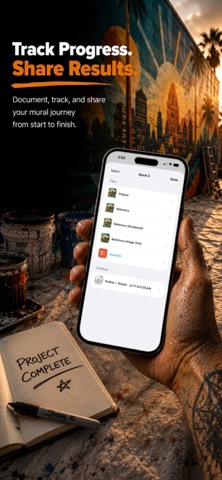
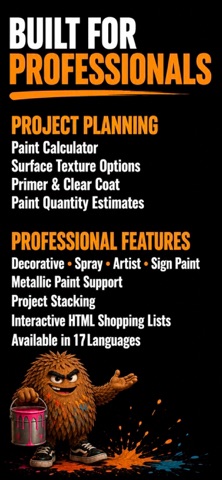
Turn any photo into a paintable wall mural—with the exact paints to buy, anywhere in the world. Swatchy is the muralist’s and DIY painter’s pocket studio. Import a photo and Swatchy pulls its colors and matches them to real paint you can buy—complete with names, codes, match percentages, and how much to purchase. Then let AI redraw your photo as clean line art, create a paint-by-number outline showing exactly where every color goes, and take the files to the wall. FIND YOUR COLORS IN REAL PAINT • Tens of thousands of colors from dozens of paint libraries worldwide, matched using perceptual color science • Leading decorative brands across the US, UK, Australia, Europe, Canada, Latin America, Asia, and beyond • A searchable brand picker that puts brands available in your region first • Long-press any swatch to match it to another brand—or switch the entire project at once • New brands and colors are added regularly FOUR KINDS OF PAINT • Decorative wall paint for rollers and brushes • Professional spray-paint lines for muralists • Artist acrylics • Sign enamels COLOR MATCHING • Brand & Paint Type Matching: match colors across brands and paint types—including spray paint, decorative wall paint, artist acrylics, and sign enamel • Live Color Matching: capture an existing color using your camera, or select a photo from your library, and match it to real paint • Compare names, codes, swatches, and match percentages to find the best available option SMART OUTLINE—YOUR PHOTO AS LINE ART • AI redraws your photo as clean, hand-drawn-style line art, as if an illustrator traced it for your wall • Choose Simple or Detailed—ready to print, project, or transfer • Create a true paint-by-number outline that divides the image into paintable sections and shows exactly where every palette color goes • Each section is numbered to match its color in your palette • Switch paint brands and the numbers update with your palette • Share outlines directly from the app KNOW EXACTLY WHAT TO BUY • Enter your wall size in feet or meters • Calculate per-color amounts in gallons or liters, including coats, primer, and clear coat • Surface-aware coverage accounts for brick, stucco, cinderblock, and other materials that require more paint • Mix Colors creates on-site ratio recipes using paints already in your project—potentially eliminating another can from your cart TAKE IT TO THE WALL • Use a tappable shopping checklist in the paint aisle • Export mural sheets, palette legends, outlines, and checklists to share, print, or AirDrop • Stack related murals into one project and shop for them together • Keep project colors, calculations, files, and planning details organized in one place ASK SWATCHY • Your AI painting expert for surfaces, preparation, technique, materials, and product availability • Ask questions with the context of your project and Swatchy’s growing paint directory TRY EVERYTHING FREE FIRST The built-in Sample Mural is a full playground—explore the palette, calculator, outlines, and paint-by-number features before deciding. Swatchy Pro unlocks paint names, codes, match percentages, quantities, and files for your own photos. Choose weekly, monthly, or one-time lifetime access, each with welcome outline credits. Outlines use credits: Simple uses 1 and Detailed uses 2. Credit packs are available anytime, and credits never expire. Available in 17 languages. Made by a muralist, for everyone who paints. — Terms of Use (EULA): https://www.apple.com/legal/internet-services/itunes/dev/stdeula/ Privacy Policy: https://middlevitalemurals.com/privacy-policy
What's new · 1.0.9
This update makes Swatchy's color picking a lot smarter. The automatic palette now grabs the colors that actually matter — the bright golds, oranges and greens, plus the deep darks and true black that used to get washed out — reading each color from light to dark so nothing important gets skipped. Picking your own colors is easier too: press and drag on the image and the two closest real paints float right in front of you, then lift your finger and tap the exact one you want. You always land on a definite catalog color, never a muddy blend. The reference image is cleaner. The numbered color strip now sits in its own bar beneath the artwork, with thin leader lines pointing to exactly where each color came from, so nothing is drawn on top of your image and it stays clean on screen and in print. The lines zoom and pan with the image, and the exported Reference sheet matches what you see in the app — the same colors and the same numbers. In fact, everything lines up now: the picker, the numbered reference, the shopping list, and the checklist all use the exact same colors and numbers, so color 3 is color 3 everywhere. The editor is simpler and tidier. It's reorganized top to bottom — image, palette, paint type, calculator, paint quantity, and project files — and "Remove a Color" is now a one-tap button right beside Mix Colors. Whether a project is a Photo or a Flat Graphic is chosen up front when you create it. The Paint Calculator is decluttered: just enter your wall size and tap Calculate, with coats, sheen, primer and the rest tucked neatly under "Advanced options." And on iPhone, turning sideways gives you a full-screen image as the header steps out of the way (iPad is unchanged). Sharing is more reliable, too. You can send a full-quality project by AirDrop, Mail, or Files and it arrives exactly as you sent it, and once a project is shared its colors lock so they never change on the other person's device. This build also builds on Color Match and Color Explorer. Color Match lets you compare any color across more than 40 real paint brands and see the closest buyable matches with a percentage score, and Color Explorer lets you look up any paint by name to see similar shades along with colors that pair well with it. Plus plenty of behind-the-scenes accuracy improvements and polish throughout. Thanks for painting with Swatchy!
Details