

CardSweep
永 张 · Utilities
Independent analytics for this App Store listing. AppTracker is not affiliated with 永 张.
Chart standing · US
What changed · US
Listing changes AppTracker has observed for this app in this storefront — new versions, price moves, rating shifts, and store copy.
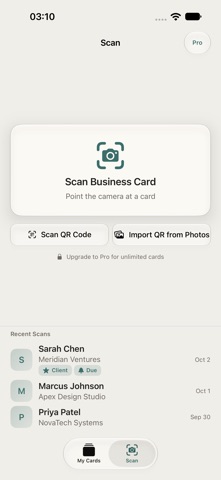
NEW: iCloud Sync — your cards follow every iPhone signed into your iCloud, with a sync setting on the About screen. Plus: scan a whole stack of cards in one session (each card is split automatically), import contacts from QR codes via camera or Photos, and enjoy a refreshed interface with a dashboard, sorting and modern iOS 26 design.
Screenshots


About
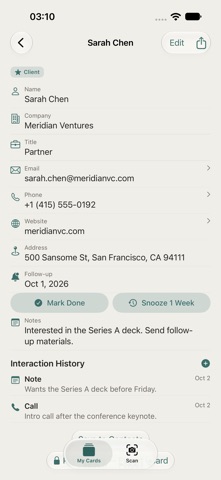
CardSweep scans business cards in seconds — no account required. Your cards stay on your device, with optional iCloud sync through your own private iCloud — never our servers. Point your camera at any card and Vision AI instantly pulls out the name, company, title, email, phone, website, and address. Built for professionals who exchange cards at conferences, meetings, and networking events and want contacts saved cleanly without friction. — WHAT MAKES CARDSWEEP DIFFERENT — • Instant OCR powered by Apple Vision • One tap to save directly to iOS Contacts • Client tracker: log calls, meetings, emails and notes, stay on top of follow-ups • Optional iCloud sync: your cards follow every iPhone signed into your iCloud • Stack scanning: capture a pile of cards in one session — each becomes its own card • QR import: grab contact details from QR codes via camera or Photos • Full card history, searchable by name or company • Export CSV & vCard in CardSweep Pro (one-time unlock) — WHO IS CARDSWEEP FOR? — • Conference-goers and sales professionals collecting stacks of cards • Freelancers and consultants who live on follow-ups • Small-business owners keeping clients organized • Anyone who wants contacts saved cleanly — no manual typing — PRICING — Scan and save up to 10 cards. CardSweep Pro is a one-time unlock for unlimited cards, CSV & vCard export, and full interaction history. — FEEDBACK — Built by Peter at Obelisk Club. Questions or feature ideas? Email obeliskclubclub@gmail.com. Learn more: obelisk.club/businesscardscanner Terms of Service (EULA): https://obelisk.club/businesscardscanner/terms
What's new · 1.1.0
NEW: iCloud Sync — your cards follow every iPhone signed into your iCloud, with a sync setting on the About screen. Plus: scan a whole stack of cards in one session (each card is split automatically), import contacts from QR codes via camera or Photos, and enjoy a refreshed interface with a dashboard, sorting and modern iOS 26 design.
Details