

Wavrift
永 张 · Utilities
Independent analytics for this App Store listing. AppTracker is not affiliated with 永 张.
Chart standing · US
What changed · US
Listing changes AppTracker has observed for this app in this storefront — new versions, price moves, rating shifts, and store copy.
New in 1.1: convert the audio track of any video, fine-tune output quality (sample rate, channels, bit rate), a conversion history that survives relaunch, iPad support, share audio into Wavrift from any app, and a Shortcuts action.
Screenshots

About
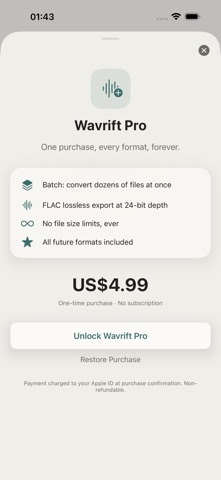
Wavrift converts audio files on your device in seconds — no uploads, no account, no limits on basic use. Drop in a file, pick your format, tap Convert. That's it. — WHAT MAKES WAVRIFT DIFFERENT — • Conversion happens on device Your audio is decoded and re-encoded locally and never leaves your iPhone. • The formats people actually need M4A, WAV and MP4 in the base app, plus FLAC lossless with Pro. • FLAC at 24-bit Pro writes FLAC at 24-bit depth, so an archival copy keeps its headroom. • Video to audio, instantly Import or share any video and keep just the audio track, in the format you need. • Quality that doesn't degrade Exports keep the source's sample rate and channels by default — nothing gets quietly downsampled. • Batch, not one at a time Pro lets you select several files and convert the whole set in one pass. • A history you can look back at Every conversion stays in a list with its source format, target format, and file size. • No account anywhere Nothing to sign up for, nothing to sync, and it works with no network at all. — WHO IS WAVRIFT FOR? — • Podcasters and interviewers turning recordings into the format their editor wants • Musicians archiving WAV sessions as 24-bit FLAC • Anyone handed an M4A that some other app refuses to open • People who would rather not upload personal audio to a conversion website — PRICING — Included: on-device conversion between M4A, WAV and MP4, and the full conversion history. Wavrift Pro is a one-time in-app purchase — no subscription — and adds batch conversion of several files at once, FLAC lossless export at 24-bit, no file size limits, and any future formats. — FEEDBACK — Made by a small indie team. Email obeliskclubclub@gmail.com with feedback, bug reports, or feature requests. Note: MP3 and OGG export are not offered, because Apple's built-in audio encoder does not write them. Terms of Use (EULA): https://obelisk.club/audioconverter/terms
What's new · 1.1.0
New in 1.1: convert the audio track of any video, fine-tune output quality (sample rate, channels, bit rate), a conversion history that survives relaunch, iPad support, share audio into Wavrift from any app, and a Shortcuts action.
Details