

Bloomkeeper Journal
AegisMGK Technologies LLC · Lifestyle
Independent analytics for this App Store listing. AppTracker is not affiliated with AegisMGK Technologies LLC.
Chart standing · US
What changed · US
Listing changes AppTracker has observed for this app in this storefront — new versions, price moves, rating shifts, and store copy.
Bloomkeeper on iPad: Bloomkeeper is now a full iPad app. Your plant list sits on the left and the selected plant on the right, in portrait, landscape, and Split View. With a keyboard, Command-N adds a plant and Command-F searches. Your Devices, in Step: With iCloud Sync on, your theme, reminder time, and daily digest setting now carry over between your own devices. Faster Care • A check button on each Overview row marks care done in one tap. Tap the row to open the plant. • Press and hold any plant for quick actions: water, fertilize, mist, snooze, or a new journal entry. • Search your plants by name, species, or location, and sort by name, next watering, or location. • A new Care History calendar shows every watering, fertilizing, and misting day. Family Sharing, Improved • Opening an invitation now joins even if Bloomkeeper wasn't running, and an invitation opened before iCloud Sync is on is kept until you turn it on. • Settings shows whether your garden is shared or you joined someone else's, and how many people have joined. • Leave a shared garden from Settings. Your own plants and locations stay on your device. • Shared locations now read "(Family)" in the Locations list too. Clearer and Easier to Read • Errors now explain what happened and what to try next. If a change can't be saved, it's undone and you're told, so nothing is half-saved. • Watering, fertilizing, and misting each have one color everywhere, adjusted for better contrast. • Better support for VoiceOver, Voice Control, Larger Text, Differentiate Without Color, and Reduce Motion across the app. Fixes • Fixed an issue where the app could fail to open on some older iPhones. • Journal entries now need a photo or a note before saving. • Care tips read more clearly. • Growth Share Cards are sharper on iPad.
In-app purchases · US
No in-app purchases.
Screenshots


About
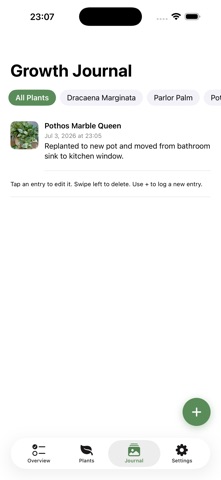
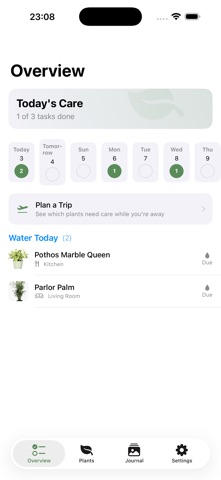
Bloomkeeper Journal is a photo growth journal for your plants, not just another watering-reminder app. Build a visual timeline of every plant's progress, get smart care reminders, and diagnose common problems right on your device. GROWTH JOURNAL • A timestamped photo timeline for every plant you own • Add notes alongside each photo to track growth, blooms, and changes over time • Turn any plant's oldest and newest photos into a shareable before-and-after Growth Share Card • See your plant's story unfold, not just a checklist of chores CARE THAT KEEPS UP • Watering, fertilizing, and misting reminders tuned to each plant's real schedule • See at a glance which plants need watering, fertilizing, or misting, right on the Plants tab, no need to open each one • Tap the check on any Overview row to mark care done, or swipe to complete or snooze • Press and hold any plant for quick actions: water, fertilize, mist, or a new journal entry • Search by name, species, or location, and sort by name, next watering, or location • A Care History calendar shows every watering, fertilizing, and misting day • Track your daily Garden Streak, with a gentle evening nudge if today's tasks are still open • Plant Health Score (0–100) with a 30-Day Health Trend so you can see improvement, not just guess • Multi-location tracking across indoor and outdoor spaces, with a Light Match badge for each plant DIAGNOSE PROBLEMS ON THE SPOT • Guided symptom picker: yellowing leaves, brown tips, drooping, spots, pests, and more • Get a likely cause and a suggested fix from a curated care decision tree • Fully on-device: no photo analysis, no network call, nothing leaves your phone FAMILY SHARING • Share your whole garden with the people you live with • Everyone you invite sees the same plants, locations, journal, and care history, and can water, log, and edit right along with you • Invite from Settings through Apple's own iCloud sharing, with no account to create • Settings shows whether your garden is shared or you joined someone else's • Stop sharing or leave any time: the shared garden leaves that device, and everyone's own plants stay theirs PLANNING & SHARING • Vacation Planner sorts your plants into a simple before/during/after care checklist for any trip, with a welcome-home reminder built in • Share, print, or email your care checklist to whoever's watching your plants • Setup File hands a copy of your plant list to anyone's device, no sharing required • Ask Siri to log a watering ("Log watering in Bloomkeeper") or check what's due ("Plants due today in Bloomkeeper"), no need to name a plant, Siri will prompt with your neediest plants first IPHONE & IPAD • A full iPad app: your plant list and the selected plant side by side • Works in portrait, landscape, and Split View, with keyboard shortcuts • With iCloud Sync, your plants, theme, and reminder time match on every device APPLE WATCH & WIDGET • Mark a plant as watered right from your wrist • Tap to water a plant directly from your Home Screen widget • Lock Screen widgets show what's due today at a glance PRIVATE BY DESIGN • Everything is stored on your device, in your own private iCloud if you choose to sync, and shared only with the people you invite • No account, no ads, no analytics, no tracking of any kind • Three accent themes, full data export, and a Privacy Dashboard that explains exactly what's stored and where Built for anyone who wants to actually watch their plants grow, not just remember to water them.
What's new · 1.4(6)
Bloomkeeper on iPad: Bloomkeeper is now a full iPad app. Your plant list sits on the left and the selected plant on the right, in portrait, landscape, and Split View. With a keyboard, Command-N adds a plant and Command-F searches. Your Devices, in Step: With iCloud Sync on, your theme, reminder time, and daily digest setting now carry over between your own devices. Faster Care • A check button on each Overview row marks care done in one tap. Tap the row to open the plant. • Press and hold any plant for quick actions: water, fertilize, mist, snooze, or a new journal entry. • Search your plants by name, species, or location, and sort by name, next watering, or location. • A new Care History calendar shows every watering, fertilizing, and misting day. Family Sharing, Improved • Opening an invitation now joins even if Bloomkeeper wasn't running, and an invitation opened before iCloud Sync is on is kept until you turn it on. • Settings shows whether your garden is shared or you joined someone else's, and how many people have joined. • Leave a shared garden from Settings. Your own plants and locations stay on your device. • Shared locations now read "(Family)" in the Locations list too. Clearer and Easier to Read • Errors now explain what happened and what to try next. If a change can't be saved, it's undone and you're told, so nothing is half-saved. • Watering, fertilizing, and misting each have one color everywhere, adjusted for better contrast. • Better support for VoiceOver, Voice Control, Larger Text, Differentiate Without Color, and Reduce Motion across the app. Fixes • Fixed an issue where the app could fail to open on some older iPhones. • Journal entries now need a photo or a note before saving. • Care tips read more clearly. • Growth Share Cards are sharper on iPad.
Details