

Git Command Ref
SANWA Inc. · Developer Tools
Independent analytics for this App Store listing. AppTracker is not affiliated with SANWA Inc.
Chart standing · US
Screenshots



About
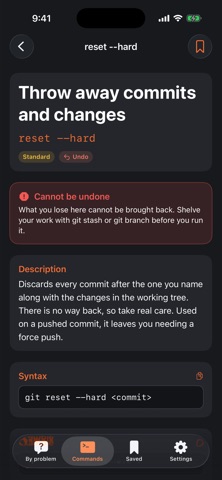
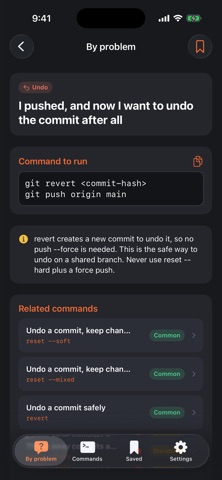
git reset --hard cannot be undone. git push --force replaces what a colleague pushed. Both sit one keystroke away from the command you actually wanted. This is a Git reference you open before you run the command, not after. ■ Look it up by the problem (69 entries, all free) "I committed to the wrong branch." "I want to undo a commit I already pushed." "I need to throw away everything I changed." Say what happened and you get the command that fixes it, plus a note on what it does to your working tree. ■ The command reference (100 commands, 114 options) Every command carries its syntax, the options worth knowing, and a worked example — not a placeholder, an actual line you could run. Eight categories: setup, recording changes, branches, remotes, undoing, history, stash and tags, advanced. ■ Two kinds of danger, held as data 14 commands and 18 lookups carry a warning, and it is not the same warning: - Cannot be undone — what you lose is gone (reset --hard, clean, stash drop, push --delete) - Rewrites history — the work survives, but the commits change identity and anyone who already pulled them has a problem (rebase, commit --amend, push --force-with-lease, filter-repo) The mark comes from the data, not from guessing at the command name. ■ Everything links up From a command you reach the others in its category, and the problems that category solves. From a problem you reach the commands behind it. That is what makes it a reference rather than a list. ■ Free and Pro Free: all 69 problem lookups, the setup / recording changes / branches categories (34 commands), search, cross-links and bookmarks. Pro (one purchase, not a subscription): the remaining 66 commands — remotes, undoing, history, stash and tags, advanced. ■ Built to be usable Works offline. No account. No tracking. Copy any command or example with one tap. Nine languages.
Details