

Couchside — Remote
Taylor Emery · Utilities
Independent analytics for this App Store listing. AppTracker is not affiliated with Taylor Emery.
Chart standing · US
What changed · US
Listing changes AppTracker has observed for this app in this storefront — new versions, price moves, rating shifts, and store copy.
Wake your gaming box directly from your iPhone. Couchside uses Apple's approved local-network multicast capability to send Wake-on-LAN packets immediately, with visible progress and relay fallback. Wake support depends on your network and hardware settings; allow Local Network access when prompted. Couch Mode now clearly separates TV-control warnings from Game Mode readiness. When you're using a handheld's built-in screen, it explains that audio stays on the box instead of reporting an audio failure. Update the Linux service to 2.9.133 for secure-connection responsiveness, safer file-upload handling, and a clearer explanation when automatic TV input switching is unavailable.
Ratings breakdown · US
The star breakdown behind this app's rating in this storefront.
Screenshots




About
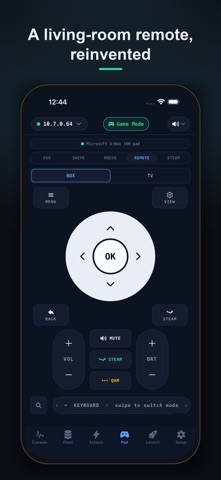
Couchside turns your iPhone into a dashboard, remote, game launcher and controller for your living-room Linux gaming PC: SteamOS, Bazzite, a docked Steam Deck, or another supported systemd Linux box. WHAT TO PLAY NEXT Find your next game with suggestions from your box’s game history. See what is running, choose another suggestion, and launch after confirming. The Play tab keeps recent content ready as you move between tabs. Optional demo mode lets you explore sample games away from your box. YOUR STEAM COMPANION Connect Steam on your box for profile and library stats, playtime trends, achievement progress, wishlist discounts and price-drop alerts. Add an optional IsThereAnyDeal integration for historical-low price comparisons. These opt-in features contact Steam and IsThereAnyDeal. Background wishlist notifications are best-effort and need your phone to reach the box. LIVE CONSOLE Check CPU temperature, load, memory, storage, uptime and service health. Supported handhelds also show battery and power information. See what is playing and manage multiple boxes from unified cards with live vitals and connection controls. When the TV is black, inspect the box from your phone. FIX IT FROM THE COUCH Read recent service logs, restart the display session, switch between Desktop and Game Mode, or reboot and shut down with confirmation. Available actions depend on your box’s capabilities and permissions. GAMES, STREAMING AND CONTROLS Browse installed games with cover art, search and filters. Launch a game on the TV or start Steam Remote Play from another PC. Use a virtual gamepad, swipe navigation, trackpad with two-finger gestures, or keyboard input. Landscape controls give you more room when you need it. TV AND LIGHTING Control power, volume and input on supported TVs, including compatible LG and Google TV models. Compatible HDMI-CEC hardware lets the box control the TV. On supported lighting hardware, adjust strip effects, reactive meters and artwork-inspired Game Aura presets. Create custom sequences with frame-by-frame timing and true on/off strobe effects. EASY PAIRING A welcome guide introduces Couchside and optional integrations. Install the free Couchside service on your box, then scan its QR code or enter its pairing PIN. Refined animations can be turned off in Preferences and respect Reduce Motion. Your phone and box must be on the same local network. WAKE FROM THE COUCH Wake supported Ethernet-connected boxes with progress and reconnection confirmation. On iPhone, waking may require another awake Couchside box on the same network to relay the request. Hardware, firmware and network settings must support Wake-on-LAN. PRIVATE LOCAL CONTROL Remote-control traffic stays on your local network, with no cloud relay or Couchside account. Pairing supports an encrypted, pinned connection. Optional online features, store purchases and update checks contact their respective services. No analytics. The Linux service is open source and the app is source-available. TRY FREE FOR 7 DAYS, PAY ONCE Download free and try the full app for 7 days. A one-time purchase unlocks continued use; there is no subscription. Existing unlocks carry forward. REQUIREMENTS • A supported Linux gaming box on your home network • The free Couchside service installed on that box • Your iPhone and box on the same LAN • Optional integrations and hardware for Steam account features, TV control and lighting
What's new · 2.9.76
Wake your gaming box directly from your iPhone. Couchside uses Apple's approved local-network multicast capability to send Wake-on-LAN packets immediately, with visible progress and relay fallback. Wake support depends on your network and hardware settings; allow Local Network access when prompted. Couch Mode now clearly separates TV-control warnings from Game Mode readiness. When you're using a handheld's built-in screen, it explains that audio stays on the box instead of reporting an audio failure. Update the Linux service to 2.9.133 for secure-connection responsiveness, safer file-upload handling, and a clearer explanation when automatic TV input switching is unavailable.
Details