

Quick Memo and To-Dos
Beijing Blue Ocean Xinfan Technology Co., Ltd · Productivity
Independent analytics for this App Store listing. AppTracker is not affiliated with Beijing Blue Ocean Xinfan Technology Co., Ltd.
Chart standing · US
What changed · US
Listing changes AppTracker has observed for this app in this storefront — new versions, price moves, rating shifts, and store copy.
This release adds a new way to lock the app, and a broad round of fixes. APP PASSWORD LOCK "App lock" now has a third option: a 6-digit passcode you set yourself. It is stored only on this device as a derived key, never in backups, and never leaves your iPhone. Five wrong attempts start a 60/300/900-second wait. Forgot it? Verify with Face ID, Touch ID or your device passcode to choose a new one — nothing is lost. The lock screen opens straight into the keypad, and the Home Screen widget keeps hiding content while locked. ALSO IN THIS RELEASE • Calendar: fixes to writing a to-do into your system calendar and to conflict checks • Voice capture: more reliable transcription start and stop, and a steadier live waveform • Repeat rules and JSON export corrected in edge cases • Month Calendar View layout and scrolling • Widget text now follows the app language Everything still runs on your device: your recordings, transcripts, to-dos and memos are never uploaded. The app makes no network requests.
Screenshots


About
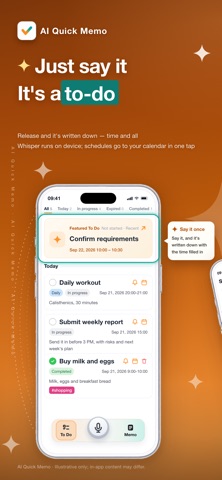
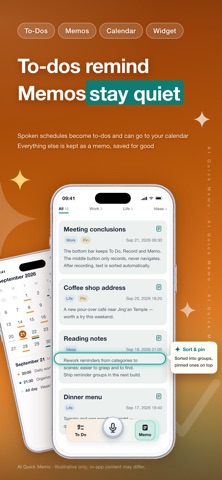
You never write things down because the moment you have time to type, you've forgotten what to type. AI Quick Memo listens instead — say it once on your phone, and it lands as a to do, a calendar event, or a memo. No app to open, no network, nothing uploaded. TO DOS & SCHEDULES • Create, complete, and manage to dos • Reminders that repeat on the schedule you set • See your items at a glance with home-screen widgets • When something is a schedule or a reminder, you choose whether it syncs to your system calendar • Add and edit events in your system calendar SMART ORGANIZING • Summaries, to dos, and key points pulled out automatically • Dates, times, and reminder intent recognized automatically • Content sorted into to dos, schedules, or memos • Keep things in order with categories, tags, and search • Your memos and history stay saved on your device QUICK CAPTURE • Voice: say a task, a plan, or an idea and it becomes text • Image text: pull the text out of a photo from your library • Typing: start a to do or memo any time • Clipboard: turn copied text into something organized in one step • Siri / Shortcuts: open AI Quick Memo without hunting for the icon PRIVACY & YOUR DATA • Recognition, organizing, and storage all happen on your device • The app itself makes zero network requests • No recordings, images, text, or usage history are ever uploaded • No cloud account needed • Import and export as plain readable text, so you can back up and move your data yourself QUICK ACTIONS • Hold Record to start; release to stop and parse • Tap or double-tap Record to choose typing or image text • Tap or double-tap To Do or Memo to switch categories fast • Hold To Do or Memo to open search, import, or export • Hold any list item to reveal more actions This is not just a voice recorder. It is an AI assistant that helps you remember things, arrange your schedule, and keep track of reminders. Capture a thought, a task, or an idea the moment it shows up — say one sentence, and AI works out what it means and turns it into a to do, a reminder, or a memo, so nothing important slips past you.
What's new · 1.5.0
This release adds a new way to lock the app, and a broad round of fixes. APP PASSWORD LOCK "App lock" now has a third option: a 6-digit passcode you set yourself. It is stored only on this device as a derived key, never in backups, and never leaves your iPhone. Five wrong attempts start a 60/300/900-second wait. Forgot it? Verify with Face ID, Touch ID or your device passcode to choose a new one — nothing is lost. The lock screen opens straight into the keypad, and the Home Screen widget keeps hiding content while locked. ALSO IN THIS RELEASE • Calendar: fixes to writing a to-do into your system calendar and to conflict checks • Voice capture: more reliable transcription start and stop, and a steadier live waveform • Repeat rules and JSON export corrected in edge cases • Month Calendar View layout and scrolling • Widget text now follows the app language Everything still runs on your device: your recordings, transcripts, to-dos and memos are never uploaded. The app makes no network requests.
Details