

Framely - Extract Frames
Jhomar Maravillas · Photo & Video
Independent analytics for this App Store listing. AppTracker is not affiliated with Jhomar Maravillas.
Chart standing · US
What changed · US
Listing changes AppTracker has observed for this app in this storefront — new versions, price moves, rating shifts, and store copy.
Zoom in to pick the sharpest frame. Tap the magnifier on any frame, then pinch or double-tap to zoom. The arrows step to the next or previous frame and keep your zoom, so you can compare the same detail frame by frame and select the best one. Also fixed: thumbnails from landscape videos no longer overlap in the grid.
Screenshots



About
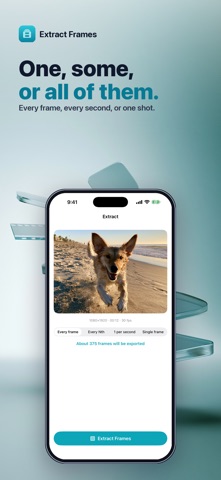
Your camera shoots 30 to 60 photos every second — Extract Frames lets you keep them. Turn any video into photos: every single frame, one per second, every Nth frame, or exactly the moment you want with a frame-by-frame scrubber. No ads. No subscription. Pay once and export forever. Most frame-grab apps let you save one photo at a time, then lock batch export behind a weekly subscription. This one doesn't. Every frame, full quality, one honest price. • EVERY FRAME — export a whole clip as photos in one go, at the video's full resolution. • YOUR PACE — every Nth frame or 1 per second for quick contact sheets. • THE PERFECT MOMENT — scrub to the exact frame on a millisecond timeline and export just that one. • KNOW BEFORE YOU RUN — see roughly how many frames you'll get before you extract. • PICK FROM A GRID — review every frame as thumbnails, select the keepers, and batch-save to Photos. • 100% PRIVATE — everything happens on your iPhone. Your videos are never uploaded anywhere. • NO ADS, NO SUBSCRIPTION — one $4.99 purchase unlocks unlimited exports forever. Great for sports and action clips, picking the sharpest shot out of a moving moment, thumbnails for your channel, art and animation reference, form checks, and rescuing that one perfect frame from a live video. Tap Select Video, choose a mode, extract. Done.
What's new · 1.0.7
Zoom in to pick the sharpest frame. Tap the magnifier on any frame, then pinch or double-tap to zoom. The arrows step to the next or previous frame and keep your zoom, so you can compare the same detail frame by frame and select the best one. Also fixed: thumbnails from landscape videos no longer overlap in the grid.
Details