

Easy Todo - Task Checklist
Min Seong Ji · Productivity
Independent analytics for this App Store listing. AppTracker is not affiliated with Min Seong Ji.
Chart standing · US
What changed · US
Listing changes AppTracker has observed for this app in this storefront — new versions, price moves, rating shifts, and store copy.
Stats and Categories got a new look. - Redesigned Stats. This week is one bar you can read at a glance; this month shows each category as a line across the weeks. - Redesigned "Manage categories". The list feels lighter, and each name appears in its category color. - Smart Sort now finishes in one tap. It used to take several presses to settle. - Fixed the calendar changing height between months, which made the list below jump.
Screenshots



About
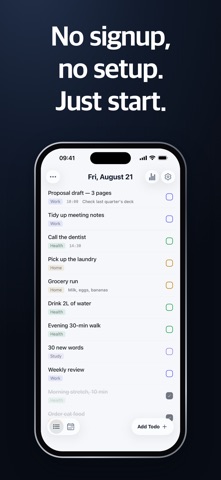
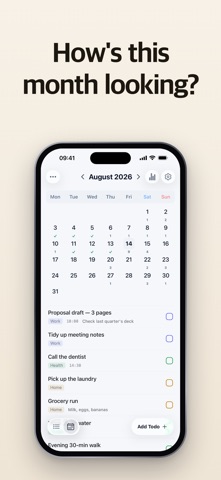
Easy Todo Focus on today's tasks, without the clutter. Register a routine once — daily, weekly, and monthly tasks are pre-filled automatically. ------------------------------------------------ ■ Routine automation - Recurring routines: daily, weekly, or monthly - Auto-generate tasks to reduce missed execution - Review routines in one place from the management screen ■ Task management - Switch between date, list, and calendar views - Organize neatly with categories - Check, delete, and reorder with drag and drop - Edit titles and set alarm times - Postpone to another date - Repeat a completed task ■ Stay focused on today - An interface built to focus on what you need to do today - Fast view switching to keep your flow - Dark mode · multi-language support - Check today's tasks right from the iOS home-screen widget ------------------------------------------------ Not a heavy memo-style todo, but a light app for getting things done. Raise your daily completion rate with Easy Todo.
What's new · 1.3.0
Stats and Categories got a new look. - Redesigned Stats. This week is one bar you can read at a glance; this month shows each category as a line across the weeks. - Redesigned "Manage categories". The list feels lighter, and each name appears in its category color. - Smart Sort now finishes in one tap. It used to take several presses to settle. - Fixed the calendar changing height between months, which made the list below jump.
Details