

PC Microphone: Mic for PC
PURPLE NIGHT Inc · Utilities
Independent analytics for this App Store listing. AppTracker is not affiliated with PURPLE NIGHT Inc.
Chart standing · US
What changed · US
Listing changes AppTracker has observed for this app in this storefront — new versions, price moves, rating shifts, and store copy.
What’s New: • Improved local network connection stability. • General performance enhancements and stability improvements. • Minor bug fixes.
In-app purchases · US
No in-app purchases.
Screenshots



Keywords this app targets
Search terms AppTracker associates with this app — estimates, not search volume. ❝ = in the app's title; a highlighted number is its current position for that term.
Similar apps
Competitors and close alternatives, as estimated by AppTracker.
 Microphone To Speaker
Nageswara Pobbathi
1 shared title word
Microphone To Speaker
Nageswara Pobbathi
1 shared title word
 Microphone test check
Yunus Gunduz
1 shared topic · 1 shared title word
Microphone test check
Yunus Gunduz
1 shared topic · 1 shared title word
 Mix Stream — Audio to Phone
Ryan Robinson
Mix Stream — Audio to Phone
Ryan Robinson
 Link to Windows
Microsoft Corporation
Link to Windows
Microsoft Corporation
 Bluetooth Microphone: EasyMic
Mustafa Baysal
Bluetooth Microphone: EasyMic
Mustafa Baysal
 MicSwap Pro: Microphone Sound
Future Moments LLC
1 shared title word
MicSwap Pro: Microphone Sound
Future Moments LLC
1 shared title word
 MicCast: Bluetooth Speaker Mic
Hespat Technology LTD
MicCast: Bluetooth Speaker Mic
Hespat Technology LTD
 PC Monitor & Control
Adriano Melnic
1 shared title word
PC Monitor & Control
Adriano Melnic
1 shared title word
About
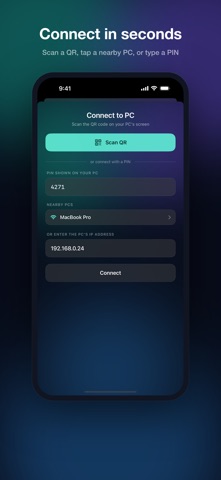
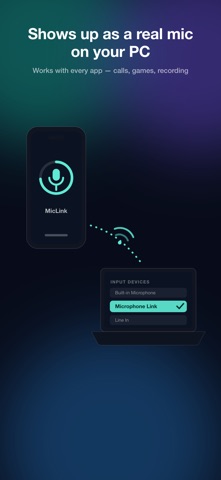
Turn your iPhone into a wireless microphone for your computer. Microphone Link streams your iPhone's mic to your Mac over Wi-Fi and registers it as a real system microphone — so it appears in the input list of every app: video calls, streaming, screen recording, voice memos, anything that uses a mic. HOW IT WORKS 1. Install the free companion app on your Mac (https://miclink.eggmango.com) 2. Scan the QR code shown on your Mac's screen 3. Select "Microphone Link" as the microphone in any app — done WHY YOU'LL LIKE IT • One-scan pairing — scan the QR on your PC and you're connected. No IP addresses, no account, no setup. • Real microphone device — not a browser trick. Your computer sees a native input device that works everywhere. • Clear voice — 48 kHz stereo audio over the efficient Opus codec. • Three latency modes — Low latency (~50 ms) for real-time use, Balanced (~100 ms) for calls, High quality for recording. • Private by design — audio travels only over your local network and never touches the internet. Pairing is protected by a PIN shown on your computer's screen; the wrong PIN gets no audio. • Auto-discovery — your iPhone finds nearby computers on the same Wi-Fi and lists them. Can't see the screen? Type the PIN instead. • Live level meter and mute — see your input level at a glance and mute instantly. • Keeps streaming in the background while you use other apps. WHAT YOU NEED • iPhone with iOS 16 or later • Mac with macOS 13 or later, Window PC and the free Microphone Link desktop app • Both devices on the same Wi-Fi network Visit https://miclink.eggmango.com/
What's new · 1.1
What’s New: • Improved local network connection stability. • General performance enhancements and stability improvements. • Minor bug fixes.
Details