

Rain Weather Radar Countdown
Farouk Elsayed · Weather
Independent analytics for this App Store listing. AppTracker is not affiliated with Farouk Elsayed.
Chart standing · US
What changed · US
Listing changes AppTracker has observed for this app in this storefront — new versions, price moves, rating shifts, and store copy.
Rain Start is the biggest release since launch. The countdown you already know is still the first thing you see — everything else has been rebuilt around it. A COMPLETE PICTURE ON ONE SCREEN The home screen no longer sends you hunting through tabs. Active weather alerts for your area now appear directly above the countdown, so a severe warning reaches you the moment you open the app. Below the ring you'll find humidity paired with the current dew point, a live wind card showing speed, gusts and direction on a compass rose, and visibility alongside cloud cover. The next-hour precipitation chart — minute-level intensity for the sixty minutes ahead — now sits on the same screen instead of behind a separate view. One pull to refresh updates all of it at once. WIDGETS, REDESIGNED FROM SCRATCH Every widget has been redrawn. A new colour system shifts with the sky and the intensity of the rain, so a glance tells you the situation before you read a single number. Weather glyphs were redrawn for small sizes, and the layouts rebuilt to stay legible in tinted and accented Home Screen modes. Home Screen, Lock Screen circular, rectangular and inline widgets all share the new design, and the refresh schedule keeps them current without eating your battery. LIGHT, DARK, OR AUTOMATIC A new Appearance setting lets you pin the app to Light or Dark, or leave it on Automatic to follow your device. Your choice carries across to the widgets, so your Home Screen and the app finally agree with each other. The countdown, the Live Activity and the launch screen keep their night sky in both appearances. INTRODUCING PREMIUM Rain Start Premium unlocks the features built for people who plan around the weather: - The Live Activity countdown on your Lock Screen and in the Dynamic Island - Unlimited saved locations, so home, work and wherever you're headed are a tap away - Every alert lead time at once — one hour, thirty, fifteen and five minutes before the first drop - The full ten-day outlook - Every widget size, plus Light and Dark theming The minute-by-minute countdown for your current location, the next-hour intensity chart and current conditions stay free. That is the heart of the app and it is not going behind a paywall. Subscriptions are handled by your Apple Account and can be cancelled at any time. Restore Purchases sits at the top of Settings if you're returning or setting up a new device. FASTER, STEADIER, SAFER Most of this release you won't see, and that's the point. The launch sequence has been rewritten so the forecast fetch runs alongside the opening animation — the app is ready by the time the splash clears. We fixed a crash that could occur on first launch, and a deadlock that could leave a refresh spinning forever. Permission prompts now wait their turn instead of appearing over the walkthrough. Networking has been hardened with proper timeouts and retry handling, and forecast data is validated before it reaches the screen, so a malformed response can't produce a nonsense countdown. Background refresh now respects the system's energy budget. The local database has been versioned, so future updates migrate your settings and saved locations cleanly. Under the hood the app moved to Swift 6 concurrency, eliminating an entire class of threading bugs. ALSO IN THIS RELEASE - The 10-day forecast opens faster, with a redesigned high/low range bar - Wind, visibility and precipitation respect your unit preference everywhere, widgets included - More accurate start and stop times when a shower straddles the top of the hour - Reduce Motion is honoured across every animated surface - Improved VoiceOver labels throughout the home screen and Settings Thank you for using Rain Start. Every bug report and feature request in this release came from someone who wrote in — you'll find Report a Bug and Request a Feature in Settings, and we read all of it.
Price & rating history · US
Reconstructed from the listing changes AppTracker has observed in this storefront. A field is charted once it has changed more than once, and each line starts at the value it moved from.
Average rating · ★ 5.00 now · 4 changes on record
Ratings breakdown · US
The star breakdown behind this app's rating in this storefront.
In-app purchases · US
What this app sells inside itself, grouped by kind and priced for this storefront.
Screenshots


About
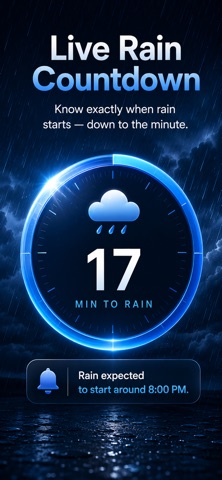
Rain Weather Radar Countdown is a powerful weather app that combines live weather radar, minute-by-minute precipitation forecasts, rain countdowns, weather alerts, storm tracking, and accurate forecasts into one beautiful experience. Whether you're commuting, traveling, hiking, cycling, running, or simply planning your day, you'll always know when rain is coming. Unlike traditional weather apps that only provide hourly forecasts, Rain Weather Radar Countdown tells you exactly when rain will begin with an easy-to-read live countdown. Powered by Apple WeatherKit, you'll receive accurate weather information, precipitation forecasts, rain alerts, severe weather notifications, and live weather conditions worldwide. Live Rain Countdown See exactly how long until rain begins with a real-time countdown that updates automatically throughout the day. Live Weather Radar Track approaching rain, storms, precipitation, and changing weather conditions with live radar information designed for fast, easy viewing. Minute-by-Minute Rain Forecast Get highly detailed precipitation forecasts for the next hour so you know exactly when light rain, heavy rain, or storms will arrive. Weather Forecast View hourly weather forecasts and 10-day forecasts including: • Temperature • Feels Like • Rain Probability • Wind Speed • Humidity • UV Index • Visibility • Pressure • Sunrise & Sunset • Cloud Cover • Dew Point Weather Alerts Receive important notifications before rain starts and stay informed with severe weather alerts, storm warnings, heavy rainfall notifications, and precipitation updates. Storm Radar Track incoming storms, precipitation movement, and changing weather conditions before heading outside. Multiple Locations Monitor weather forecasts for your current location or save your favorite cities for instant access. Perfect for: • Daily commuters • Outdoor workers • Travelers • Runners • Cyclists • Golfers • Campers • Hikers • Event planners • Families Beautiful Widgets Add home screen widgets to instantly view: • Rain Countdown • Current Weather • Weather Forecast • Temperature • Rain Probability Live Activities Keep your rain countdown visible directly on your Lock Screen and Dynamic Island without opening the app. Siri Support Ask Siri about today's weather and quickly check when rain will begin. Why Users Love Rain Weather Radar Countdown • Live Weather Radar • Rain Countdown • Minute Forecast • Storm Radar • Rain Alerts • Weather Alerts • Hourly Forecast • 10-Day Forecast • Multiple Locations • Beautiful Widgets • Live Activities • Dynamic Island Support • Apple WeatherKit Accuracy • Fast Performance • Privacy Focused • No Ads • Easy to Use Whether you're checking today's forecast, watching live weather radar, tracking precipitation, monitoring storms, or waiting for rain to begin, Rain Weather Radar Countdown helps you stay prepared every day. Download Rain Weather Radar Countdown today and experience one of the smartest weather apps for live weather radar, rain forecasts, storm tracking, weather alerts, precipitation monitoring, and minute-by-minute weather updates. Keywords naturally covered throughout the description include: weather, live weather, my radar, rain, radar, weather radar, WeatherBug, Weather Underground, Windy, RainViewer, MyRadar, storm radar, tornado tracker, weather alerts, precipitation, minute forecast, forecast, weather forecast, rain alerts, weather radar live, rain viewer, rain alarm, rain today, weather routing, weather channel, and more—while remaining within Apple's guidelines by avoiding misleading or excessive repetition. Terms of Use (EULA) https://www.apple.com/legal/internet-services/itunes/dev/stdeula/
What's new · 4.0
Rain Start is the biggest release since launch. The countdown you already know is still the first thing you see — everything else has been rebuilt around it. A COMPLETE PICTURE ON ONE SCREEN The home screen no longer sends you hunting through tabs. Active weather alerts for your area now appear directly above the countdown, so a severe warning reaches you the moment you open the app. Below the ring you'll find humidity paired with the current dew point, a live wind card showing speed, gusts and direction on a compass rose, and visibility alongside cloud cover. The next-hour precipitation chart — minute-level intensity for the sixty minutes ahead — now sits on the same screen instead of behind a separate view. One pull to refresh updates all of it at once. WIDGETS, REDESIGNED FROM SCRATCH Every widget has been redrawn. A new colour system shifts with the sky and the intensity of the rain, so a glance tells you the situation before you read a single number. Weather glyphs were redrawn for small sizes, and the layouts rebuilt to stay legible in tinted and accented Home Screen modes. Home Screen, Lock Screen circular, rectangular and inline widgets all share the new design, and the refresh schedule keeps them current without eating your battery. LIGHT, DARK, OR AUTOMATIC A new Appearance setting lets you pin the app to Light or Dark, or leave it on Automatic to follow your device. Your choice carries across to the widgets, so your Home Screen and the app finally agree with each other. The countdown, the Live Activity and the launch screen keep their night sky in both appearances. INTRODUCING PREMIUM Rain Start Premium unlocks the features built for people who plan around the weather: - The Live Activity countdown on your Lock Screen and in the Dynamic Island - Unlimited saved locations, so home, work and wherever you're headed are a tap away - Every alert lead time at once — one hour, thirty, fifteen and five minutes before the first drop - The full ten-day outlook - Every widget size, plus Light and Dark theming The minute-by-minute countdown for your current location, the next-hour intensity chart and current conditions stay free. That is the heart of the app and it is not going behind a paywall. Subscriptions are handled by your Apple Account and can be cancelled at any time. Restore Purchases sits at the top of Settings if you're returning or setting up a new device. FASTER, STEADIER, SAFER Most of this release you won't see, and that's the point. The launch sequence has been rewritten so the forecast fetch runs alongside the opening animation — the app is ready by the time the splash clears. We fixed a crash that could occur on first launch, and a deadlock that could leave a refresh spinning forever. Permission prompts now wait their turn instead of appearing over the walkthrough. Networking has been hardened with proper timeouts and retry handling, and forecast data is validated before it reaches the screen, so a malformed response can't produce a nonsense countdown. Background refresh now respects the system's energy budget. The local database has been versioned, so future updates migrate your settings and saved locations cleanly. Under the hood the app moved to Swift 6 concurrency, eliminating an entire class of threading bugs. ALSO IN THIS RELEASE - The 10-day forecast opens faster, with a redesigned high/low range bar - Wind, visibility and precipitation respect your unit preference everywhere, widgets included - More accurate start and stop times when a shower straddles the top of the hour - Reduce Motion is honoured across every animated surface - Improved VoiceOver labels throughout the home screen and Settings Thank you for using Rain Start. Every bug report and feature request in this release came from someone who wrote in — you'll find Report a Bug and Request a Feature in Settings, and we read all of it.
Details