

Panorama: Spherical Camera
Daniel Monahan · Photo & Video
Independent analytics for this App Store listing. AppTracker is not affiliated with Daniel Monahan.
Chart standing · US
What changed · US
Listing changes AppTracker has observed for this app in this storefront — new versions, price moves, rating shifts, and store copy.
Interactive 360° sharing is back: • "Share 360 panorama" and "Save 360 panorama to Photos" are available again. The saved file is a standard equirectangular JPEG, so besides Panorama's own interactive viewer, it's also ready to use anywhere else that works with equirectangular images — from a website embed to a 3D or simulation tool that takes a 360° photo as input. • A short in-app explainer ("About sharing a 360 photo") walks through what the file is and how to view it interactively, since most photo apps only show it as a flat, stretched image.
Ratings breakdown · US
The star breakdown behind this app's rating in this storefront.
In-app purchases · US
No in-app purchases.
Screenshots


About
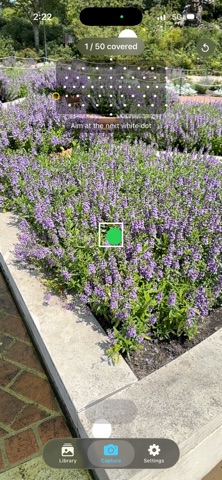
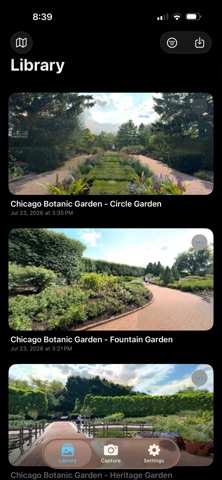
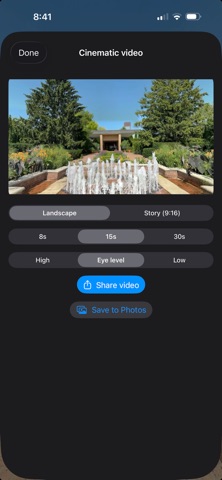
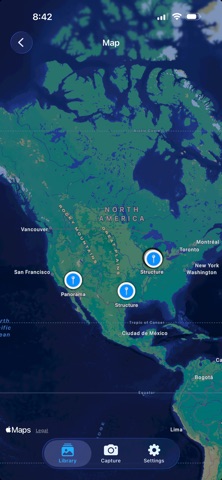
See the whole place, not just a slice of it. Panorama turns your iPhone into a spherical-panorama camera. Sweep the phone around you and Panorama captures the scene in every direction — up, down, and all the way around — then stitches it into a single seamless image you can step back into anytime. Capture Follow the on-screen guide as you pan across the scene. Panorama grabs frames automatically as you cover new ground and stitches them on-device in seconds — no waiting, no upload. Relive it Open a saved panorama and look around by simply moving your phone — tilt up to the sky, turn to see behind you — or drag and pinch to explore. It feels like standing back in the room. Keep it, share it Every panorama is saved to a tidy library on your device and remembers where you took it. Share to anyone as a standard panoramic image — AirDrop it, save it to Photos, drop it in Files, or send it to a VR headset. Take it further Turn any panorama into a tiny-planet image, a flat photo of any direction, or a cinematic video flythrough — with the scene's own ambient sound if you choose to record it, and a 9:16 Story cut for Instagram. Post the 360 itself to Google Photos or Facebook and it stays interactive. Private by design Panorama has no account, no cloud, and no servers. Capture, stitching, storage, and sharing all happen on your iPhone. Nothing is collected, tracked, or uploaded — your panoramas stay yours. Capture the sunrise from your balcony, the whole living room, a mountaintop, a favorite café — and keep the entire view, forever, on your phone.
What's new · 1.0.2
Interactive 360° sharing is back: • "Share 360 panorama" and "Save 360 panorama to Photos" are available again. The saved file is a standard equirectangular JPEG, so besides Panorama's own interactive viewer, it's also ready to use anywhere else that works with equirectangular images — from a website embed to a 3D or simulation tool that takes a 360° photo as input. • A short in-app explainer ("About sharing a 360 photo") walks through what the file is and how to view it interactively, since most photo apps only show it as a flat, stretched image.
Details