

Pic to Line Art - Lines Me
嘉宁 何 · Graphics & Design
Independent analytics for this App Store listing. AppTracker is not affiliated with 嘉宁 何.
Chart standing · US
What changed · US
Listing changes AppTracker has observed for this app in this storefront — new versions, price moves, rating shifts, and store copy.
Price & rating history · US
Reconstructed from the listing changes AppTracker has observed in this storefront. A field is charted once it has changed more than once, and each line starts at the value it moved from.
Average rating · ★ 4.50 now · 6 changes on record
Ratings breakdown · US
The star breakdown behind this app's rating in this storefront.
In-app purchases · US
What this app sells inside itself, grouped by kind and priced for this storefront.
Screenshots


About
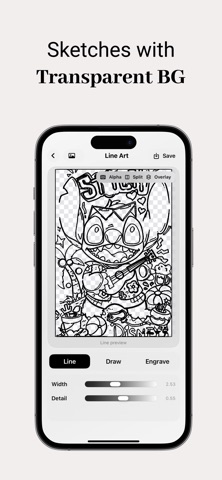
Lines Me — Turn Your Images Into Clean Line Art Your comic panel, character sketch, or reference photo deserves a cleaner outline — not a messy trace job. Lines Me turns images into crisp black-and-white line art and expressive sketches, right on your iPhone. No cloud upload. No waiting in a queue. Just import, tweak, and export. #Two ways to create 1. Line Art — Best for comics, manga, and illustrated artwork. Pick from three styles: Line — Clean, precise outlines Draw — Softer, hand-drawn feel Engrave — Bold, graphic detail Fine-tune line width, detail retention, and more until the result feels right. 2.Sketch — For images with clear lines and a strong subject. A stylized, layered sketch look — great when you want something artistic, not just traced. Built for creators who care about the details! -Import from your photo library in seconds -Compare before and after with Split View or Overlay View -Switch between white and transparent backgrounds -Export as PNG, JPG, or HEIF -Choose Standard or HD Enhanced export for sharper results -Auto-save drafts so you can come back and adjust later -Frosted-glass UI that stays out of your way Pro tip: Line Art works best on illustrated images — real photos can be hit or miss. Sketch mode shines when your image already has strong, readable lines. Lines Me Pro Go Pro for unlimited line art conversions, transparent background export, and HD Enhanced export. Start your free trial and unlock the full toolkit. Privacy first All processing happens on your device. Your images stay on your phone unless you choose to export them. Privacy Policy: https://my.feishu.cn/docx/SuRNdfiYko2LKRxYXrhcoj68nDc Terms of Use: https://my.feishu.cn/docx/RxXfdcZgBoSTeUxYd99cHdBTncf?from=from_copylink
What's new · 1.2
fixed some bugs
Details