

VibeSDR
Stuart Carr · Utilities
Independent analytics for this App Store listing. AppTracker is not affiliated with Stuart Carr.
Chart standing · US
What changed · US
Listing changes AppTracker has observed for this app in this storefront — new versions, price moves, rating shifts, and store copy.
VibeSDR 11 — the biggest update yet. A NEW LOOK • The controls are now a real front panel: original, brushed silver or black metal; Nixie tubes, VCR dot-matrix or segment displays; a bar, LED VU strip or analogue needle meter. Pick your colours, and the app icon too. • A rebuilt station strip with logos, flags and RDS, and a new icon. MAPS THAT ARE OURS • Every map — HFDL aircraft, digital and CW spots, the server directory — is drawn on the GPU from map data built into the app. No tile server: maps work without internet, with relief, airports and runways, ports and the day-night greyline. Optional High Detail maps for close zooming. SHARED RECEIVERS • On a shared tuner the app follows whoever tunes, with a no-typing chat ("Can I tune?", "Anyone know what this is?") and Signal ID Wiki answers. • Receivers introduce themselves: aerial, coverage, notices and PIN protection per radio. DECODERS REBUILT • RTTY with AUTO (shift, speed and polarity found for you) and much better copy on fading signals. • NAVTEX with error correction and a message box; WEFAX charts that come out clean and straight; SSTV in true colour; FT8 decodes about 40% more; WWV/WWVB/time signals that read the year from the air. • On a VibeServer every listener gets their own decoders. DAB AND FM • DAB/DAB+ on VibeServer: station logos, now playing, slideshow pictures, the transmitter you hear, and a reception meter judged on real errors. • Advanced RDS: deviation and left/right meters, eye diagram, RDS phase, and US call letters. MORE • A Recordings button on the server list. • OpenWebRX: a true S-meter and OpenWebRX's own Auto Squelch. • Nearly half of public KiwiSDRs (those behind the KiwiSDR proxy) now connect. • A band-aware automatic gain that stops a strong local station creating false signals. FIXES • Audio that heals itself if it goes silent, and a fault in one panel no longer takes the app with it. • Audio now runs at its exact rate, so WEFAX and SSTV pictures no longer slant. • Shared servers reconnect by themselves after the internet drops. • Plus many smaller fixes to tuning, reconnecting and layout on every screen size.
Ratings breakdown · US
The star breakdown behind this app's rating in this storefront.
In-app purchases · US
No in-app purchases.
Screenshots



Keywords this app targets
Search terms AppTracker associates with this app — estimates, not search volume. ❝ = in the app's title; a highlighted number is its current position for that term.
Similar apps
Competitors and close alternatives, as estimated by AppTracker.
 MagicSDR: SDR Radio Receiver
Vladyslav Haliuk
1 shared topic
MagicSDR: SDR Radio Receiver
Vladyslav Haliuk
1 shared topic
 Demod: SDR Receiver
Alphonse Romero
Demod: SDR Receiver
Alphonse Romero
 SmartSDR™ - FlexRadio Systems®
Marcus Roskosch
SmartSDR™ - FlexRadio Systems®
Marcus Roskosch
 Digi Voices
Fatih ONDER
Digi Voices
Fatih ONDER
 SDR Receiver
Transition Technology Ventures, LLC
SDR Receiver
Transition Technology Ventures, LLC
 WebSDR
Blue Mangoo Consulting Company Limited
WebSDR
Blue Mangoo Consulting Company Limited
 SWListener - radio scanner
MD2Tech Srls
SWListener - radio scanner
MD2Tech Srls
 SSTV Signal Desk
方宇 周
SSTV Signal Desk
方宇 周
About
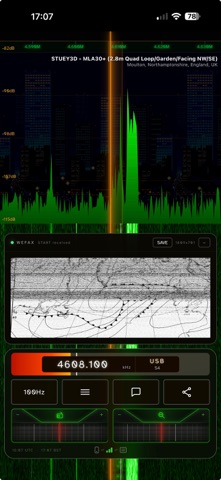
VibeSDR is a mobile-first software-defined radio (SDR) receiver — and far more than a single-server client. It speaks multiple SDR server protocols and does its own demodulation of the raw IQ with a clean-room DSP engine. Pair that with a GPU-rendered waterfall, native background audio, on-device decoders and maps, plus voice and in-car control, for a genuinely great SDR experience on any iPhone — whatever receiver is behind it. WHAT YOU CAN CONNECT TO • Remote SDR servers — native support for UberSDR, OpenWebRX / OpenWebRX+, and KiwiSDR, all behind one interface, with a directory chooser in the instance picker. • Networked rtl_tcp — connect to a remote rtl_tcp server and VibeSDR demodulates the raw IQ itself. DISPLAY & WATERFALL • Custom GPU waterfall and spectrum, rendered with a Skia shader for a smooth, high-frame-rate display independent of the server. • Portrait and landscape layouts, ProMotion 120 Hz, haptic tuning feedback. • Classic colour palettes (GQRX, KiwiSDR, CuteSDR, SdrDx, OpenWebRX), VFO glow controls, and a spectrum backdrop image. TUNING & CONTROLS • VFO drum with inertia scrolling and a dual-drum waterfall zoom. • Full mode set — USB, LSB, AM, SAM, FM, NFM, CW — with passband sliders. • Noise reduction, noise blanker, squelch, AGC, volume and mute. AUDIO • Native audio engines running outside any WebView, so playback survives app suspension. • Background audio on both platforms. • Lock-screen, Now Playing, CarPlay and Apple Watch controls with frequency + station metadata and station/bookmark skipping. • AAC recorder with share sheet. VOICE CONTROL • Siri — "Hey Siri, tune VibeSDR" then a frequency, a station name, or a band; it tunes with the right demodulator and step, even in the background over headphones, CarPlay or the lock screen. DECODERS & MAPS • On-device decoders — RTTY, NAVTEX, WEFAX, SSTV, Morse, and speech-to-text. • Server maps — HFDL aircraft, digital and CW activity maps, fully embedded. STATIONS & BOOKMARKS • Instance picker directory across UberSDR, OpenWebRX/OpenWebRX+ and KiwiSDR receivers, with country flags, favourites and an auto-connect default. • Bookmark and band-plan search with live EiBi schedules. • Visual Tuning System (VTS) — nearby-station bar, band-crossing popups and station skipping. • Live chat, and Share a tuned station as a tappable deep link. NEW: DEEP LINKING • Tap a vibesdr:// link to connect straight to a receiver and tune to the shared frequency — no hunting through the picker. VibeSDR is free software under the GNU GPL-3.0, built by Stuart Carr with AI assistance from Claude (Anthropic). VibeSDR is a receiver client and is not affiliated with the SDR servers it connects to.
What's new · 11.0
VibeSDR 11 — the biggest update yet. A NEW LOOK • The controls are now a real front panel: original, brushed silver or black metal; Nixie tubes, VCR dot-matrix or segment displays; a bar, LED VU strip or analogue needle meter. Pick your colours, and the app icon too. • A rebuilt station strip with logos, flags and RDS, and a new icon. MAPS THAT ARE OURS • Every map — HFDL aircraft, digital and CW spots, the server directory — is drawn on the GPU from map data built into the app. No tile server: maps work without internet, with relief, airports and runways, ports and the day-night greyline. Optional High Detail maps for close zooming. SHARED RECEIVERS • On a shared tuner the app follows whoever tunes, with a no-typing chat ("Can I tune?", "Anyone know what this is?") and Signal ID Wiki answers. • Receivers introduce themselves: aerial, coverage, notices and PIN protection per radio. DECODERS REBUILT • RTTY with AUTO (shift, speed and polarity found for you) and much better copy on fading signals. • NAVTEX with error correction and a message box; WEFAX charts that come out clean and straight; SSTV in true colour; FT8 decodes about 40% more; WWV/WWVB/time signals that read the year from the air. • On a VibeServer every listener gets their own decoders. DAB AND FM • DAB/DAB+ on VibeServer: station logos, now playing, slideshow pictures, the transmitter you hear, and a reception meter judged on real errors. • Advanced RDS: deviation and left/right meters, eye diagram, RDS phase, and US call letters. MORE • A Recordings button on the server list. • OpenWebRX: a true S-meter and OpenWebRX's own Auto Squelch. • Nearly half of public KiwiSDRs (those behind the KiwiSDR proxy) now connect. • A band-aware automatic gain that stops a strong local station creating false signals. FIXES • Audio that heals itself if it goes silent, and a fault in one panel no longer takes the app with it. • Audio now runs at its exact rate, so WEFAX and SSTV pictures no longer slant. • Shared servers reconnect by themselves after the internet drops. • Plus many smaller fixes to tuning, reconnecting and layout on every screen size.
Details