

Keeply – Stress-Free Cleanup
Nicolas Zanette · Photo & Video
Independent analytics for this App Store listing. AppTracker is not affiliated with Nicolas Zanette.
Chart standing · US
What changed · US
Listing changes AppTracker has observed for this app in this storefront — new versions, price moves, rating shifts, and store copy.
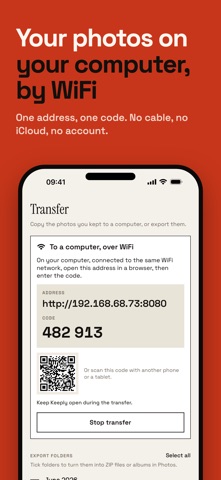
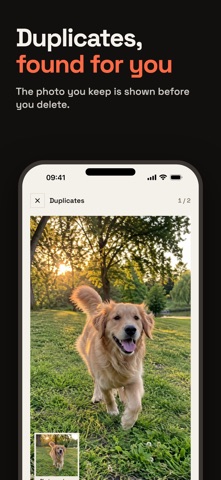
Keeply gets simpler, and transfer to your computer takes a big step forward. — New interface: four tabs (Sort, Folders, Trash, Transfer), everyday words, and the photo shown large on the sorting screen. — WiFi transfer: download a whole folder, or everything, in one click from your computer's browser. A short address and a 6-digit code are all you need. — Original files with their real name and format, videos included, plus a JPEG version for computers that cannot read HEIC. — Duplicates are checked against the actual file content; the photo you keep is shown before you delete. — Trash: a single confirmation to empty it, and the space to free is always shown. — Folders: rename them; deleting a folder no longer undoes your sorting. — More reliable undo and many fixes.
Screenshots




About
Sort your photos, transfer them to your computer, then free up space on your iPhone — no cable, no iCloud, no account. Most swipe apps stop at delete. Keeply finishes the job: what you keep is filed into folders, then sent to your computer over WiFi. After that, you empty the trash with peace of mind. For the first 7 days everything is unlocked, transfer included, with no card required. TRANSFER TO YOUR COMPUTER • WiFi transfer: Keeply shows a short address and a 6-digit code (or a QR code). Open the address in the browser of a Mac or PC on the same WiFi network. • Download a whole folder, or everything at once, in one click: you get a ZIP file. • Original files, not recompressed, with their real name, format and date. Videos included. • A JPEG version is offered for computers that cannot read HEIC. • Keep Keeply open during the transfer; a summary tells you what was transferred. • Nothing to install on the computer. No cable, no account, no cloud. • ZIP archive: one .zip file per folder, shared through the iOS share sheet (AirDrop, Files…). • iOS albums: get your folders as albums in the Photos app. SORT • Swipe right to keep, left to delete. • Sort month by month, full screen, with zoom. • Undo your latest decisions as many times as you need. • Photos you've already sorted don't come back: you pick up where you left off. FILE INTO FOLDERS • Every photo you keep is filed automatically in its month's folder. • Create your own folders (trips, family, work…) and file photos there. • Those folders are what you transfer. FREE UP SPACE • Suggestions: screenshots, bursts, exact duplicates, similar photos (iOS 17 or later), heavy videos. • Reclaimable space is shown before you delete anything. • Trash: nothing is erased from your iPhone until you confirm. FREE AND PREMIUM Free: swipe sorting, sorting by month, Screenshots and Bursts suggestions, folders, trash. Keeply Premium: WiFi transfer, ZIP archive, iOS albums, and the Duplicates, Similar photos and Heavy videos suggestions. Full 7-day trial from the very first launch, no card required. After that, a single purchase unlocks Keeply Premium for life: no subscription, nothing to cancel. The price is shown on the purchase screen. YOUR PHOTOS STAY WITH YOU Keeply never uploads your photos to a server. They only leave your iPhone for your own computer, over your local network. The transfer address changes every session and only gives access to the photos in your folders. No account to create. Duplicate and similar-photo detection runs on your iPhone. Terms of Use (EULA): https://www.apple.com/legal/internet-services/itunes/dev/stdeula/ Privacy Policy: https://appcraft31.vercel.app/privacy/keeply.html
What's new · 4.0
Keeply gets simpler, and transfer to your computer takes a big step forward. — New interface: four tabs (Sort, Folders, Trash, Transfer), everyday words, and the photo shown large on the sorting screen. — WiFi transfer: download a whole folder, or everything, in one click from your computer's browser. A short address and a 6-digit code are all you need. — Original files with their real name and format, videos included, plus a JPEG version for computers that cannot read HEIC. — Duplicates are checked against the actual file content; the photo you keep is shown before you delete. — Trash: a single confirmation to empty it, and the space to free is always shown. — Folders: rename them; deleting a folder no longer undoes your sorting. — More reliable undo and many fixes.
Details