

Nodino: Reminders & To-Do
Carlo Di Giuseppe · Lifestyle
Independent analytics for this App Store listing. AppTracker is not affiliated with Carlo Di Giuseppe.
Chart standing · US
What changed · US
Listing changes AppTracker has observed for this app in this storefront — new versions, price moves, rating shifts, and store copy.
Write the reminder the way you'd say it. • Dates, from the sentence: Type "dentist thursday at 10" and Nodino takes the date out for you — the title stays "dentist", the date goes where it belongs. It shows you what it understood before it acts on it, and one tap waves it away if it got you wrong. Nothing is filed behind your back. • Nodino on your wrist (Pro): See what's next and tick it off from your Apple Watch. Your reminders are already there — nothing to set up, nothing to pair. • Lock Screen widgets: The next reminder beside your clock, on the Lock Screen and in StandBy. • All-day reminders: Some things have a day, not an hour. "Pay the tax bill" doesn't need 10:00 — switch on All day and the question stops being asked. You choose once, in Settings, when all-day reminders should ring. • Swipe to postpone or delete: Swipe a card right to push it back an hour, left to delete it. Deleting no longer costs five taps and a confirmation — and if you change your mind, Undo is right there for a few seconds. • Undo, including on repeats: Checked something off by accident? Undo puts it back exactly where it was — for a repeating reminder, on the occurrence it was actually on, not the next one. • Your day, at a glance: The top of the screen now tells you how the day is going — "2 today, 1 overdue" — instead of just naming the app. The reassuring green card is gone: the list says what's there, and the header says what's left. • A timeline you can read: "Later" used to put next Tuesday and next January on the same pile. It's now This week, This month and Further ahead. Completing a reminder finally feels like something. Thanks for using Nodino. One thing, done well.
Screenshots




About
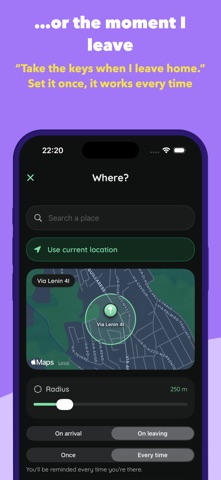
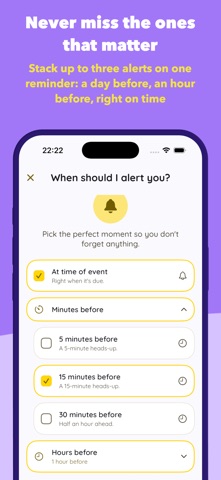
"Buy milk when I get to the store." Nodino reminds you the moment you arrive at a place — or the moment you leave it. Tie a knot, never forget. Three taps to create. Nothing leaves your iPhone. No ads, no account. Nodino is the reminder app that does one thing brilliantly: it gets what's in your head onto a list — and back into your day at the right moment. No clutter, no learning curve. Just open, type, done. WHY YOU'LL LOVE IT • Ridiculously fast — Create a reminder in three quick taps: what, when, alert. The keyboard is ready the second you open it. • It understands what you type — Start typing and Nodino suggests the reminder and picks the category for you. It runs entirely on your device, so it's private and instant. • One-tap timing — Today, Tomorrow, Weekend, or pick a date. Set it and move on. • Beautiful by default — A calm, focused design with a friendly typeface and nothing in your way. REMIND ME WHERE, NOT JUST WHEN (PRO) Some things aren't tied to a time — they're tied to a place. Nodino can nudge you the moment you get somewhere, or the moment you leave. • "Buy milk when I get to the store." Arrive at a place, get reminded. • "Take the keys when I leave home." Leave a place, get reminded. • Search any spot on the map and set how close is close enough. • One-time errand, or a standing rule that repeats on every visit. • Your places stay on your device and in your own private iCloud — always. EVERYTHING YOU NEED • Home-screen widgets — See what's next at a glance and check things off without opening the app. • Reliable alerts — On-time notifications, a gentle nudge for overdue items, and flexible snooze. Add up to three alerts to one reminder with Pro. • Repeat anything — Daily, weekly, monthly, every 6 months, or yearly. • Categories that pick themselves — 16 colour-coded categories, chosen for you as you type and changed with a tap. • Syncs everywhere — Your reminders follow you across iPhone and iPad via iCloud, privately. • Siri shortcuts — "Hey Siri, add a reminder on Nodino." • Tidy history — Completed reminders group by time and clean themselves up, so your list never gets heavy. • 9 themes — Light and dark looks to match your style. • Speaks your language — Fully translated into 8 languages. PRIVATE BY DESIGN Your reminders are yours. Everything syncs through your own private iCloud, the suggestions never leave your device, and your locations are never sent anywhere. NODINO PRO Place reminders and multiple alerts per reminder are part of Nodino Pro. Everything else is yours for free, forever. Download Nodino and tie the knot. =========================================================================== Terms of use (EULA): https://www.apple.com/legal/internet-services/itunes/dev/stdeula/ Privacy Policy: https://appjuice.it/nodino/privacy.html ===========================================================================
What's new · 1.4.0
Write the reminder the way you'd say it. • Dates, from the sentence: Type "dentist thursday at 10" and Nodino takes the date out for you — the title stays "dentist", the date goes where it belongs. It shows you what it understood before it acts on it, and one tap waves it away if it got you wrong. Nothing is filed behind your back. • Nodino on your wrist (Pro): See what's next and tick it off from your Apple Watch. Your reminders are already there — nothing to set up, nothing to pair. • Lock Screen widgets: The next reminder beside your clock, on the Lock Screen and in StandBy. • All-day reminders: Some things have a day, not an hour. "Pay the tax bill" doesn't need 10:00 — switch on All day and the question stops being asked. You choose once, in Settings, when all-day reminders should ring. • Swipe to postpone or delete: Swipe a card right to push it back an hour, left to delete it. Deleting no longer costs five taps and a confirmation — and if you change your mind, Undo is right there for a few seconds. • Undo, including on repeats: Checked something off by accident? Undo puts it back exactly where it was — for a repeating reminder, on the occurrence it was actually on, not the next one. • Your day, at a glance: The top of the screen now tells you how the day is going — "2 today, 1 overdue" — instead of just naming the app. The reassuring green card is gone: the list says what's there, and the header says what's left. • A timeline you can read: "Later" used to put next Tuesday and next January on the same pile. It's now This week, This month and Further ahead. Completing a reminder finally feels like something. Thanks for using Nodino. One thing, done well.
Details